
Selenium interviews at tech companies are not knowledge tests. They are judgment tests. An interviewer asking about explicit waits does not want the definition from the docs. They want to know whether you have debugged a test suite that collapsed because someone scattered Thread.sleep() calls across 200 test files.
Questions about Page Object Model are not about the pattern itself. They are about whether you have maintained a framework after the team that built it moved on.
This article covers 50+ Selenium interview questions and answers across Basic, Intermediate, Advanced, Framework Design, and Scenario sections. Each question includes a callout on what the interviewer is actually probing for, the layer that separates prepared candidates from those who memorized definitions.
Which sections apply to you?Junior QA engineers and manual testers moving to automation: Start with Basic and Intermediate. The QA Automation Interview Questions guide at Interview Kickstart covers the broader automation context beyond Selenium.
Mid-level automation engineers (2 to 5 years): Intermediate, Framework Design, and Advanced sections are your primary focus. Basic is a confidence check.
Senior SDETs targeting FAANG or Tier-1 product companies: Scenario, Framework Design, and Advanced sections are where interviews at this level are won or lost. Expect follow-up questions on every answer.
Key Takeaways
- Selenium interviews test judgment, not memorization.
- Strong answers show real framework experience, not just syntax knowledge.
- Senior roles also test Java, CI/CD, and parallel execution thinking.
- Locator strategy, waits, and POM are the most revealing topics in Selenium interviews.
Basic Selenium Interview Questions
Q1. What is Selenium and what are its main components?
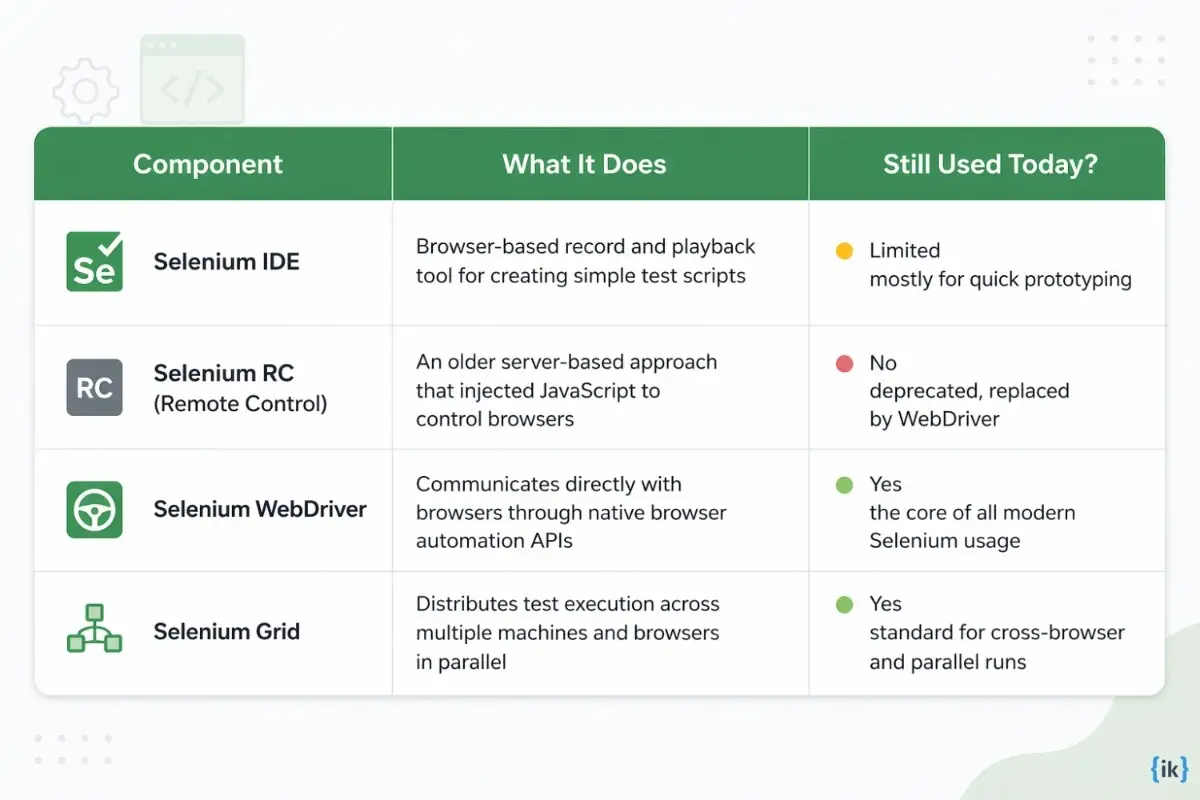
Selenium is a suite of tools for browser automation, not a single product. Candidates who treat it as just the WebDriver thing miss the architectural question behind this.
What the interviewer is testing: Whether you understand Selenium as a tool suite with distinct components. Even in automation interview questions, Selenium candidates for junior roles receive, missing the distinction between Grid and WebDriver signals, surface-level exposure.
Q2. What is Selenium WebDriver, and how is it different from Selenium RC?
Selenium WebDriver is the modern Selenium API that directly controls browsers using native drivers like ChromeDriver and GeckoDriver, enabling faster and more reliable automation. Selenium RC used a server to inject JavaScript into browsers, which made it slower and less stable, leading to its deprecation in favor of WebDriver.
Q3. What programming languages does Selenium support?
Selenium WebDriver supports Java, Python, C#, Ruby, JavaScript (Node.js), and Kotlin. However, in most enterprise environments, Java Selenium Interview Questions are the standard due to the massive footprint of the Java ecosystem in automation.
Q4. What are the different types of locators in Selenium?
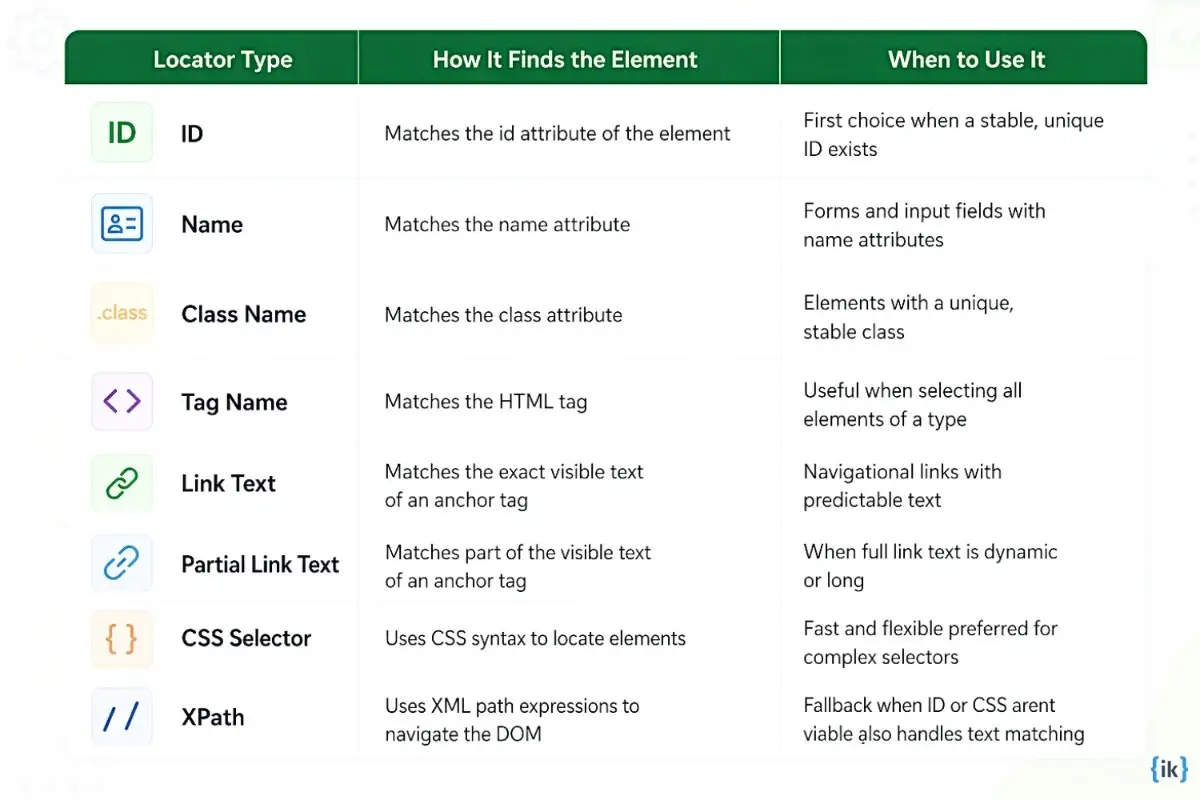
Selenium provides eight locator strategies for finding elements on a page.
Q5. What is the difference between findElement() and findElements() in Selenium?
In Selenium, findElement() returns the first matching WebElement and throws a NoSuchElementException if no match is found. In contrast, findElements() returns a list of all matching elements and returns an empty list if none are found, making it useful for safely checking element presence without handling exceptions.
Q6. What browsers does Selenium WebDriver support?
Selenium WebDriver supports Chrome, Firefox, Edge, Safari, and Opera. Each browser requires a corresponding driver binary, such as ChromeDriver for Chrome, GeckoDriver for Firefox, and so on. From Selenium 4.6 onward, Selenium Manager handles driver management automatically, removing the need to manually download and configure driver binaries.
Q7. What are the types of waits in Selenium, and when do you use each?
Selenium provides three wait mechanisms. Thread.sleep() is a Java method that forces an unconditional pause, and its presence in a test suite is a signal that the engineer did not understand how to handle dynamic elements properly.

What the interviewer is testing: Whether you choose waits based on the situation or default to Thread.sleep() everywhere. Blanket use of Thread.sleep() is one of the most visible indicators that a candidate has not maintained a production test suite.
Q8. What is the difference between absolute XPath and relative XPath?
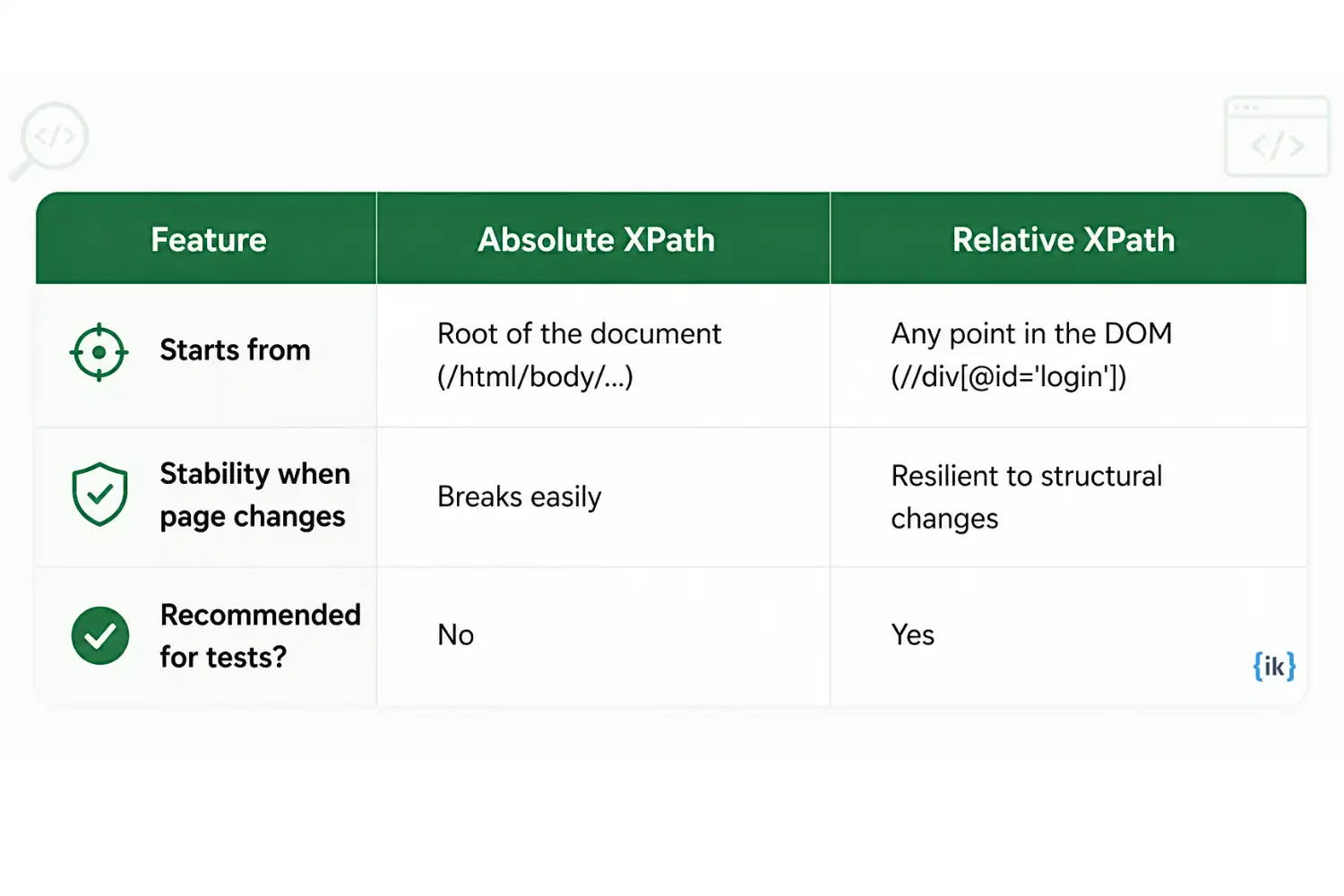
Absolute XPath starts from the root of the HTML document and traces the full path to the element. Relative XPath starts from anywhere in the DOM using // and navigates from a reference point. Relative XPath is the standard choice for test automation, while absolute XPath breaks whenever the page structure changes, even slightly.
Q9. What is the difference between CSS selectors and XPath in Selenium?
CSS selectors are faster in most browsers because they use the browser’s native CSS engine, and the syntax is generally more readable. XPath is more powerful for traversing the DOM because it can navigate to parent elements, match by text content, and handle more complex structural relationships.
For most test automation work, CSS selectors are the preferred starting point. XPath is appropriate when CSS cannot express what you need, such as selecting an element based on its visible text.
Q10. How do you handle dropdowns in Selenium?
For standard HTML <select> elements, Selenium provides the Select class, which exposes methods to select by visible text, by value attribute, or by index. For custom dropdowns built with <div> or <ul> elements, which do not use the native <select> tag, the Select class does not apply. These require clicking the dropdown trigger and then clicking the target option as separate WebElement interactions.
Q11. How do you handle alerts and pop-ups in Selenium?
Selenium handles browser-native alerts using the driver.switchTo().alert() interface. There are three types: simple alerts with an OK button (handled with alert.accept()), confirmation dialogs with OK and Cancel (use accept() or dismiss()), and prompt dialogs that accept text input (use alert.sendKeys() before accepting). This only applies to native browser alerts. Custom modal dialogs built in JavaScript or CSS are interacted with as regular WebElements.
Q12. What are the limitations of Selenium?
Selenium does not support desktop application testing, only web browsers.
It has no built-in reporting. Test reports require a separate library, such as ExtentReports, or rely on TestNG/JUnit output.
Selenium cannot handle CAPTCHA or OTP-based authentication flows natively.
Image comparison and visual testing require additional libraries.
Performance and load testing are outside Selenium’s scope.
Intermediate Selenium Interview Questions
Q14. What is the Page Object Model (POM) and why do automation engineers use it?
The Page Object Model (POM) is a design pattern where each page or component is represented by a dedicated class that stores locators and page actions. It is used to keep test code clean, reusable, and easier to maintain, since locator changes are updated in one place instead of across multiple tests.
Callout: The interviewer is checking whether you have built maintainable test frameworks, not just written one-off scripts.
Q15. What is Page Factory in Selenium, and how does it relate to POM?
Page Factory is Selenium’s built-in support for implementing the Page Object Model. It uses the @FindBy annotation to declare locators as class fields and initialises them lazily using PageFactory.initElements().
public class LoginPage {
    @FindBy(id = "username")
    private WebElement usernameField;

    @FindBy(id = "password")
    private WebElement passwordField;

    @FindBy(id = "loginBtn")
    private WebElement loginButton;

    public LoginPage(WebDriver driver) {
        PageFactory.initElements(driver, this);
    }

    public void login(String user, String pass) {
        usernameField.sendKeys(user);
        passwordField.sendKeys(pass);
        loginButton.click();
    }
}
Q16. What is Selenium Grid, and when would you use it?
Selenium Grid distributes test execution across multiple machines so you can run tests in parallel on different browsers and operating systems.

You would use it for cross-browser coverage or when a large suite takes too long to run on a single machine, such as running the same tests on Chrome, Firefox, and Edge at the same time.
Q17. What is the difference between driver.close() and driver.quit()?
driver.close() closes only the current browser window or tab and is used when you want to keep the session alive for other open windows. driver.quit() closes all browser windows and ends the WebDriver session, making it the correct choice for test teardown to release resources.
Q18. How do you handle frames and iframes in Selenium?
Frames are separate HTML documents embedded within a parent page. Selenium operates within the current document context, so you must explicitly switch context to a frame before interacting with elements inside it. After finishing work inside a frame, switch back to the default content before interacting with the parent page.
// Switch by index (zero-based)
driver.switchTo().frame(0);

// Switch by name or ID attribute
driver.switchTo().frame("frameName");

// Switch by WebElement reference
WebElement frame = driver.findElement(By.cssSelector("iframe.modal-frame"));
driver.switchTo().frame(frame);

// Return to the parent document
driver.switchTo().defaultContent();
Q19. How do you handle dynamic web elements in Selenium?
Dynamic elements change their attributes, position, or existence based on application state. The primary strategies are:
Using relative locators or attributes that remain stable across state changes (such as data-testid attributes added explicitly for testing)
Using explicit waits with ExpectedConditions to wait for the element to reach the required state before interacting.
Using XPath text-based matching when the visible text is stable, even if attributes are not.
Q20. What is the difference between driver.get() and driver.navigate().to()?
Both load a URL, but driver.navigate() provides browser history controls that driver.get() does not. With navigate(), you can also call .back(), .forward(), and .refresh(), which correspond to the browser’s back/forward buttons and page refresh. For simply loading a URL from scratch, driver.get() is sufficient.
Q21. How do you take a screenshot in Selenium?
Screenshots are useful in teardown methods when a test fails. Capturing the browser state at the point of failure makes debugging significantly faster. Cast the WebDriver instance to TakesScreenshot, retrieve the file, and copy it to a target path.
import org.apache.commons.io.FileUtils;
import org.openqa.selenium.OutputType;
import org.openqa.selenium.TakesScreenshot;
import java.io.File;

File screenshot = ((TakesScreenshot) driver).getScreenshotAs(OutputType.FILE);
FileUtils.copyFile(screenshot, new File("./test-output/failure-screenshot.png"));
Q22. What is TestNG, and why do automation engineers use it with Selenium?
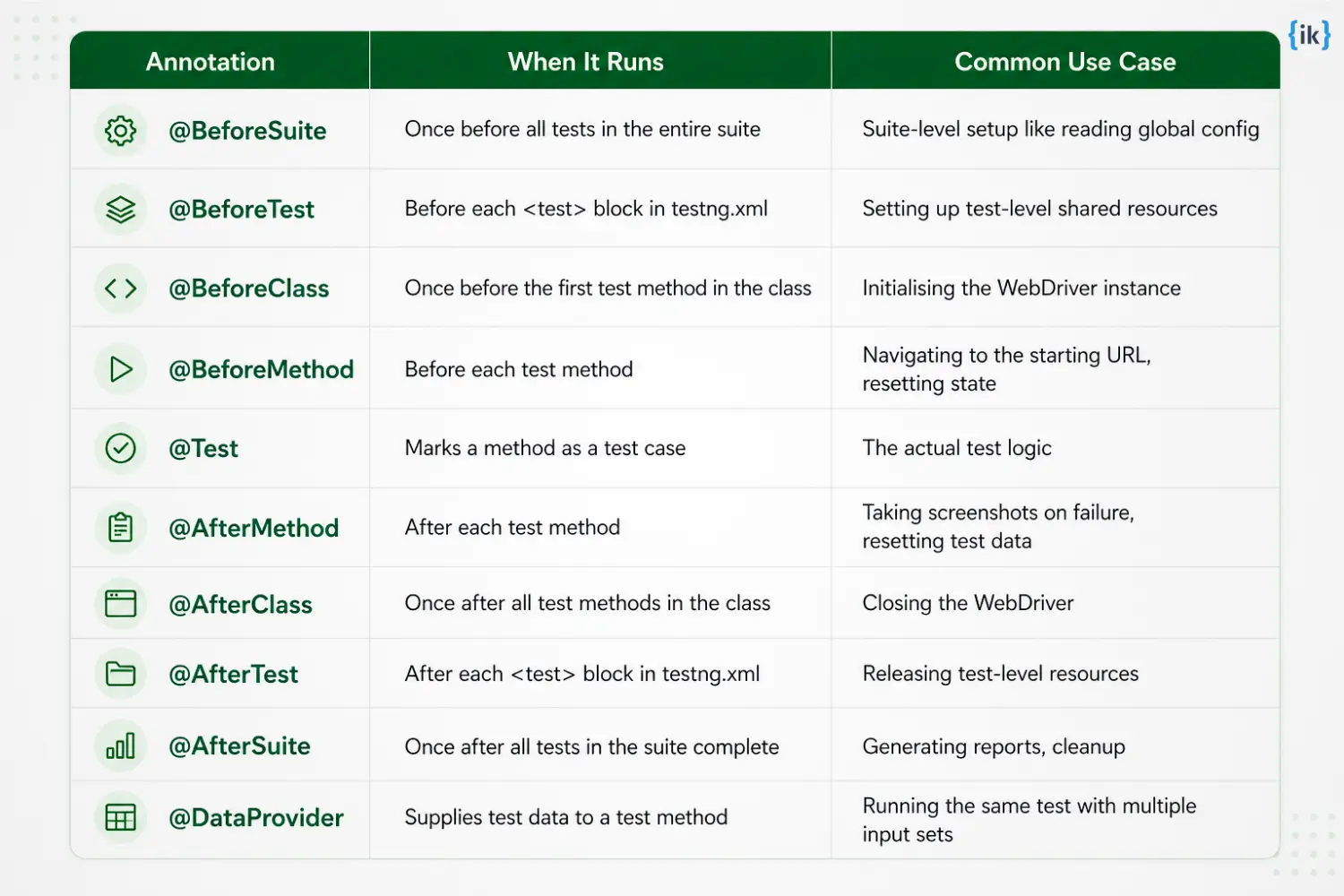
TestNG is a Java testing framework that adds what plain Selenium lacks, including test organization, annotations, grouping, prioritization, and execution control. It also supports parallel runs, data-driven testing with @DataProvider, and built-in reporting, which makes Selenium test suites easier to manage and scale.
Q23. What are the most commonly used TestNG annotations, and what does each do?
Parallel execution means running multiple test cases or classes at the same time to reduce overall test suite execution time. In TestNG, this is configured in the testng.xml file using the parallel attribute (methods, classes, or tests) along with thread-count. Selenium Grid extends this by enabling tests to run across multiple machines and browsers in parallel, a concept closely related to concurrency patterns discussed in Java multithreading interview questions.
Q24. How do you handle stale element exceptions in Selenium?
A StaleElementReferenceException happens when a previously located WebElement is no longer valid, usually because the DOM has changed after the element was found. Handle it by locating the element again at the point of use, and for flaky cases, use an explicit wait or retry logic with ExpectedConditions.refreshed() before interacting with it.
Advanced Selenium Interview Questions
Q25. How would you design a scalable Selenium automation framework from scratch?
In answering this selenium interview question, you can mention the following steps:
- Start with one primary language and test stack that your team already ships with, so the framework fits the CI pipeline and developer skill set from day one.
- Build the framework around Page Object Models so that page locators and actions live in one place, reducing duplicate code and making UI changes easier to maintain.
- Define a clear layer for test utilities such as waits, driver setup, logging, screenshots, and assertions, so test cases stay focused on business flow rather than plumbing.
- Keep test data outside the test body through JSON, CSV, factories, or a data provider layer, so the same test can run with multiple inputs without copy pasted code.
- Add reporting early, not at the end, so failures are easy to diagnose, and the suite stays useful for the whole team.
- Finish by wiring the suite into CI and remote execution, then use Selenium Manager for driver setup and Selenium Grid when you need distributed runs across machines or browsers.
Callout: The interviewer is checking whether you can design a maintainable automation system, not just write scripts.
Q26. What is the difference between Selenium 3 and Selenium 4?
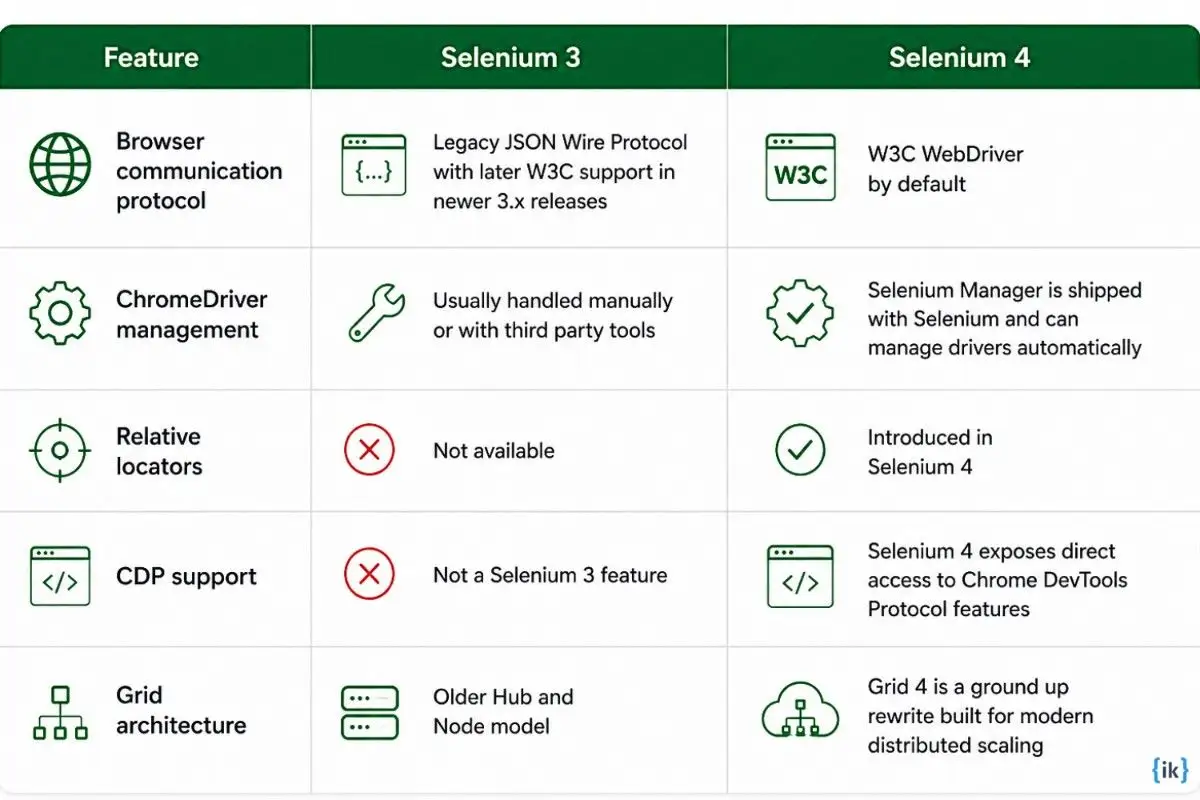
Selenium 4 moved the project fully onto the W3C WebDriver standard, added relative locators, shipped Selenium Manager for automatic driver management, and rewrote Grid for modern distributed execution. Selenium 3 still sits closer to the legacy JSON Wire world and the older Grid model.
Q27. What are fluent waits in Selenium, and when do you use them instead of explicit waits?
FluentWait is the configurable version of a wait in Selenium, where you control the timeout, polling interval, and which exceptions to ignore while waiting. It is useful when an element appears intermittently, a page is noisy, or a plain explicit wait needs tighter control over retry timing. For stable dynamic UI checks, a normal explicit wait is usually enough.
Q28. How do you handle SSL certificate errors in Selenium?
Use the acceptInsecureCerts capability when you need a browser session to trust an invalid or self-signed TLS certificate during test execution. It is appropriate for non-production test environments or internal staging systems, but it should not be used to hide real certificate problems in environments that matter.
Q29. How does Selenium 4 support Chrome DevTools Protocol, and what does this enable?
Chrome DevTools Protocol is the browser debugging protocol behind Chrome DevTools, and Selenium 4 exposes direct access to it for browser-level operations that WebDriver alone did not cover. That enables scenarios like capturing console and network events, inspecting requests, and doing deeper browser diagnostics in test runs. A practical use case is verifying API calls or console errors during a checkout flow.
Callout: The interviewer is checking whether you are current with Selenium 4 and its browser-level capabilities.
Q30. What is data-driven testing in Selenium, and how do you implement it?
Data-driven testing means running the same test logic with multiple input sets so you can cover more cases without duplicating the test. In TestNG, @DataProvider is the standard way to feed those inputs into a test method, and it can also run in parallel when needed. A common example is validating a login form with many username and password combinations.
Q31. How do you integrate Selenium tests into a CI/CD pipeline?
In a CI/CD pipeline, Selenium tests are usually triggered after a commit, a pull request, or a scheduled build in tools like Jenkins, GitHub Actions, or similar systems. The pipeline then launches the suite on a local runner, a container, or a remote Grid node, and publishes pass or fail results back to the build report so the team sees failures quickly.
Q32. What are the trade-offs between Selenium and modern alternatives like Playwright or Cypress?
Selenium has the widest browser and language coverage, while Playwright offers strong auto-waiting and supports multiple languages with a single underlying implementation. Cypress is very JavaScript-focused and runs inside the browser, which makes it fast for front-end testing but limits language choice and changes how you talk to back-end systems.
For broad enterprise browser coverage, Selenium is still the safer default, while Playwright is often the better pick for modern end-to-end speed and stability.
Q33. How do you manage test data in a large Selenium test suite?
The cleanest options are external files for simple reusable data, databases for shared environment-driven data, and factory methods or data providers for generated test inputs. External files work well when the data is stable, databases help when tests must reflect live seeded records, and factories are best when the suite needs fresh combinations of entities on demand.
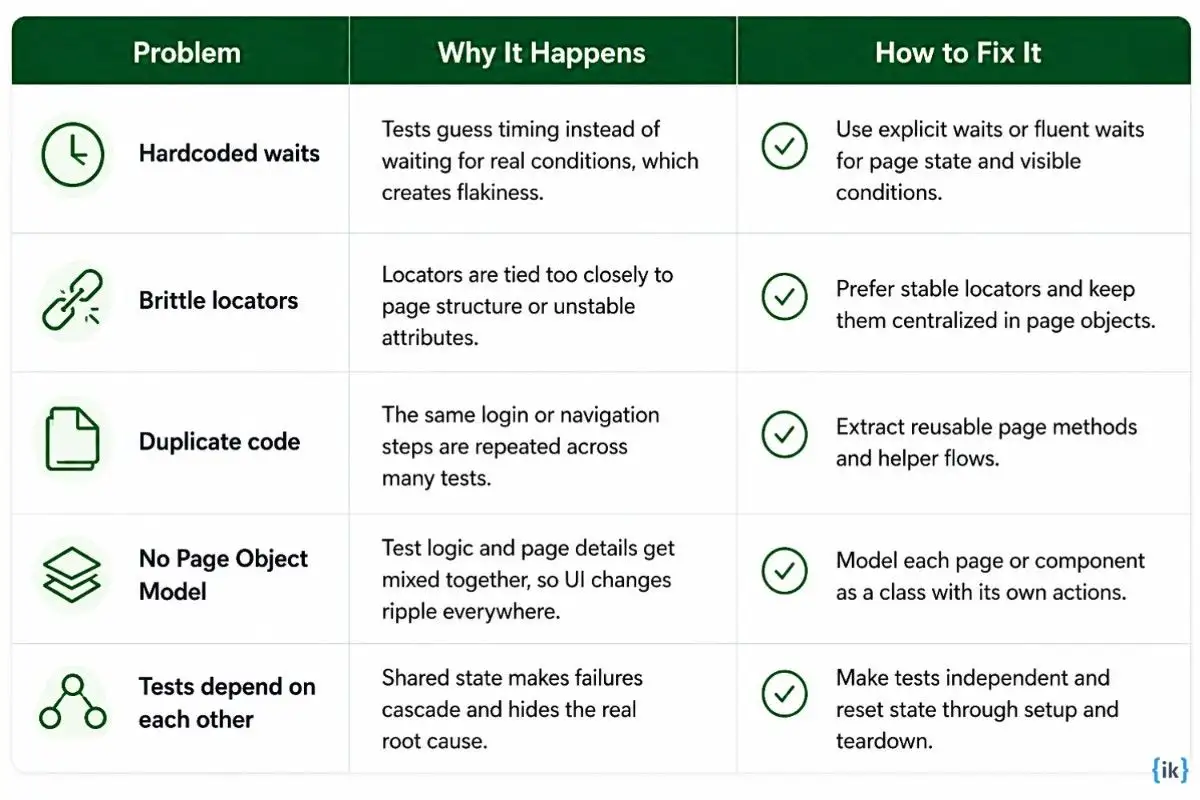
Q34. What makes a Selenium test suite hard to maintain, and how do you prevent it?
Selenium Framework Design Questions
Q35. How do you structure a Selenium project using the Page Object Model?
What the interviewer is testing: Whether you have actually owned a test project structure, not just written tests inside someone else’s built.
- Create a pages/ package where each class represents one page or major component. Locators are private fields, and public methods represent user actions only. No assertions go inside page classes.
- Create a tests/ package for test classes. Test methods call page class methods and contain all assertions. Test code should read like a user journey, not a sequence of findElement() calls.
- Create a base/ package with a BasePage for shared utilities like waits and screenshot capture, and a BaseTest for WebDriver setup and teardown using @BeforeClass and @AfterClass.
- Store configuration in a resources/ folder: a config.properties file for base URLs, browser type, and timeouts, plus test data files in JSON or CSV format.
- Keep generated output like screenshots and ExtentReports HTML files in a test-output/ directory that is excluded from version control.
Q36. How do you handle test reporting in Selenium?
The two most common choices are ExtentReports and Allure. ExtentReports generates a standalone HTML report with test status, step-level detail, and screenshots, and integrates directly with TestNG listeners. Allure produces interactive reports with timeline views and trend tracking across runs, which works well when reports are tied to a CI dashboard. For pipeline-level pass/fail signals without an added library, TestNG’s Surefire XML output is sufficient.
Q37. How do you handle test configuration across multiple test environments?
Maintain one properties file per environment, such as dev.properties and staging.properties, each holding the base URL, credentials, and timeout values for that environment. A config reader class loads the correct file based on an environment variable passed at runtime, for example, mvn test -Denv=staging.
Q38. How do you debug a failing Selenium test?
Read the stack trace to identify the exception type, like NoSuchElementException, TimeoutException, StaleElementReferenceException, or an assertion failure.
Check the screenshot captured at the point of failure, if one exists.
Run the test locally against the same environment to rule out environment differences.
Add step-level logging before the failing line to confirm exactly which action fails.
Inspect the locator against the live DOM in browser DevTools to verify the element exists and is visible.
Check for timing issues and wrap the interaction in an explicit wait if the element loads dynamically.
Q39. How do you decide which tests to automate and which to leave as manual?
Automate tests that run repeatedly across builds, cover stable functionality, and require consistency across browsers or environments. Leave exploratory testing, usability evaluations, and tests for features still in active design as manual. The practical threshold: if a test will run fewer than five times in its lifetime, the automation cost and ongoing maintenance rarely justify it.
Q40. How do you keep a large Selenium test suite fast?
- Configure TestNG parallel execution at the method or class level with ThreadLocal<WebDriver> to keep driver instances thread-safe.
- Use Selenium Grid when the suite needs to cover multiple browsers simultaneously.
- Audit for Thread.sleep() calls and replace each with a targeted explicit wait.
- Use TestNG groups to run only the relevant subset per change: smoke tests on every commit, full regression before releases.
- Enable headless mode on CI, as headed execution adds overhead that is unnecessary in automated runs.
Selenium Troubleshooting and Scenario Questions
Q41. Your Selenium tests pass locally but fail on the CI/CD server. What do you investigate?
What the interviewer is testing: Whether you have maintained tests in a real CI environment. Candidates who have only run tests locally have not dealt with the environment gaps that produce these failures.
- Confirm headless mode is configured correctly on CI, as some elements behave differently without a display server.
- Compare browser and driver versions between local and CI since version mismatches are the most frequent cause.
- Check the virtual display resolution on CI, as elements can be off-screen or unclickable at smaller dimensions.
- Review CI build logs for environment errors, such as missing dependencies or misconfigured variables, that appear before the test output.
- Verify the application is fully deployed before the test job starts, since test runs often begin before deployment completes.
- Isolate the failing test and run it alone on CI to rule out inter-test dependencies.
Q42. Your tests are intermittently failing on the same code. How do you diagnose and fix flaky tests?
What the interviewer is testing: Flaky tests are the clearest signal of whether a candidate has maintained a test suite over time, not just built one.
- Check whether failures correlate with slow load times or specific environments, which points to a timing issue.
- Audit for Thread.sleep() mixed with explicit waits since this combination produces non-deterministic behaviour.
- Check for test interdependence where one test modifies a shared state that another reads.
- Look for StaleElementReferenceException patterns since stale references cause failures that appear random but are actually structural.
- Run the failing test ten times in isolation: if it still fails intermittently, the problem is in the test itself, not test ordering.
- Apply TestNG’s IRetryAnalyzer with a single retry as a last resort, not as the first fix.
Q43. An element found on Chrome is not found on Firefox. What do you do?
- Open the page in Firefox and inspect the element in DevTools to confirm it exists with the same attributes.
- Check whether the locator relies on a Chrome-specific rendering behaviour, such as shadow DOM or a CSS property not supported in Firefox.
- Test whether the element is inside a frame in Firefox that is not present in Chrome, since cross-browser rendering can affect document structure.
- Try an alternative locator based on stable text content or a shared attribute that both browsers render identically.
- Verify the GeckoDriver version since an outdated driver causes lookup failures on specific Firefox versions.
Q44. Your test suite takes 3 hours to run. The team wants it under 30 minutes. What is your approach?
- Profile the suite first and identify the 20% of tests consuming the most time before making any changes.
- Enable parallel execution with TestNG and distribute across a Selenium Grid with multiple nodes.
- Sweep the codebase for Thread.sleep() calls and replace each with an explicit wait to remove fixed delays.
- Separate smoke tests from full regression so a focused 10-minute suite runs on every commit and the full suite runs on a schedule.
- Add fail-fast logic so tests that cannot proceed past a critical step terminate immediately rather than waiting out long timeouts.
- Retire tests that cover deprecated features or duplicate coverage since test count directly drives run time.
Q45. A test that ran successfully for 6 months failed after a UI change. How do you fix it?
- Compare the current DOM structure against the locator in the failing test to identify exactly what changed.
- Update the locator in the page class, not in the test file, so the fix is contained in one location.
- Search the codebase for any other references to the old locator before finalising the change.
- Run the full test class for the affected page to confirm the fix does not break adjacent tests.
Q46. You are asked to add Selenium tests to a project with no existing automation. Where do you start?
- Assess the application’s tech stack, the team’s primary language, and whether any manual test cases exist to convert.
- Set up the full framework skeleton before writing a single test: project structure, dependencies, configuration management, and a working CI connection.
- Write smoke tests for the three to five most critical user journeys first, so CI has immediate value from day one.
- Agree on a locator strategy with the development team and request that data-testid attributes be added to key elements.
- Document the framework decisions in the README before other team members start contributing tests.
Selenium Concepts Every Interviewer Tests
This section highlights the core Selenium concepts interviewers focus on to assess your practical automation skills and understanding of test execution. These fundamentals are essential for solving real-world UI testing challenges.

Crack Your Next SDET or QA Automation Interview with Interview Kickstart’s Test Engineering Masterclass
Knowing the right selenium interview questions and answers is only half the battle. To land a senior SDET role at a top tech company, you also need framework thinking, coding strength, and strong interview delivery. Interview Kickstart’s Test Engineering Interview Masterclass is built for QA and automation engineers targeting FAANG and Tier 1 product companies.
Why does it stand out?
- Covers the full interview stack, including Selenium, framework design, test infrastructure, Java, Python, and behavioral rounds.
- Includes mock interviews and career coaching with feedback, resume support, LinkedIn help, and salary negotiation guidance.
Explore the Test Engineering Interview Masterclass today.
Conclusion
Selenium remains the dominant automation tool in Java-based SDET roles, and interviews at top tech companies go well beyond syntax.
If you are preparing for a senior automation or SDET role, Interview Kickstart’s structured program covers framework design, system design for test infrastructure, and mock interviews with engineers from top companies.
Visit Interview Kickstart to see the full curriculum. For Java-specific preparation, our Java Interview Questions resource covers the language fundamentals that appear alongside Selenium in every senior SDET stack.
FAQ: Selenium Interview Questions
Q1. Can I enter text into a field without using sendKeys() in Selenium?
Yes. You can use JavaScriptExecutor to set the field value directly, which helps when sendKeys() fails on difficult elements. It is a fallback method only, since it does not fire normal keyboard events and may skip validation logic tied to them.
Q2. How do you handle a situation where .click() does not work on an element in Selenium?
You can use JavaScriptExecutor to trigger a click, or use the Actions class for a real mouse click. If that still fails, check for overlays, scroll the element into view, or wait until it becomes clickable, since blocking elements and timing issues are the usual causes.
Q3. What is the difference between @FindBy and @FindAll in Selenium Page Factory?
@FindBy locates a single element using one selector. @FindAll uses OR logic across multiple selectors and returns matching elements, which is useful when the same element may have different locators in different environments.
Q4. How do you execute Selenium tests in headless mode, and why does it matter for CI/CD?
For Chrome, add –headless to ChromeOptions, and for Firefox, add -headless. It matters in CI because build servers often have no display, and headless runs are usually faster, though you should still verify that viewport differences do not change behavior.
Q5. How do you switch between multiple browser windows or tabs in Selenium?
Use driver.getWindowHandles() to get all open window handles, then switch to the one you need with driver.switchTo().window(handle). The safe pattern is to store the parent window first, switch to the new handle after the action opens it, and return to the parent when you are done.
References
Recommended Reads:


