
Kubernetes interview questions at top tech companies do not stop at defining a pod. They test whether you can diagnose a CrashLoopBackOff at 2 am, explain why a rollout is stuck, and make trade-off decisions across cluster architecture.
This article is for DevOps engineers, SREs, and cloud engineers preparing for Kubernetes interview questions and answers. It covers architecture, workloads, networking, storage, security, RBAC, and troubleshooting scenarios across basic, intermediate, advanced, scenario, and quick reference sections.
Key Takeaways
- Kubernetes interviews test troubleshooting and decision making, not just definitions.
- Core concepts like pods, services, storage, networking, and RBAC are foundational.
- Operational topics such as scaling, Helm, and Ingress often determine interview depth.
- Troubleshooting questions reveal hands-on cluster experience.
- Senior roles require platform-level thinking across reliability, security, and recovery.
Basic Kubernetes Interview Questions
These questions form the floor of any Kubernetes interview. Regardless of the role, every interviewer will establish that you understand the cluster model before moving on to deeper questions.
Q1. What is Kubernetes, and what problem does it solve?
Kubernetes is an open-source container orchestration platform that automates the deployment, scaling, and lifecycle management of containerized applications across a cluster of machines. It solves the operational problem of running containers reliably at scale, handling failures, resource allocation, and rollouts without manual intervention per host.
Q2. Explain the Kubernetes architecture.
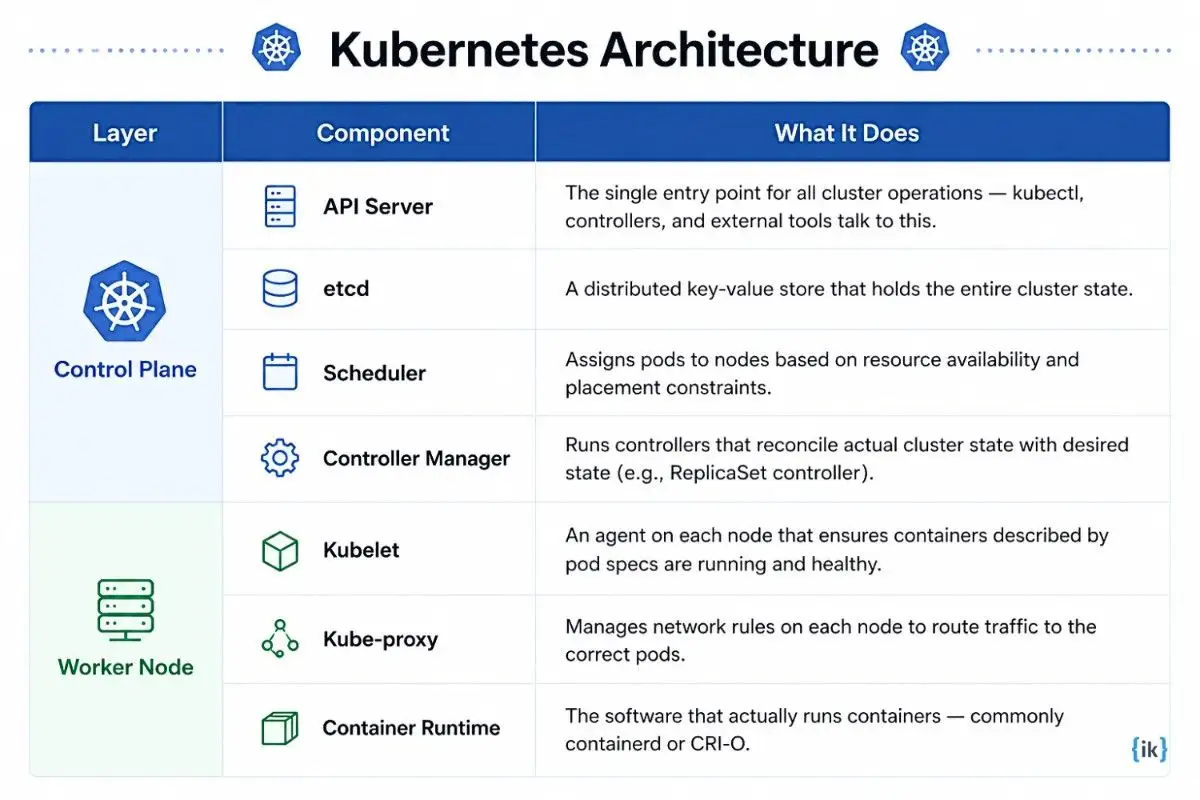
Kubernetes is organized into two distinct layers: the control plane, which manages cluster state and decision-making, and the worker nodes, which run the actual workloads.
What the interviewer is testing: Whether you understand Kubernetes as a system with two distinct operational layers. Candidates who cannot clearly separate the control plane from the data plane have not operated clusters; they have only deployed to them.
Q3. What is the difference between a pod and a container?
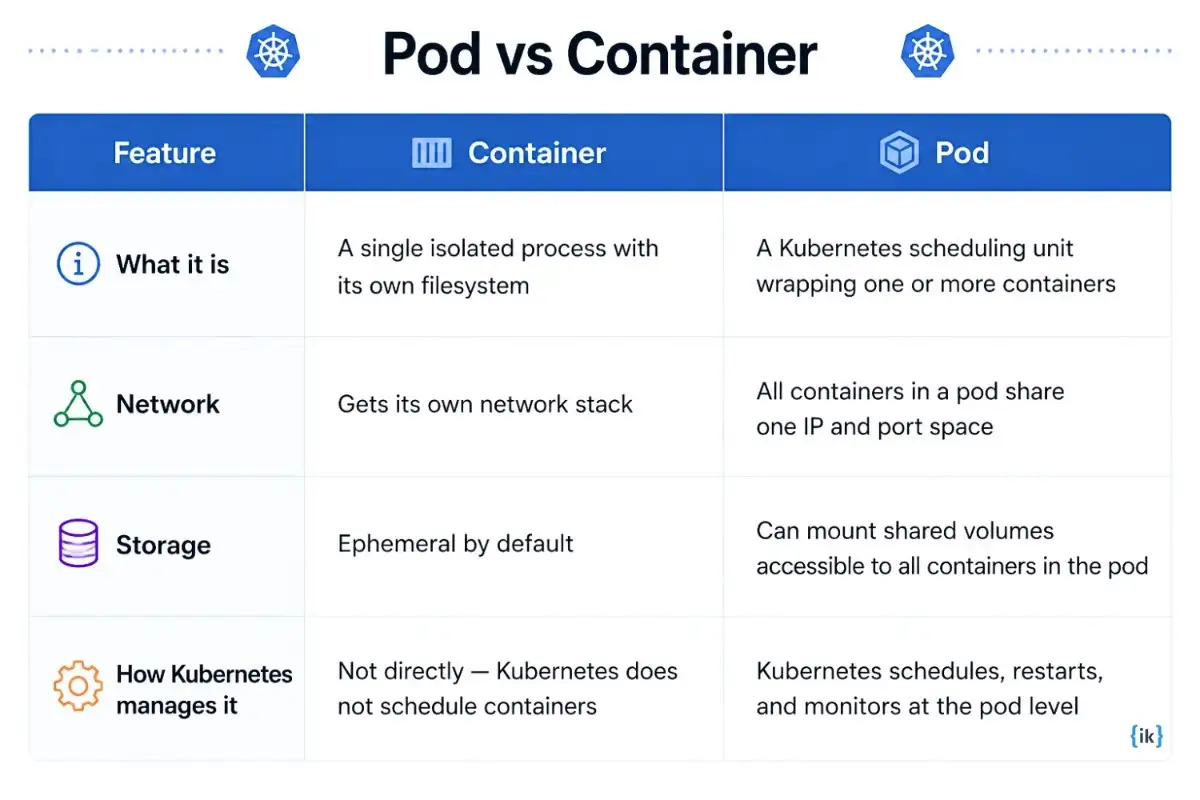
A container is a single runnable process packaged with its dependencies. A pod is the smallest deployable unit in Kubernetes, and wraps one or more containers that share the same network namespace, IP address, and storage volumes. Kubernetes always schedules and manages them as a unit.
Q4. What is the relationship between a Deployment, a ReplicaSet, and a Pod?
A Deployment is the top-level object you define, as it describes the desired state of your application, including the container image and the number of replicas. The Deployment controller creates and manages a ReplicaSet to enforce that replica count, and the ReplicaSet, in turn, creates and replaces the individual pods.
What the interviewer is testing: Whether you understand how Kubernetes enforces desired state through abstraction layers. Candidates who treat Deployment and ReplicaSet as synonymous have not debugged a failed rollout.
Q5. What is the difference between a Deployment, a StatefulSet, and a DaemonSet?
| Workload Controller | What It Does | When to Use |
|---|---|---|
| Deployment | Manages stateless pods with interchangeable replicas; supports rolling updates and rollbacks | Stateless apps like web servers, APIs, and microservices |
| StatefulSet | Manages stateful pods with stable identities, ordered deployment, and persistent storage per replica | Databases, message queues, and distributed systems like Kafka or Cassandra |
| DaemonSet | Ensures one pod runs on every node (or a subset) in the cluster; new nodes automatically get the pod | Node-level daemons like log collectors, monitoring agents, and network plugins |
Q6. What are ConfigMaps and Secrets in Kubernetes, and how do they differ?
ConfigMaps store non-sensitive configuration data like environment variables, config files, or command-line arguments as key-value pairs that pods consume at runtime. Secrets store sensitive data such as passwords, tokens, and TLS certificates, and Kubernetes base64-encodes them and applies stricter access controls compared to ConfigMaps.
Q7. What are the types of Kubernetes Services, and when do you use each?
| Service Type | Scope | When to Use |
|---|---|---|
| ClusterIP | Internal only; stable virtual IP reachable within the cluster | Default for internal service-to-service communication |
| NodePort | Exposes the service on a static port on every node’s IP | Development, testing, or simple external access without a cloud LB |
| LoadBalancer | Provisions an external cloud load balancer with a public IP | Production workloads that need direct external exposure |
| ExternalName | Maps a service to an external DNS name via CNAME | Routing cluster traffic to an external service by DNS name |
What the interviewer is testing: Whether you understand when to expose a workload internally versus externally, a fundamental networking decision in every Kubernetes deployment. Confusing ClusterIP with LoadBalancer is an immediate signal that the candidate has not designed a real cluster.
Q8. What is a Namespace in Kubernetes, and why would you use one?
A Namespace is a logical partition within a cluster that provides a scope for resource names. Teams use Namespaces to isolate environments (development, staging, production) within the same cluster and to apply resource quotas and RBAC policies per team or application without provisioning separate clusters.
Q9. What is etcd, and why is it critical to a Kubernetes cluster?
etcd is the distributed key-value store that holds all cluster state, including every object definition, node status, and configuration the control plane knows about. If etcd becomes unavailable, the API server cannot read or write cluster state. This means no scheduling, no rollouts, and no reconciliation until etcd recovers.
Q10. What is the role of the Kubernetes Scheduler?
The Kubernetes Scheduler watches for newly created pods without an assigned node. It places them on the most suitable node based on available CPU and memory, affinity rules, taints, tolerations, and other scheduling constraints defined in the pod spec.
Q11. What are Labels and Selectors in Kubernetes?
Labels are key-value metadata attached to Kubernetes objects, which are used to organise and identify resources. Selectors are queries that match objects by their labels. For example, a Service with selector app: frontend routes traffic to all pods labelled app: frontend, which is how Kubernetes connects services to their target pods without a hard-coded reference.
Q12. What is the difference between a liveness probe and a readiness probe?
| Probe | Purpose | Action on Failure |
|---|---|---|
| Liveness Probe | Checks whether the container is alive and not deadlocked | Kubernetes restarts the container |
| Readiness Probe | Checks whether the container is ready to accept traffic | Kubernetes removes the pod from Service endpoints until it passes |
Intermediate Kubernetes Interview Questions
These questions test whether you have operated real Kubernetes clusters. Knowing what something is matters less here than knowing what breaks and why.
Q11. How does Kubernetes handle container scaling with the Horizontal Pod Autoscaler (HPA)?
The HPA watches resource metrics like CPU utilisation by default, or custom metrics via the Metrics API, and adjusts the replica count of a Deployment or StatefulSet up or down within defined minimum and maximum bounds.
One practical consideration: HPA requires the Metrics Server to be running in the cluster, and it introduces a lag between load spikes and scale-out because the metrics pipeline has a scrape interval, typically 15 seconds.
Q12. What is the difference between resource requests and resource limits in Kubernetes?
| Feature | Resource Request | Resource Limit |
|---|---|---|
| Definition | The minimum resources a pod is guaranteed on a node | The maximum resources a pod is allowed to consume |
| Scheduling impact | Used by the Scheduler to find a node with enough capacity | Not used for scheduling; enforced at runtime |
| Exceeding the value | Pods can use more than the request if resources are available | CPU is throttled; memory excess causes OOMKill |
What the interviewer is testing: Whether you understand how Kubernetes allocates resources across nodes. Misconfigured requests and limits are one of the most common causes of node pressure, pod evictions, and unpredictable performance in production clusters.
Q13. What is the difference between a StatefulSet and a Deployment in practice?
StatefulSets deploy pods in order and give each one a stable identity, a stable network name, and its own persistent storage that survives restarts. Deployments treat pods as interchangeable, with no fixed identity and no built-in persistent volume per replica. Use StatefulSets for databases; use Deployments for stateless web servers and APIs.
Q14. How does Kubernetes networking work between pods?
Every pod gets a unique cluster-wide IP address, and pods can communicate directly without NAT, which is the Kubernetes networking model. The CNI plugin, such as Calico, Flannel, or Cilium, implements this by assigning IPs and creating routes between nodes.
Q15. What is an Ingress, and how does it differ from a LoadBalancer Service?
A LoadBalancer Service gives one external IP per service, which works but becomes expensive and hard to manage at scale. An Ingress sits in front of multiple services and routes traffic based on HTTP host headers or URL paths, so one external endpoint can route api.example.com to one service and app.example.com/login to another while also handling TLS termination centrally.
Q16. What are Persistent Volumes and Persistent Volume Claims in Kubernetes?
| Object | What It Is | Who Creates It |
|---|---|---|
| Persistent Volume (PV) | A piece of storage provisioned in the cluster, either statically by an admin or dynamically via a StorageClass | Admin or dynamic provisioner |
| Persistent Volume Claim (PVC) | A request for storage by a pod, specifying size and access mode; Kubernetes binds it to a matching PV | Developer / pod spec |
Q17. What is a StorageClass in Kubernetes, and why does it exist?
A StorageClass defines how Kubernetes dynamically provisions storage, including the provisioner, volume type, and reclaim policy. Use different classes when you need different storage tiers, such as SSD for databases and standard HDD for log archives.
Q18. What is RBAC in Kubernetes, and how does it work?
RBAC (Role-Based Access Control) controls who can perform which actions on which Kubernetes resources. It uses four objects:
- Roles define permissions within a namespace.
- ClusterRoles define permissions across the entire cluster.
- RoleBindings grant a Role to a user or service account in a specific namespace.
- ClusterRoleBindings grant a ClusterRole cluster-wide.
Q19. What is a Kubernetes Job and a CronJob, and when would you use each?
A Job runs pods to completion for one-off tasks like database migrations or batch processing. A CronJob adds a schedule and creates Jobs on a recurring basis for tasks like nightly reports or log rotation.
Q20. What is Helm, and why do teams use it with Kubernetes?
Helm packages Kubernetes manifests into a versioned, configurable chart. Teams use it to make deployments repeatable, support environment-specific values, roll back versions, and share apps as a package instead of raw YAML files.
Q21. How does Kubernetes handle rolling updates and rollbacks?
Kubernetes rolls out Deployment updates gradually by creating new pods and scaling down old ones in waves, controlled by the maxSurge and maxUnavailable parameters. If the new version fails or needs to be reverted, kubectl rollout undo deployment/<name> restores the previous ReplicaSet.
Q22. What is a Network Policy in Kubernetes, and why would you use one?
A Network Policy is a namespaced object that controls which pods can talk to each other and to external endpoints. Teams use it for zero-trust isolation, such as allowing a payment pod to accept traffic only from the API gateway.
Advanced Kubernetes Interview Questions
These questions test design judgment, security depth, and the kind of operational reasoning that comes from running clusters under real conditions.
Q21. How would you design a highly available Kubernetes cluster?
What the interviewer is testing: Whether you think architecturally about reliability, not just about keeping pods running. Candidates who answer this question without addressing control plane redundancy have not operated production clusters; they have used someone else’s.
- Run an odd number of control plane nodes (3 or 5) across separate availability zones so etcd maintains quorum even if one zone fails.
- Configure etcd on dedicated nodes or as a stacked topology, and ensure each etcd member is on a separate infrastructure.
- Place a load balancer in front of the API server endpoints so clients and nodes always have a reachable control plane endpoint.
- Distribute worker nodes across at least three availability zones and use pod anti-affinity rules to spread critical workload replicas across zones.
- Use a managed or externally replicated etcd backup strategy, so cluster state can be recovered if all control plane nodes are lost.
- Configure cluster autoscaler and PodDisruptionBudgets to handle node failures without manual intervention.
Also Read: Top 50 Must-Know System Design Interview Questions (with Answers)
Q22. What is the difference between vertical and horizontal pod autoscaling, and when would you use each?
Horizontal Pod Autoscaler adds or removes pod replicas based on load. Vertical Pod Autoscaler adjusts CPU and memory requests for existing pods. Use HPA for stateless services and VPA for workloads that cannot scale horizontally.
Q23. How do you secure a Kubernetes cluster?
What the interviewer is testing: Whether you approach Kubernetes security as a layered practice rather than a checklist item. Senior security questions test whether you have defended a cluster under real operational constraints, not whether you have read a CIS Benchmark.
- Enable and configure RBAC and make sure to avoid wildcard permissions and cluster-admin for application service accounts.
- Use NetworkPolicies to restrict pod-to-pod communication to what is explicitly required.
- Scan container images for vulnerabilities before they reach the cluster, and enforce admission policies that reject images from untrusted registries.
- Run containers as non-root users and set
readOnlyRootFilesystem. - Enable Secrets encryption at rest in etcd using a KMS provider.
- Audit API server logs and configure alerts on sensitive operations: exec into pods, changes to RBAC objects, and secret reads.
- Keep Kubernetes and node OS versions current. Many CVEs target known vulnerabilities in older versions.
Q24. What is etcd backup and restore, and why does it matter?
etcd stores the complete cluster state, including objects, node registrations, and RBAC rules. Backups are created using etcdctl snapshot save as point-in-time snapshots. Restoring recreates the cluster state and is essential for disaster recovery.
Q25. What are taints and tolerations in Kubernetes, and when would you use them?
Taints prevent pods from scheduling onto specific nodes unless they explicitly tolerate them. Tolerations allow selected workloads to run on those restricted nodes. This is commonly used to reserve GPU nodes for machine learning workloads.
Q26. What is the difference between a resource quota and a limit range in Kubernetes?
| Feature | Resource Quota | Limit Range |
|---|---|---|
| Scope | Namespace-level aggregate cap on total resource consumption | Per-object defaults and constraints within a namespace |
| What it controls | Total CPU, memory, and object counts for all pods in a namespace | Min/max CPU and memory per pod or container; default requests/limits |
| Use case | Prevent one team from consuming all cluster resources | Enforce baseline resource hygiene on every workload in a namespace |
Q27. How does Kubernetes service discovery work?
Each Kubernetes Service gets an internal DNS record managed by CoreDNS. Pods communicate using service names instead of relying on changing IP addresses. DNS records update automatically whenever Services are created or modified.
Q28. What are init containers, and when would you use them?
Init containers run before application containers and must complete successfully before they do. They handle setup tasks such as dependency checks or configuration generation. Use them when initialization must finish before the application starts.
Q29. How do you integrate Kubernetes into a CI/CD pipeline?
A CI pipeline builds the container image, runs tests, and pushes it. CD then updates Kubernetes deployments using kubectl, Helm, or GitOps tools. Platforms such as Argo CD and Flux automate cluster synchronization from Git.
Also Read: CI/CD Interview Questions Answers for Freshers and Experienced
Q30. What is the difference between Kubernetes on-premises and managed Kubernetes (EKS, GKE, AKS)?
Managed Kubernetes handles control plane operations, upgrades, and infrastructure integrations automatically. On-premises Kubernetes gives full control over networking, storage, and cluster operations. Managed suits lower operational overhead, while on-premises fits strict compliance requirements.
Also Read: 100+ AWS Interview Questions for Tech Interview Preparation
Kubernetes Troubleshooting and Scenario Questions
These questions test whether you have actually run Kubernetes clusters under pressure, not whether you have read about them.
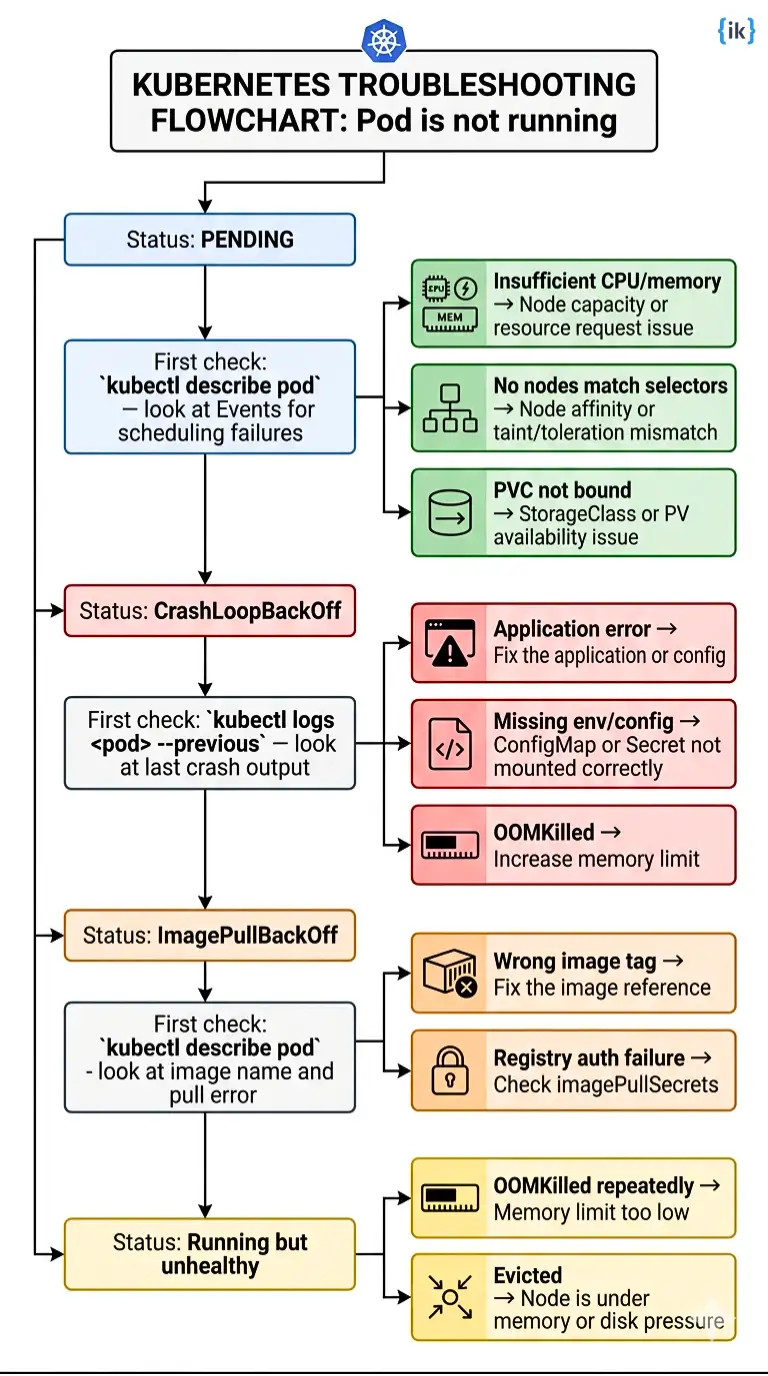
Q31. A pod is stuck in CrashLoopBackOff. Walk me through how you diagnose it.
What the interviewer is testing: CrashLoopBackOff is one of the most common problems in production Kubernetes. Candidates who cannot walk through a systematic diagnostic approach have not operated clusters and have only deployed to them.
- Run
kubectl describe pod <pod-name>and check the Events section for image pull errors, volume mount failures, or scheduling issues. - Run
kubectl logs <pod-name> --previousto see the last crash output, which often shows the real application error. - Check the exit code in the describe output. Exit code 1 usually means an application error, 137 usually means OOMKilled, and 139 usually means a segfault.
- If the logs are empty, check whether the container is crashing before it can write output. Verify the command and entrypoint in the pod spec.
- Check that required ConfigMaps, Secrets, and volume mounts exist and are referenced correctly. A missing Secret is a common cause of clean crashes with no logs.
- If the issue is still unclear, use
kubectl execinto a healthy version of the image or a debug container to compare the runtime environment.
Q32. A pod is stuck in the Pending state and is not being scheduled. What do you check?
- Run
kubectl describe pod <pod-name>and check the Events section. The Scheduler emits a specific message explaining why the pod was not scheduled. - Check whether the cluster has nodes with enough available CPU and memory to satisfy the pod’s resource requests.
kubectl describe nodesshows allocatable vs allocated resources per node. - Check for node affinity or nodeSelector constraints in the pod spec that might not match any available node labels.
- Check whether the pod has tolerations for any taints on the target nodes. A pod without the required toleration will not be scheduled on a tainted node.
- If the pod references a PVC, verify the PVC is in the Bound state. A pod will stay Pending if its required PVC is not yet bound to a PV.
Q33. Your deployment rolled out, but pods are OOMKilled repeatedly. What do you do?
- Confirm OOMKilled by running
kubectl describe pod <pod-name>and checking the container state. Exit code 137 also confirms it. - Check actual memory usage with
kubectl top pod <pod-name>and review historical metrics in Prometheus or Datadog to find the peak. - Decide whether this is a memory leak or real growth. A steady climb points to a leak, while a spike during traffic or batch work points to a too-low limit.
- Increase the memory limit above the measured peak and set the request to a realistic baseline. Apply the change with
kubectl apply -forkubectl set resources.
Q34. Your application is returning 502 errors after a deployment. Nothing in the pod logs shows an error. What do you investigate?
- Check whether the pod readiness probe is passing. A 502 with no app log error usually means the pod is not Ready and is not receiving traffic correctly.
- Run
kubectl get endpoints <service-name>. If the Endpoints object is empty or missing the pod IP, the Service selector does not match the pod labels. - Check the Ingress configuration and confirm the backend service name and port match the actual Service definition.
- Check the Service port configuration and verify that
targetPortmatches the container port. A mismatch often causes upstream 502 errors.
Q35. A node in your cluster is showing as NotReady. What is your response?
- Run
kubectl describe node <node-name>and check the Conditions section for DiskPressure, MemoryPressure, NetworkUnavailable, or a kubelet issue. - SSH into the node if possible and check the kubelet status with
systemctl status kubelet. A stopped or failing kubelet is a common cause. - Check node-level resource pressure, especially disk usage under
/var/lib/kubeletor/var/lib/containerd. - If the node cannot be recovered quickly, cordon it with
kubectl cordon <node-name>and then drain it withkubectl drain <node-name> --ignore-daemonsets --delete-emptydir-data.
Q36. Your cluster’s etcd is consuming unusually high disk space. What do you do?
- Confirm etcd disk usage by checking the data directory size on the etcd pod or node. The main consumers are usually
/var/lib/etcd/member/waland/var/lib/etcd/member/snap. - Identify whether old revisions are the cause. etcd keeps revision history, and without compaction, the store can grow quickly.
- Run
etcdctl compactto compact the revision history, then runetcdctl defragto release reclaimed space. Do this on each etcd member during low traffic periods. - Configure automatic compaction with
--auto-compaction-mode=periodic --auto-compaction-retention=1hand add disk usage alerts on etcd nodes.
Conclusion
Kubernetes is one component of what top tech companies evaluate in DevOps, SRE, and cloud engineering interviews, but the full interview loop covers system design, cloud infrastructure, CI/CD, and behavioral rounds as well.
If you are preparing for a role at a FAANG or Tier-1 tech company and want structured preparation across all of those areas, including mock interviews with engineers who have been hired at these companies, explore Interview Kickstart’s Cloud Engineer Interview Preparation program.
FAQs: Kubernetes Interview Questions
1. Do I need Docker knowledge for Kubernetes interviews?
Yes, at least the basics. Interviewers ask Docker and Kubernetes interview questions together because they expect you to connect container images, Dockerfiles, and Kubernetes workflows, not treat them as entirely separate topics.
2. How much Linux and networking should I know?
Enough to reason about namespaces, DNS, TLS, routing, and node-level behavior when a pod cannot reach another service. That kind of depth comes up often in public interview discussions.
3. Are Kubernetes interviews mostly practical or conceptual?
A lot of interviewers prefer open-ended, scenario-style questions because they show how you think, not just what you memorized. Reddit threads consistently describe this style as more useful than trivia.
4. How should I answer a vague prompt like “run this app on Kubernetes”?
Walk through image, deployment, service, ingress, config, storage, and probes in order. Then say what you would verify first and why.
5. What advanced topics can come up for senior roles?
Expect CRDs, Operators, reconciliation loops, cluster upgrades, multi-cluster management, and platform design trade-offs. Those are the kinds of Kubernetes questions senior interviewers keep raising.
References
Recommended Reads:


