
.NET interview questions at product companies go well past syntax. Interviewers test if you understand why the CLR manages memory the way it does, what breaks when async/await is misused, and how you diagnose a silent N+1 query in production.
This article covers 50+ questions across Basic, Intermediate, Advanced, and Scenario tiers, built for C# and .NET developers targeting backend roles at top-tier companies. Each section includes what the interviewer is actually testing, short code examples where they clarify a point, and a quick-reference cheat sheet to anchor the core concepts.
Key Takeaways
- .NET interview questions test runtime understanding (CLR, GC, JIT, managed vs unmanaged), not just definitions.
- Content is structured by difficulty, progressing from basic to intermediate to advanced, and finally scenario-based sections.
- Covers core backend topics like DI, middleware, async/await, LINQ, EF Core, caching, JWT, and SOLID.
- Advanced .NET interview questions highlight production trade-offs like LOH, ConfigureAwait(false), Redis, and EF Core migrations.
- Built for experienced backend candidates, with real-world scenarios and a troubleshooting focus.
Basic .NET Interview Questions
These are the foundational concepts that appear in almost every .NET interview, regardless of role or seniority. If you are early in your preparation, start here.
Q1. What is the difference between .NET Framework and .NET (Core / .NET 5+)? <h3>

The two are distinct platforms with different design goals. .NET Framework is Windows-only and ships with the OS, while .NET 5+ is the modern, cross-platform successor that replaced it.
Q2. What is the CLR, and what does it do?
The CLR (Common Language Runtime) is the execution engine that runs .NET code. It handles three core responsibilities, including executing your code via JIT (Just-In-Time) compilation, managing memory through garbage collection, and enforcing type safety at runtime.
This is what makes .NET a managed environment; your code runs under CLR supervision rather than directly on the OS, which is fundamentally different from languages like C++.
What the interviewer is testing: If you understand what managed code actually means and why .NET behaves differently from languages like C++. Candidates who just say ‘it runs your code’ fail this question at the mid-level.
Q3. How does garbage collection work in .NET?
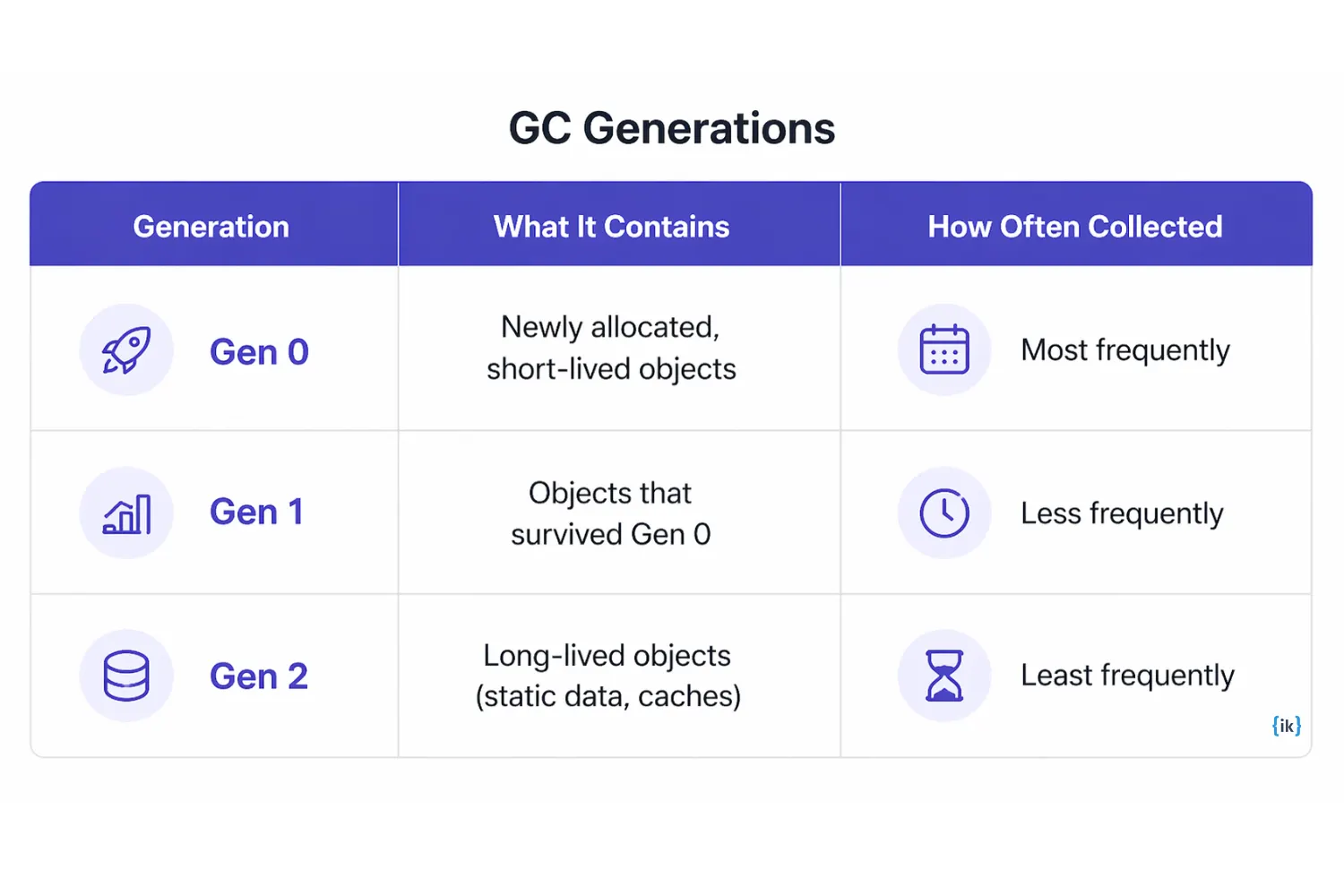
The GC automatically frees memory for objects no longer referenced by your application. It uses a generational model where objects are promoted across generations based on how long they survive collection cycles. Creating many short-lived objects is fine; repeatedly allocating large objects causes GC pauses because they go directly to the Large Object Heap (LOH) and are collected less frequently.
Q4. What is the difference between managed and unmanaged code?
Managed code runs under CLR control, while memory allocation and cleanup are handled automatically. Unmanaged code runs outside the CLR, such as C++ libraries or COM objects, and requires manual memory management.
When you need to call unmanaged resources from C#, you use P/Invoke for external DLL calls or unsafe blocks for direct pointer manipulation. Both of these bypass CLR memory management for that scope.
Q5. What is the difference between value types and reference types in C#?
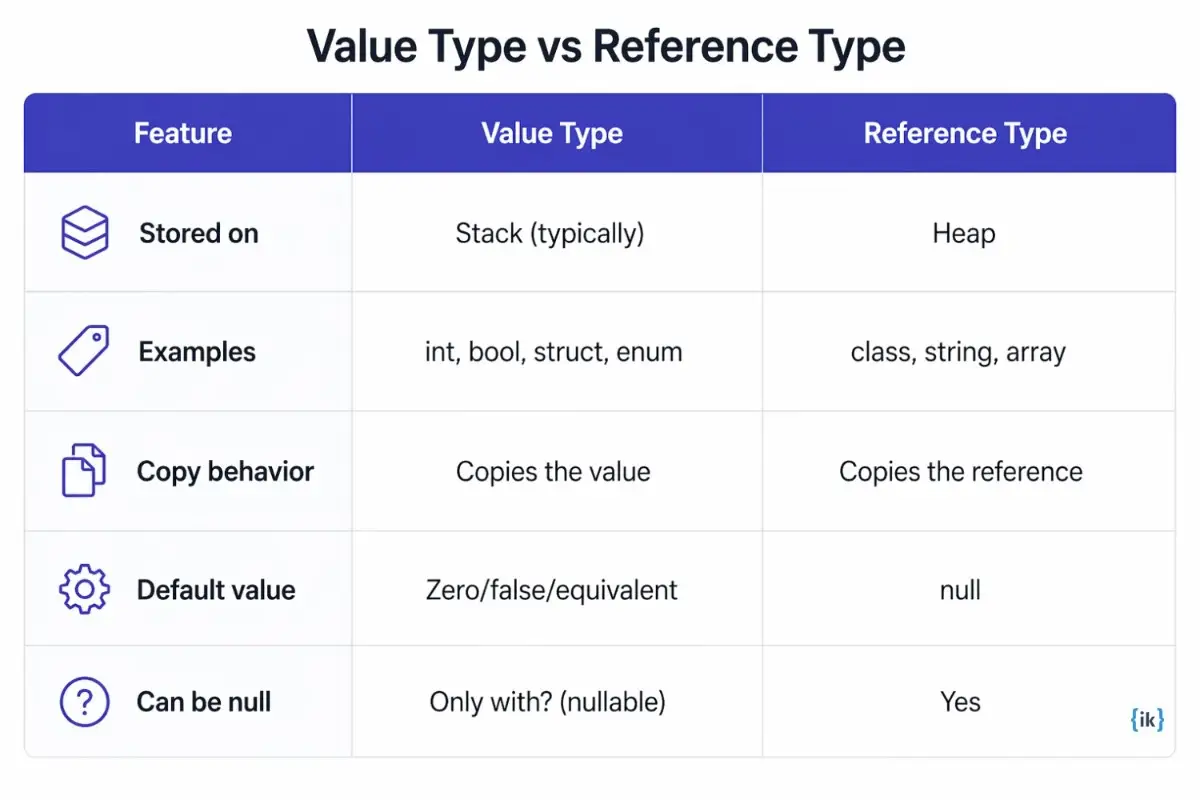
Value types store data directly; reference types store a pointer to data on the heap. This distinction drives copy behavior, nullability, and a category of subtle bugs around struct mutations.
What the interviewer is testing: How memory works in C#stack vs heap, copy behavior, and why this causes bugs around null references and struct mutations. This is a high-frequency question at all levels.
Q6. What is the difference between an interface and an abstract class in C#?

Both define contracts for derived types, but they serve different design purposes. Use an interface when you are defining a contract with no shared state, and an abstract class when you need shared base behavior with some default implementation.
Q7. What is boxing and unboxing in .NET, and why does it matter?
Boxing wraps a value type (like int) in a heap-allocated object. Unboxing does the reverse, as it extracts the value type back out. The performance cost comes from the heap allocation and the GC pressure it creates.
The most common real-world fix is to use List<T> instead of ArrayList. ArrayList stores everything as an object, forcing boxing on inserts and unboxing on reads.
Q8. What is the difference between == and.Equals() in C#?
== is an operator that checks reference equality by default, but can be overloaded per type. .Equals() is a virtual method designed for value equality. The string type overrides both to compare by content, so for strings, both work the same way. For custom classes, neither does value comparison unless you explicitly override it.
Q9. What is LINQ, and when would you use it?
LINQ (Language Integrated Query) is a way to query and transform collections using C# syntax to filter, group, sort, and project data in a readable, composable style.
The distinction that matters in interviews: LINQ over in-memory collections runs in the application. LINQ to EF Core translates your C# expressions into SQL and runs in the database. Mixing them up and calling a C# method inside a LINQ-to-EF query that has no SQL translation causes runtime exceptions.
Q10. What are the four OOP principles, and how does C# support each?
The four core principles often covered in OOP interview questions are Encapsulation, Abstraction, Inheritance, and Polymorphism. In C#, each of these is supported through built-in language features:
|
Principle |
What It Means |
C# Example |
| Encapsulation | Hiding internal state behind a public interface | private fields with public properties |
| Inheritance | Deriving behavior from a base class | class Dog: Animal |
| Polymorphism | One interface, multiple implementations | virtual/override methods |
| Abstraction | Exposing only what is necessary | abstract classes and interfaces |
Q11. What is the difference between string and StringBuilder in C#?
string is immutable; every modification (concatenation, replace, trim) creates a new object in memory. StringBuilder is mutable and modifies the same buffer in place.
Use a string for simple, infrequent operations. Use StringBuilder when you are building strings across many iterations. Inside a loop is the clearest signal.
Q12. What are generics in C#, and why do they exist?
Generics let you write type-safe, reusable code that works across data types without boxing. List<int> stores integers directly on the heap as integers. ArrayList stores them as objects, boxing every value on insert and unboxing on read, adding GC pressure and losing compile-time type checking in one move.
Intermediate .NET Interview Questions
These ASP.NET Core interview questions cover how the framework works in practice. Dependency injection, async patterns, middleware, EF Core behavior, and the design principles that separate engineers who understand .NET from those who just make things work.
Q13. What is dependency injection, and how does ASP.NET Core implement it?

Dependency injection means providing an object with its dependencies from outside rather than having it create them itself. This makes code testable and loosely coupled because you can swap implementations without changing the class that uses them. In ASP.NET Core, you register services in Program.cs, and the framework injects them automatically via constructor parameters.
The three service lifetimes control how long an instance lives.
What the interviewer is testing: If you understand DI as a design principle, not just a feature to enable in startup code. Candidates who say You add it in the program.cs’s are failing this question at the senior level without explaining why.
Q14. How does async/await work in C#, and what are the two most common mistakes?
async/await lets you write code that waits for slow operations, such as database calls or HTTP requests, without blocking a thread. While the operation is in progress, the thread is released back to the pool to handle other work.
The two mistakes that trip up experienced developers in production are calling. Result or.Wait() on a Task inside an ASP.NET context, which causes a deadlock because it blocks the thread that the continuation needs to resume on, and using async void instead of async Task, which silently swallows exceptions because there is no Task for the caller to observe.
What the interviewer is testing: If you have hit async bugs in production. The deadlock and async void questions specifically filter candidates who use the keywords from those who understand what they are doing.
Q15. What is middleware in ASP.NET Core, and how does the pipeline work?
Middleware is a component that processes HTTP requests in sequence. Each middleware receives the request, does its work, then calls next() to pass control to the next component in the pipeline. Any middleware can short-circuit the pipeline by returning a response directly without calling next().
Two examples that show why order matters: authentication middleware validates the token before the request ever reaches a controller, and logging middleware wraps the entire pipeline to record request timing, including everything that happened downstream.
Q16. What is Entity Framework Core, and what is the difference between lazy loading and eager loading?
EF Core maps C# classes to database tables and generates SQL based on your LINQ queries.
Lazy loading loads related data only when you access a navigation property. It is convenient but dangerous because each access triggers a separate database query. Eager loading loads related data upfront.Include(). It is predictable but can overfetch if you include more than you need.
What the interviewer is testing: If you understand the performance implications of each approach and have hit the lazy loading N+1 problem in production. Saying ‘I just use Include()’ without understanding why is a yellow flag.
Q17. What is the N+1 query problem in EF Core, and how do you fix it?
N+1 means one query fetches the list, then one additional query runs per item to load related data. If you have 100 orders and an access order. Customer inside a loop without eager loading, EF Core fires 101 database queries.
Fix it by using.Include() to load related data in the initial query, or use.Select() to project only the specific fields you need, so you never load navigation properties at all.
// N+1 problem: fires one query per order
var orders = context.Orders.ToList();
foreach (var order in orders)
{
    Console.WriteLine(order.Customer.Name); // separate query each time
}

// Fix: load customers in the same query
var orders = context.Orders.Include(o => o.Customer).ToList();
Q18. What is the difference between IEnumerable, IQueryable, and IList in C#?
The key difference is where the data gets processed and when execution actually happens.
|
Type |
Where Data Is Processed | When to Use |
Deferred Execution |
| IEnumerable | In memory, on the application side | Iterating in-memory collections | Yes |
| IQueryable | At the data source (database) | Building EF Core queries before execution | Yes |
| IList | Already in memory | When you need indexed access or know you need the full list | No |
Q19. What are delegates and events in C#, and how are they related?
A delegate is a type-safe variable that holds a reference to a method, letting you pass methods around like any other value. An event is a delegate with restricted access: only the class that declares it can fire it, while other classes can only subscribe or unsubscribe.
The most common real-world pattern is publish/subscribe. A button fires a click event, and any number of handlers can respond without the button knowing anything about them
Q20. What is the difference between Task and Thread in .NET?
A Thread is an OS-level resource with real overhead. Creating and destroying threads is expensive, and each one consumes significant memory for its stack.
A Task is a higher-level abstraction built on the thread pool. It is lighter, composable with async/await, and designed for the kind of concurrent work modern applications actually do. In modern .NET, use Task for almost everything.
Q21. What is the SOLID principle and how does it apply to .NET code?
| Letter | Principle Name | What It Means | .NET Example |
| S | Single Responsibility | A class should have one reason to change | Separate OrderService from OrderEmailSender |
| O | Open/Closed | Open for extension, closed for modification | Add behavior via new classes, not by editing existing ones |
| L | Liskov Substitution | Subtypes must be substitutable for their base types | A ReadOnlyList should not throw when.Add() is called |
| I | Interface Segregation | Prefer small, focused interfaces over large ones | IReadable and IWritable instead of one IFileManager |
| D | Dependency Inversion | Depend on abstractions, not concrete classes | Inject IEmailSender, not SmtpEmailSender |
Q22. What is JWT, and how is authentication set up in ASP.NET Core?
A JWT (JSON Web Token) is a compact, signed string that carries claims about a logged-in user, such as their ID, role, and token expiry. The signature lets the server verify the token without hitting a database on every request.
In ASP.NET Core, you register JWT bearer authentication in Program.cs, which adds middleware that automatically validates the token on each incoming request. The [Authorize] attribute on a controller or endpoint then enforces that only requests with a valid token are allowed to proceed.
Expiry and refresh tokens are the natural follow-up. Short-lived access tokens paired with a refresh token flow is the standard production pattern.
Q23. What are the main caching options in ASP.NET Core?
In-memory caching stores data in the application’s process memory. It is the fastest option, but only works for single-server deployments because the cache is not shared across instances.
Distributed caching with Redis works across multiple servers because the cache lives outside the application process. This is the standard choice when you are running more than one instance behind a load balancer.
Response caching works at the HTTP middleware level and caches the entire response for a given request. It is useful for endpoints where the output does not change frequently and does not depend on the caller’s identity.
Q24. What are extension methods in C#, and when are they useful?
Extension methods let you add new methods to existing types without modifying the original type or subclassing it. You define them as static methods in a static class with this before the first parameter, which tells the compiler which type is being extended.
LINQ is the most widely used example. Where(), Select(), and OrderBy() are all extension methods defined on IEnumerable<T>, which is why they work on any collection type without those collections inheriting from a special base class.
Advanced .NET Interview Questions
These advanced .NET interview questions are aimed at senior engineers and architects. Definitions alone will not cut it here. Interviewers at this level are testing if you have operated .NET systems in production and can reason through trade-offs.
Q25. How does the .NET garbage collector handle large objects differently, and why does it matter?
Objects over 85KB go to the Large Object Heap (LOH), which is collected far less frequently than the regular generational heaps and is not compacted by default. Over time, this creates fragmentation, where gaps in memory cannot be reused efficiently, which shows up as memory pressure even when your application is not holding any large references.
The practical fix is to use ArrayPool<T> to rent and return large arrays rather than repeatedly allocating new ones. This keeps large allocations off the LOH entirely.
What the interviewer is testing: If you have diagnosed memory pressure in a real .NET application. Candidates who have not operated .NET systems at scale have never noticed the LOH.
Q26. What is the difference between IHostedService and BackgroundService?
IHostedService is the raw interface with just two methods, StartAsync and StopAsync. It gives you full control but requires you to manage the execution loop yourself.
BackgroundService is an abstract class that implements IHostedService and provides an ExecuteAsync method where you write your background logic. It handles the lifecycle wiring for you, which makes it the right starting point for almost every background job.
Common uses include polling a message queue, running a scheduled database cleanup, or processing items off an in-memory channel.
Q27. How do you implement distributed caching with Redis in ASP.NET Core?
You register IDistributedCache with the Redis provider in Program.cs, then inject it wherever you need caching. The usage pattern is to serialize your object to JSON, store it with an expiry time using SetStringAsync, and retrieve and deserialize it on the next request.
The harder part is cache invalidation. When the underlying data in the database changes, you need a strategy to either update the cache entry immediately, aggressively expire it, or use a write-through pattern so that the cache and database are updated together. Serving stale data silently is the failure mode interviewers are actually probing for when they ask this question.
Q28. What is the difference between ASP.NET Core MVC and Minimal APIs?
ASP.NET Core MVC follows a structured approach with controllers, routing, model binding, and filters, which works well for complex apps with many endpoints and shared behavior. Minimal APIs keep things lightweight by defining endpoints directly in Program.cs using lambda functions, making them a better fit for simple services or microservice-style APIs, something often highlighted in MVC interview questions.
Q29. How does async/await work under the hood at the runtime level?
The C# compiler transforms every async method into a state machine. When execution reaches an await on an incomplete task, the method saves its current state and returns control to the caller. Nothing is blocked. When the awaited operation eventually completes, the runtime resumes the method from where it left off, typically on a thread pool thread.
The insight that separates senior candidates is this: async does not create more threads. It makes better use of the existing threads by avoiding idle time during I/O waits. A server handling hundreds of concurrent requests can do so with a small thread pool because those threads are freed up between the start and completion of each async operation.
What the interviewer is testing: If you understand async at the runtime level, not just the keyword level. This question filters out senior candidates who use async because they were told to.
Q30. What are the trade-offs between a monolith and microservices when building a .NET application?
A monolith is simpler to build, test, and deploy with a single codebase, no network calls, and easier debugging. Microservices provide independent deployment, fault isolation, and the ability to scale parts of the system separately, but they introduce network complexity, distributed tracing, and higher operational overhead. In .NET, microservices are commonly built using ASP.NET Core for APIs, gRPC for fast service communication, and Dapr for runtime abstraction, a topic often covered in system design interview questions.
Q31. What is middleware short-circuiting, and when is it correct vs a bug?
Short-circuiting means a middleware component handles the request and returns a response without calling next(), stopping the pipeline there.
It is the correct behavior when failing fast is appropriate. Authentication middleware returning a 401 before the request reaches any controller is exactly what you want. A rate limiter returning 429 before any business logic runs is another correct use.
It becomes a bug when middleware accidentally skips next() due to a missing code path, and the request never reaches the controller with no clear error to diagnose.
Q32. How do you handle database migrations safely in a production deployment with EF Core?
Handle EF Core migrations in production by running dotnet ef database update as a dedicated step in your CI/CD pipeline, which gives you better control and avoids race conditions compared to calling context.Database.Migrate() on app startup when multiple instances may start together. Keep migrations backward-compatible, since adding columns is generally safe, but renaming or dropping columns can break older versions still running during a rolling deployment. These nuances around schema changes and compatibility are often explored in deeper SQL interview questions.
Q33. What is gRPC, and when would you use it instead of REST in a .NET application?
gRPC uses Protocol Buffers, a compact binary format, instead of JSON. This makes it significantly faster for internal service-to-service communication where both sides are under your control, and you can define the contract in a .proto file.
REST is the better choice for public APIs because browsers and standard HTTP clients support it without any additional setup. The practical rule for .NET applications is to use gRPC between your services and REST for client-facing endpoints. ASP.NET Core supports gRPC natively via the Grpc.AspNetCore package.
Q34. What does ConfigureAwait(false) do, and when should you use it?
By default, await tries to resume on the same synchronization context that was active when the operation started. In a desktop UI application, this means resuming on the UI thread, which is necessary to update controls after an async operation completes.
ConfigureAwait(false) tells the runtime not to capture and restore the original context. This avoids a class of deadlocks that occur when code blocks on an async operation while holding a context, and it removes the overhead of context switching on resumption.
The practical rule is to always use ConfigureAwait(false) in library code when you have no control over the context the caller uses. In ASP.NET Core application code, it rarely matters because ASP.NET Core lacks a synchronization context.
Scenario and Troubleshooting .NET Interview Questions
Scenario questions are the highest-signal format in senior .NET interviews. They reveal if you have actually shipped and debugged .NET systems in production. A structured diagnostic approach matters as much as the answer itself.
Q35. Your ASP.NET Core API is responding slowly under load. Walk me through how you diagnose it.
What the interviewer is testing: Whether you follow a layered, systematic diagnostic process or guess randomly. The ideal order should be cheap checks first, expensive profiling later.
- Check Application Insights or structured logs to identify which endpoints are slow and if latency is consistent or spiky.
- Check database query count and duration per request using SQL Server Profiler or EF Core query logging. N+1 queries are the first suspect.
- Profile with dotnet-trace or MiniProfiler to find CPU hotspots or unexpectedly slow code paths.
- Check for thread pool starvation caused by sync-over-async code blocking thread pool threads.
- Check GC pressure using dotnet-counters. Frequent Gen 2 collections or high LOH allocation rates point to a memory problem.
- If all of the above are clean, check external dependencies. A slow third-party API or an under-indexed database query can make every request slow, regardless of your application code.
Tools: Application Insights, dotnet-trace, dotnet-counters, SQL Server Profiler, MiniProfiler.
Q36. You are getting 500 errors in production, but only under concurrent load. What do you investigate?
- Pull the logs and identify the exception type and stack trace first.
- Look for shared mutable state being accessed by multiple requests simultaneously. A static field or singleton holding request-specific data is a common source of race conditions.
- Check DbContext usage. EF Core’s DbContext is not thread-safe and must be scoped to one request. A shared DbContext will produce unpredictable failures under load.
- Look for race conditions in caching code where two concurrent requests both find a cache miss and attempt to write at the same time.
- Check database connection pool exhaustion. If connections are not released promptly due to sync-over-async blocking, new requests will fail waiting for an available connection.
Q37. EF Core is generating 50 database queries for a page that should need 2. How do you debug and fix it?
What the interviewer is testing: Production database awareness, and if you know how ORMs generate SQL and how to control it. This question directly tests hands-on EF Core experience.
- Enable EF Core query logging by adding optionsBuilder.LogTo(Console.WriteLine) in your DbContext configuration to print every SQL statement to the console.
- Identify which navigation property accesses are triggering separate queries inside a loop.
- Fix with.Include() to load related data upfront, or use.Select() to project only the fields the page actually needs.
- Add a query-count assertion to your integration tests so lazy-loading regressions fail before reaching production.
Q38. A colleague is using async void throughout the codebase. How do you explain the problem?
Async void methods cannot be awaited, so the caller has no way to know when they finish or if they threw an exception. If an exception is thrown inside one, it propagates directly to the synchronization context and crashes the process with no way to catch it.
The fix is to return an async Task instead. The only legitimate use of async void is event handlers, which require a void return type by design.
Q39. Your API is returning stale data even though you updated the database. Walk me through your investigation.
You can mention the following steps when answering this .NET interview question:
- Check if caching is active for the affected data, and the cache was invalidated after the update.
- Review the cache TTL. A long expiry means stale data is served until the entry expires naturally.
- Check if reads are hitting a read replica lagging behind the primary.
- Check EF Core change tracking. If the same DbContext has already loaded the entity, it may return the tracked in-memory version instead of querying the database.
- Check whether a CDN or reverse proxy is caching the HTTP response at the network layer.
Q40. You need to deploy a new version of an ASP.NET Core API with zero downtime. What is your approach?
Mention the following to explain your approach to answering this question:
- Use a rolling or blue/green deployment so new instances come up gradually while old ones continue serving traffic.
- Make the new version backward-compatible with the current schema before deploying. Add columns before removing old ones.
- Use feature flags to gate new behavior so it can be turned off without a full rollback.
- Only route traffic to new instances after health checks pass.
- Have a tested rollback plan ready before the deployment window opens.
Core .NET Concepts Every Interviewer Test
This section covers the fundamental .NET concepts interviewers consistently test to evaluate your understanding of application design and runtime behavior. These topics form the base for answering both conceptual and real-world scenario questions.

Conclusion
These .NET interview questions cover the runtime mechanics, production trade-offs, and scenario-based thinking that top-tier companies actually test. Memorizing definitions won’t get you past a senior panel, so the candidates who stand out are those who can connect CLR internals to real debugging decisions and architecture choices.
For candidates targeting backend roles at top tech companies, pair this guide with our article on C# Interview Questions for Experienced Developers to go deeper on language-level patterns, coding questions, and the C# specifics that complement everything covered here.
If you are targeting backend engineering roles at FAANG or Tier-1 companies, Interview Kickstart’s Back-End Engineering Interview Masterclass, taught by active FAANG engineers and hiring managers, covers system design, DSA, and the full backend interview loop with live mock interviews.
FAQs: .NET interview questions
Q1. How should I prepare for a mid-level or senior .NET interview?
Focus on the depth of real projects and decision-making. Be ready to explain why you chose a specific approach and what tradeoffs you handled.
Q2. Can I use another language in coding rounds for a .NET role?
Some companies allow it, but using C# is safer since it aligns with the role and shows stronger ecosystem familiarity.
Q3. Do .NET interviews include LeetCode-style questions?
Yes, in some cases, but many interviews prioritize backend thinking and practical implementation over pure algorithm puzzles.
Q4. What should a junior .NET candidate focus on before interviews?
Strengthen fundamentals, understand your projects deeply, and clearly explain what you built and why.
Q5. What differentiates strong senior .NET candidates?
Clear thinking, ownership of systems, and the ability to explain architecture decisions in simple terms.
References
Recommended Reads:


