
At tech companies, IT interviews test more than technical knowledge. They check how you diagnose problems under pressure, explain complex issues to nontechnical people, and make good calls when systems fail.
This article is for IT professionals at any level preparing for support, operations, technician, or infrastructure roles. The questions below are organized by difficulty and role tier, with each one showing what the interviewer is actually measuring.
Key Takeaways
- IT interviews test troubleshooting, communication, and pressure handling more than memorized definitions.
- Core topics like DNS, DHCP, IP addresses, Active Directory, and ticketing systems appear often.
- Scenario questions matter because they reveal how you handle outages, slow systems, and access issues.
- Strong answers stay structured, specific, and practical.
- Help desk, operations, and senior roles share the same foundations, but the depth and complexity rise with the role.
Basic IT Interview Questions
Foundational IT interviews test your technical literacy and problem-solving logic, not just memorized definitions.
Below are the most common questions you can expect.
Q1. Walk me through your troubleshooting process.
In the interview, you can mention the following steps to explain your troubleshooting process:
- Define the problem by gathering user details and identifying exactly what is failing and when.
- Isolate the cause by testing individual components and ruling out variables to narrow down the point of failure.
- Develop and implement a solution based on the evidence while ensuring the fix does not create new issues.
- Verify full functionality with the user and document the entire incident in the ticketing system for future reference.
Interviewer is testing: If you follow a systematic, repeatable approach or guess randomly. Methodical thinking under pressure is the signal here, not technical knowledge.
Q2. What is the difference between RAM and storage?
RAM acts as high-speed temporary memory for active tasks and open applications, while storage provides long-term data retention for files and software. A slow computer often results from insufficient RAM, which prevents smooth multitasking, or from a nearly full storage drive, which hinders the operating system’s ability to swap data.
Q3. What is an IP address and why does it matter?
It is the label devices use to send and receive data on a network. IT teams need to understand IPv4 and IPv6 because addressing issues directly affects connectivity, access, and troubleshooting.
Q4. What is DNS, and how does it work?
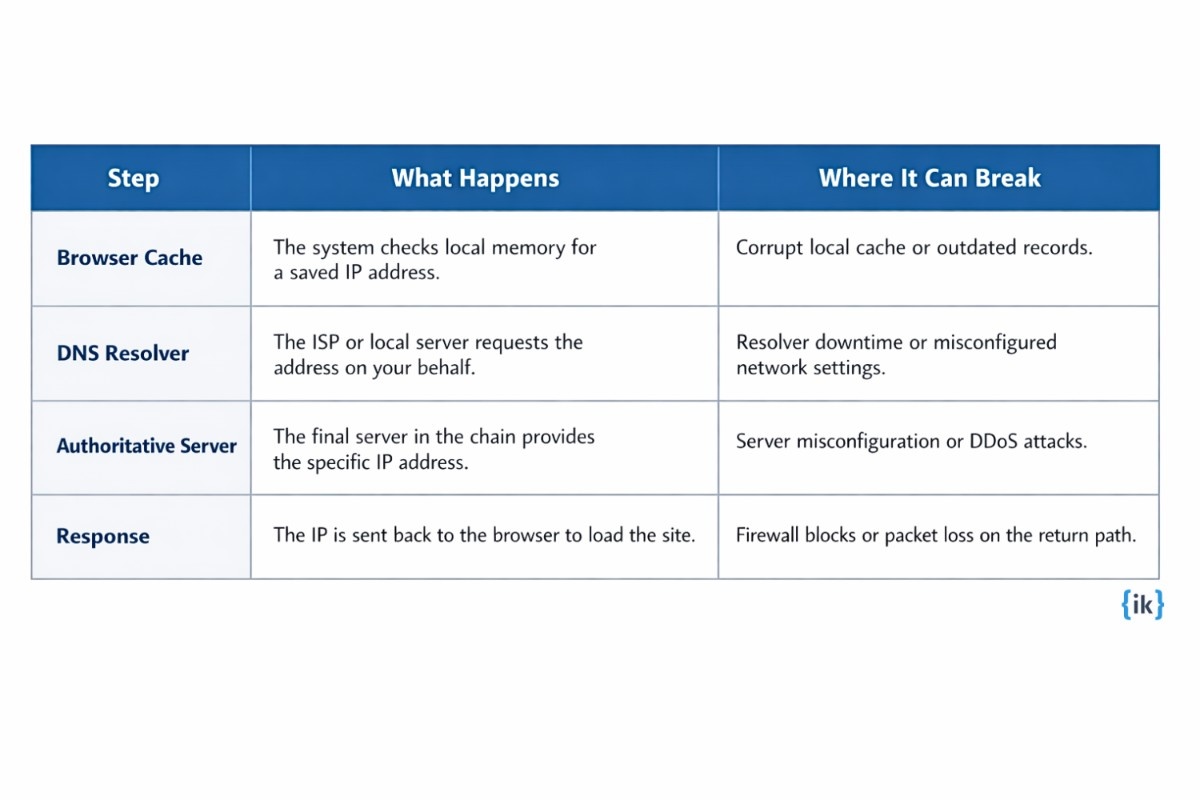
DNS acts as the phonebook of the internet by translating human-readable domain names into machine-friendly IP addresses. When DNS fails, users can lose website access even when the network is working. It converts domain names into the IP addresses that machines need to route traffic correctly.
Interviewer is testing: If you can explain a technical concept to a non-technical person, basically a core IT support skill.
Q5. What is the difference between a hub, a switch, and a router?
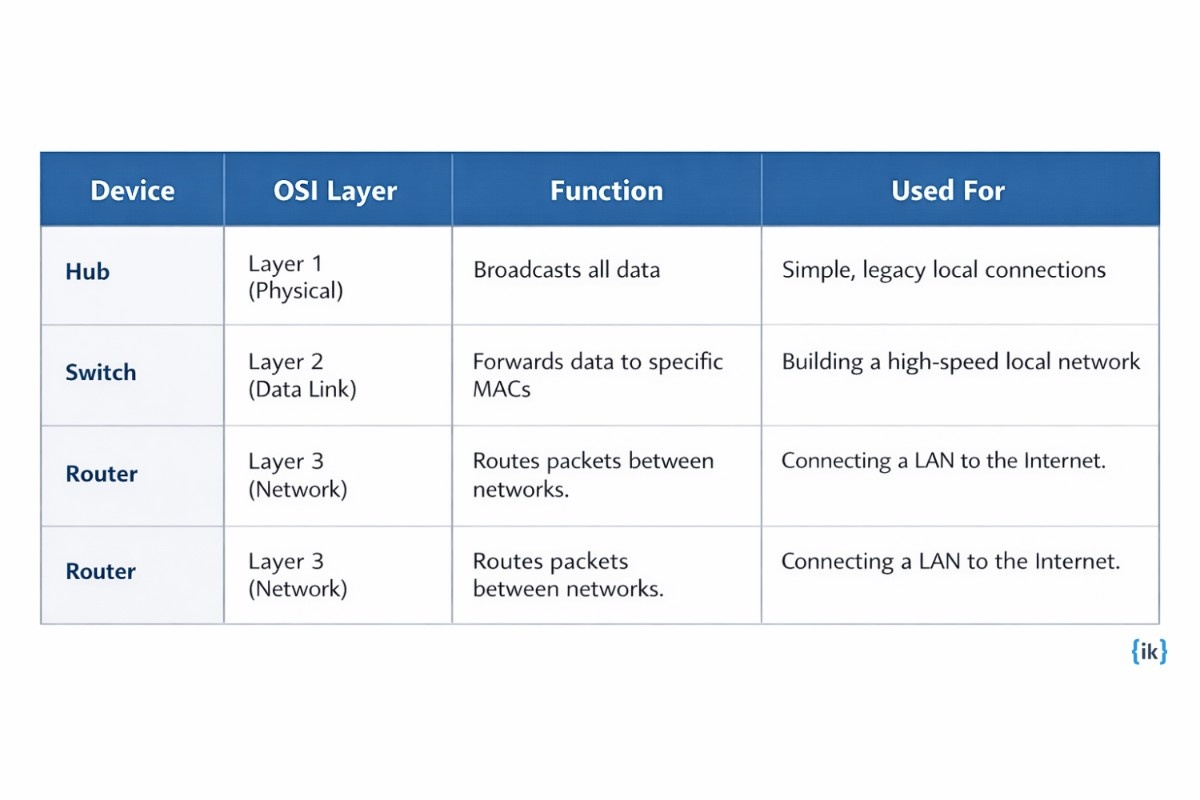
A hub is a Layer 1 device that broadcasts data to every port regardless of the intended recipient.
A switch operates at Layer 2 and uses MAC addresses to send data only to the specific device that needs it.
A router functions at Layer 3 to connect different networks and manage traffic flow between them.
Q6. What operating systems are you comfortable working with?
You should list specific versions like Windows 11 for enterprise desktop support, macOS Sonoma for creative department hardware, and Ubuntu 22.04 for managing web servers.
Q7. What is Active Directory, and what do you use it for?
Active Directory is a Microsoft directory service that centralizes the management of users, computers, and security permissions across a corporate network. IT professionals use it to reset passwords and deploy global software policies through Group Policy Objects.
Q8. How would you handle a user who says, ‘My computer is slow’?
You can mention the following when explaining how you handle users:
- Ask when the slowness started and whether it affects one app or the whole system.
- Check Task Manager or Activity Monitor for high CPU, RAM, or disk usage.
- Review startup programs, background services, updates, low disk space, and malware.
- Escalate to hardware diagnostics if software fixes do not resolve the lag.
Interviewer is testing: Diagnostic instinct and communication style. They check if you ask questions before jumping to solutions.
Q9. What is DHCP, and what problem does it solve?
DHCP automates the assignment of IP addresses to devices as they join a network, preventing manual configuration errors and IP conflicts. If a DHCP server fails, devices receive an APIPA address starting with 169.254 and lose the ability to communicate with the rest of the network.
Q10. What is a VPN, and why do organizations use it?
A VPN creates an encrypted tunnel over a public network to allow secure remote access to internal corporate resources. Organizations rely on them to ensure employees can work from home or branch offices while keeping sensitive data protected from interception.
Q11. What ticketing systems have you worked with?
Identify specific platforms, such as ServiceNow for enterprise workflows or Jira for technical issue tracking, and mention how you managed ticket lifecycles. Emphasizing your attention to Service Level Agreements (SLAs) demonstrates that you prioritize issues based on business impact and urgency.
Q12. What does ITIL stand for, and why does it matter to IT operations?
ITIL stands for Information Technology Infrastructure Library and serves as a framework of best practices for aligning IT services with business needs. It provides a standardized language for concepts like Incident Management and Change Management to ensure service consistency across the entire organization.
Intermediate IT Interview Questions
Intermediate roles focus on operational stability and infrastructure management rather than individual fixes. Interviewers look for how your decisions impact system reliability and business continuity.
Q13. How do you handle a situation where a critical system goes down during business hours?
You can explain the following when answering this IT interview question:
- Identify outage scope and notify stakeholders through established channels.
- Diagnose whether the issue is network, hardware, or application; escalate if unclear.
- Apply a fix or failover to restore service quickly.
- Verify with users and document root cause and recovery steps.
Interviewer is testing: Incident management judgment and whether you can prioritize, communicate, and stay systematic when there is business impact and pressure.
Q14. What is the difference between TCP and UDP?
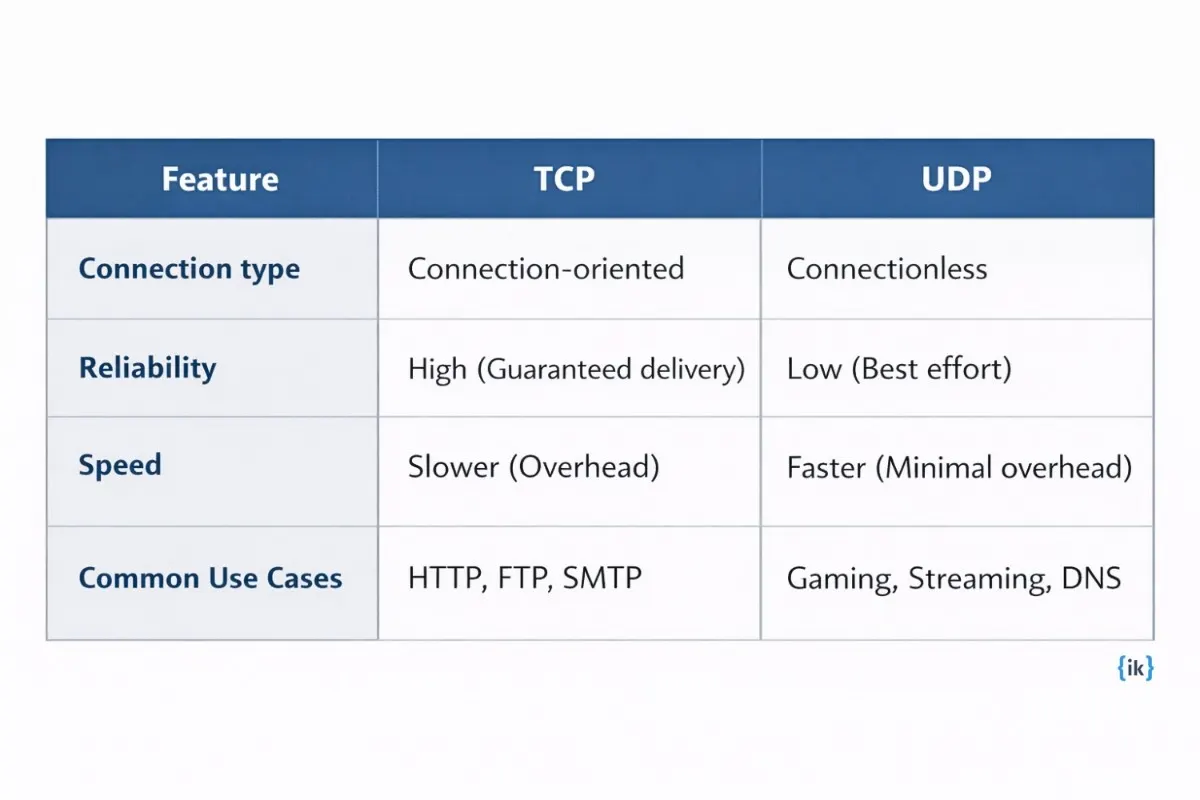
Use TCP when delivery must be guaranteed, such as HTTP, FTP, and SMTP. Use UDP when latency matters more than completeness, such as VoIP, live streaming, and DNS queries.
Q15. How do you approach patch management?
The process starts with an accurate inventory of hardware and software, then moves to testing patches in a non-production environment to catch conflicts early. After validation, I schedule rollout during low-impact windows and keep a rollback plan ready if anything becomes unstable.
Interviewer is testing: If you treat patching as a risk management process, not just an install task.
Q16. What is the OSI model, and how do you use it in troubleshooting?
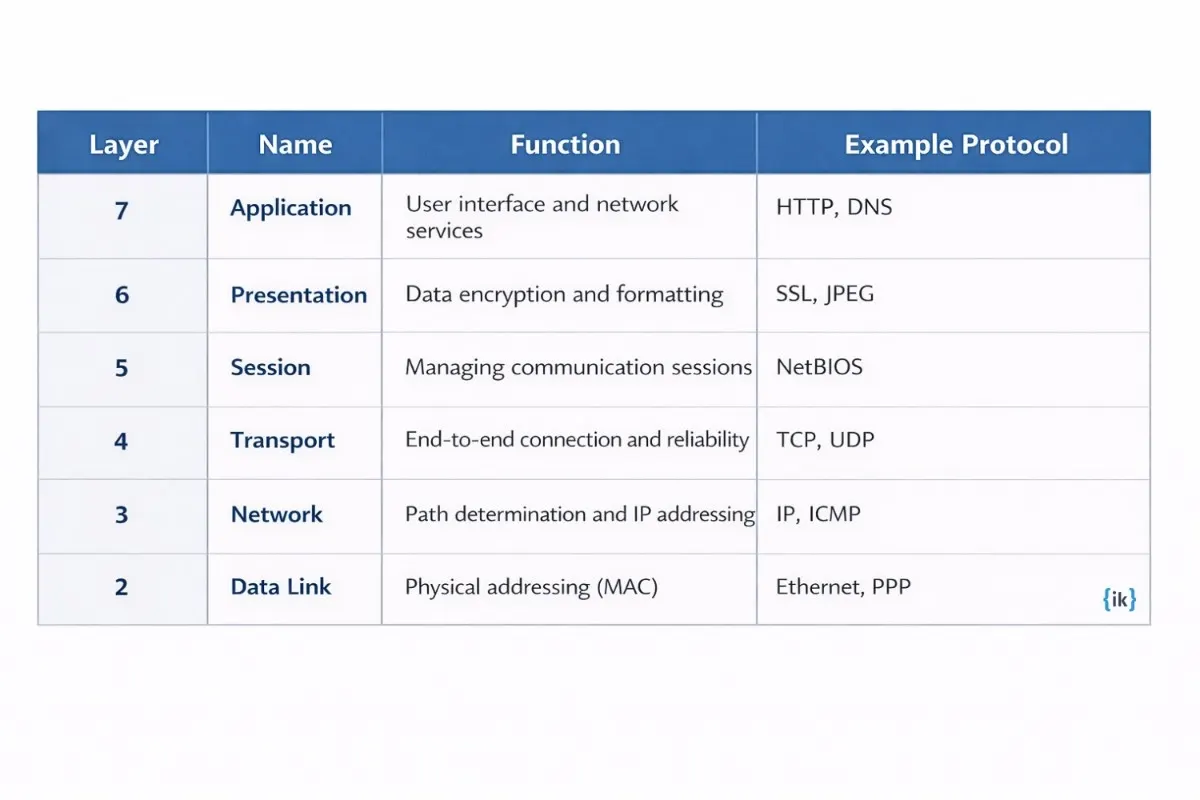
The Open Systems Interconnection (OSI) model is a conceptual framework that standardizes the functions of a telecommunication system into seven distinct layers. By applying this model, you can troubleshoot logically by starting at the Physical layer to check cables or starting at the Application layer to check software settings.
Q17. How do you manage user permissions and access control?
I follow the principle of least privilege by ensuring users only have the minimum access necessary to perform their job functions. This is typically implemented using role-based access control (RBAC) in Active Directory, where permissions are assigned to groups rather than individuals. Granting access too broadly creates significant security risks and increases the potential for accidental data loss or unauthorized modifications.
Q18. What is a firewall, and what are the main types?
Traffic filtering is the core function: block what should not enter and allow what should. The main firewall types differ in how deeply they inspect traffic.
| Type | What It Checks | Best For |
| Packet filtering | Basic header data like IP and port | Fast, simple rule enforcement |
| Stateful inspection | Connection state and session context | General enterprise traffic control |
| Application-layer | Full application content | Deeper inspection of specific traffic |
Q19. How do you back up data, and what is the 3-2-1 rule?
The 3-2-1 rule dictates that you should have three total copies of your data stored on two different types of media, with at least one copy located off-site. IT professionals follow this standard to ensure data can be recovered even in the event of a local hardware failure or a site-wide disaster like a fire or theft.
Q20. What is the difference between virtualization and containerization?
|
Aspect |
Virtualization |
Containerization |
| Core idea | Runs multiple operating systems on one physical server | Runs apps in isolated units sharing the host OS kernel |
| Best use case | Legacy apps and mixed OS environments | Microservices and fast-scaling modern apps |
| Tradeoff | Heavier and slower to start | Lighter and faster to deploy |
Q21. How do you monitor IT infrastructure for issues?
I use monitoring platforms like Zabbix or Datadog to track critical metrics, including system uptime, CPU load, and network latency in real-time. Alerts are configured with specific thresholds so that the IT team receives notifications via email or SMS before a resource reaching capacity causes a system failure.
Q22. What is RAID, and when would you recommend it?
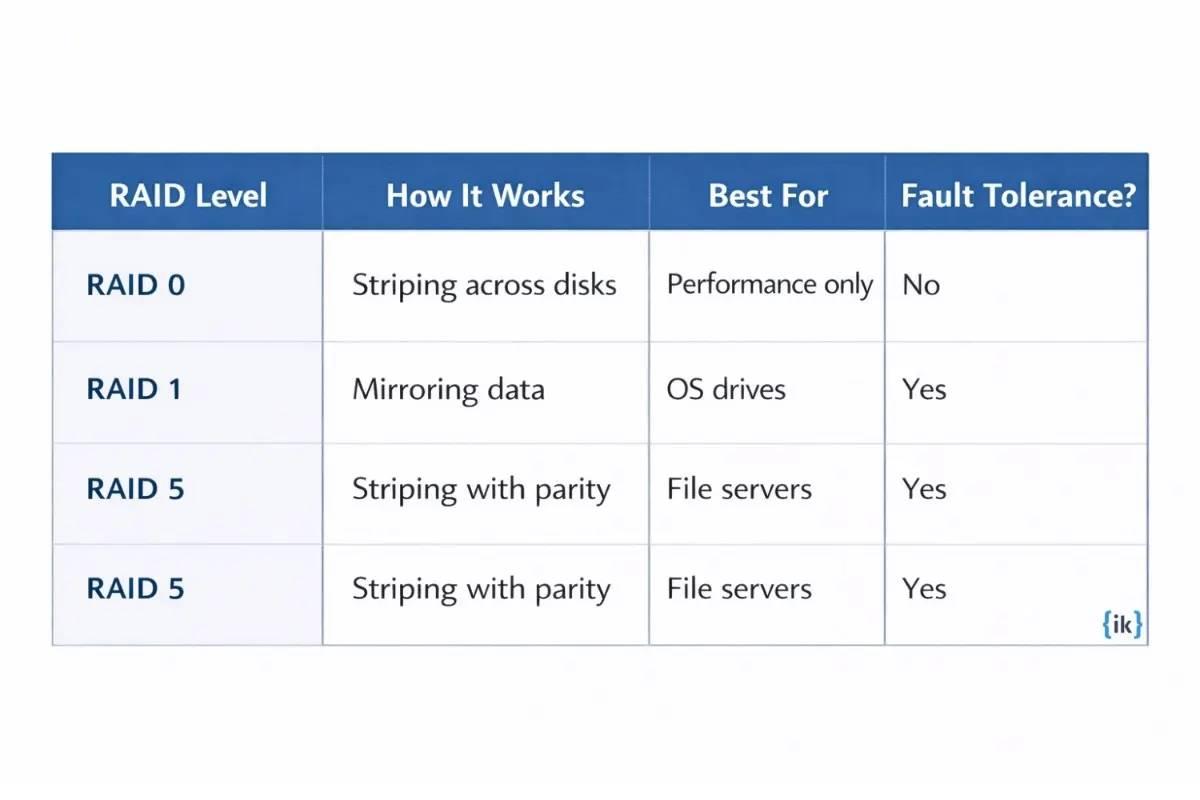
Use RAID when you need better redundancy, better performance, or both across multiple drives. RAID 1 fits workstations or critical OS drives, while RAID 5 is a common choice for file servers that need a balance of speed and fault tolerance.
Q23. How do you handle a phishing email reported by an employee?
To answer this question, you can talk about the following steps:
- Verify the report by inspecting the email headers and content within a secure environment.
- Quarantine or delete the email from the entire mail server to prevent other users from interacting with it.
- Check system logs to see if the reporting user or any other employees clicked links or submitted credentials.
- Escalate the incident to the security team and issue a brief awareness notification to the organization if the threat is widespread.
Q24. What cloud platforms have you worked with, and what IT tasks did you perform on them?
You should reference platforms like Azure or AWS and describe specific operational tasks, such as managing IAM permissions, spinning up EC2 instances, handling storage buckets, or monitoring usage to control costs.
Also Read: 100+ AWS Interview Questions for Tech Interview Preparation
Advanced IT Interview Questions
Q25. How do you build and maintain an IT disaster recovery plan?
A robust disaster recovery plan centers on defining the Recovery Time Objective (RTO) for how long systems can be down and the Recovery Point Objective (RPO) for how much data loss is tolerable. The plan must include redundant data backups, failover site procedures, and clear communication trees for key personnel.
Interviewer is testing: Whether you think about disaster recovery as a living operational process, not a document that gets filed away.
Q26. How would you approach migrating on-premises infrastructure to the cloud?
I begin with a comprehensive audit of existing workloads to determine if a simple lift-and-shift is viable or if applications require refactoring for cloud-native performance. The plan must include a phased execution to minimize business disruption and a clear rollback strategy in case of connectivity or data integrity issues.
Q27. How do you manage IT security across an organization?
IT practitioners manage the operational side of security by ensuring timely patch deployment, enforcing identity management policies, and securing hardware endpoints. While a dedicated security team handles high-level threat modeling, IT is responsible for the daily hygiene that prevents the majority of common vulnerabilities.
Also Read: Security Engineering Interview Questions and Answers 2026
Q28. How do you handle competing priorities when multiple high-severity tickets arrive simultaneously?
I use a prioritization framework that weighs the number of affected users against the criticality of the impacted business function. I immediately communicate realistic timelines to stakeholders to manage expectations while delegating tasks across the team to address separate threads of the incident. If the workload exceeds the team’s immediate capacity, I make an informed escalation decision to pull in additional resources or external vendors to maintain uptime.
Interviewer is testing: Prioritization judgment and stakeholder communication. Senior IT roles require both under pressure.
Q29. What is your approach to capacity planning for IT infrastructure? <h3>
I analyze historical utilization trends for CPU, memory, and storage to project when current resources will reach their limits based on company growth forecasts. By planning hardware refreshes or cloud bursting capabilities six to twelve months in advance, I ensure the infrastructure scales proactively rather than reacting after performance degradation occurs.
Q30. How do you evaluate and onboard a new IT vendor or tool?
I evaluate vendors based on technical compatibility, total cost of ownership, and the quality of their support SLAs. The process involves running a structured Proof of Concept (POC) to test the tool in a sandbox environment and obtaining sign-off from all impacted stakeholders before committing to a full-scale rollout.
Q31. How do you approach IT documentation and knowledge management?
Effective documentation is the backbone of a scalable IT department and must include updated network diagrams, standardized operating procedures (SOPs), and detailed runbooks. I ensure these records stay current by making documentation a mandatory step in the ticket resolution and change management workflows.
Q32. Describe how you would design the IT infrastructure for a 200-person company starting from scratch.
When answering IT interview questions such as this, you can mention the follwing steps:
- Build a resilient core network with redundant firewalls and high-availability switches.
- Use Azure AD or Okta for cloud-based identity and secure single sign-on.
- Deploy endpoint management for software provisioning and security updates.
- Set up central storage and collaboration with strict access controls.
- Apply encryption, MFA, and automated backups as baseline security.
- Add centralized monitoring and logging for network and security visibility.
Also Read: Top 50 Must-Know System Design Interview Questions (with Answers)
Q33. What is zero-trust security, and how does it change how IT teams work?
It changes how IT teams work day to day by shifting security from the perimeter to identity verification. Every device and every access request gets checked, not just traffic coming from outside the network.
Q34. How do you keep your IT skills current?
I maintain my technical edge by pursuing advanced certifications like the CCNP or AWS SysOps Administrator and maintaining a home lab to test new virtualization and automation tools. I also participate in professional communities like Spiceworks or local tech meetups to discuss emerging infrastructure trends with other industry peers.
IT Behavioral Interview Questions
Technical competence may get you the interview, but behavioral interview questions are what help employers assess if you’re the right fit for the role. In IT positions, hiring managers rely on these questions to understand how you handle pressure, communicate with non-technical stakeholders, and take ownership of the systems you manage.
Q35. Tell me about a time you troubleshot a problem you had never encountered before.
Detail your specific diagnostic methodology and the external resources like system logs or vendor documentation used to isolate the root cause. Explain how you validated the solution in a test environment to ensure stability before modifying the production system.
Interviewer is testing: Problem-solving methodology and intellectual resourcefulness – not technical knowledge.
Q36. Describe a time you had to explain a technical issue to a non-technical stakeholder.
Identify a specific analogy or simplified framework used to bridge the gap between technical failure and business impact. Focus on the information the stakeholder required to approve a solution or understand a delay.
Q37. Tell me about a time you made a mistake that caused a system outage or data issue.
Describe the specific technical error and the immediate steps taken to restore service and notify leadership. Detail the changes made to standard operating procedures or monitoring configurations to prevent a repeat of the incident.
Interviewer is testing: Accountability, transparency, and learning orientation, not error-free performance.
Q38. How have you handled a situation where a user was frustrated or difficult?
Explain the specific de-escalation techniques used to acknowledge the user’s frustration while keeping the technical troubleshooting process moving forward. Show how you separated the emotional management of the situation from the actual repair.
Q39. Tell me about a project where you had to coordinate across multiple teams.
Focus on how you identified cross-team dependencies and managed communication without having direct authority over the other groups. Describe the specific mechanism used to resolve a resource conflict or a timeline delay.
Q40. Describe a time you identified and fixed a problem before it became an outage.
Detail the specific monitoring signal or routine check that alerted you to an emerging issue and the preventative action taken. Contrast this proactive step with the potential business impact of a reactive response.
Interviewer is testing: Proactive monitoring mindset – the difference between reactive IT and reliable IT operations.
Q41. How do you prioritize your workload when everything feels urgent?
Name a specific prioritization framework used to rank tasks based on user volume and business criticality. Explain how you communicated these priorities to stakeholders to manage their expectations during high-volume periods.
Q42. Tell me about a time you had to learn a new technology quickly to solve a problem.
Specify the new tool or protocol learned and the exact timeframe and resources used to gain proficiency. Explain the immediate operational application of this new knowledge to resolve a pending technical challenge.
IT Scenario and Troubleshooting Questions
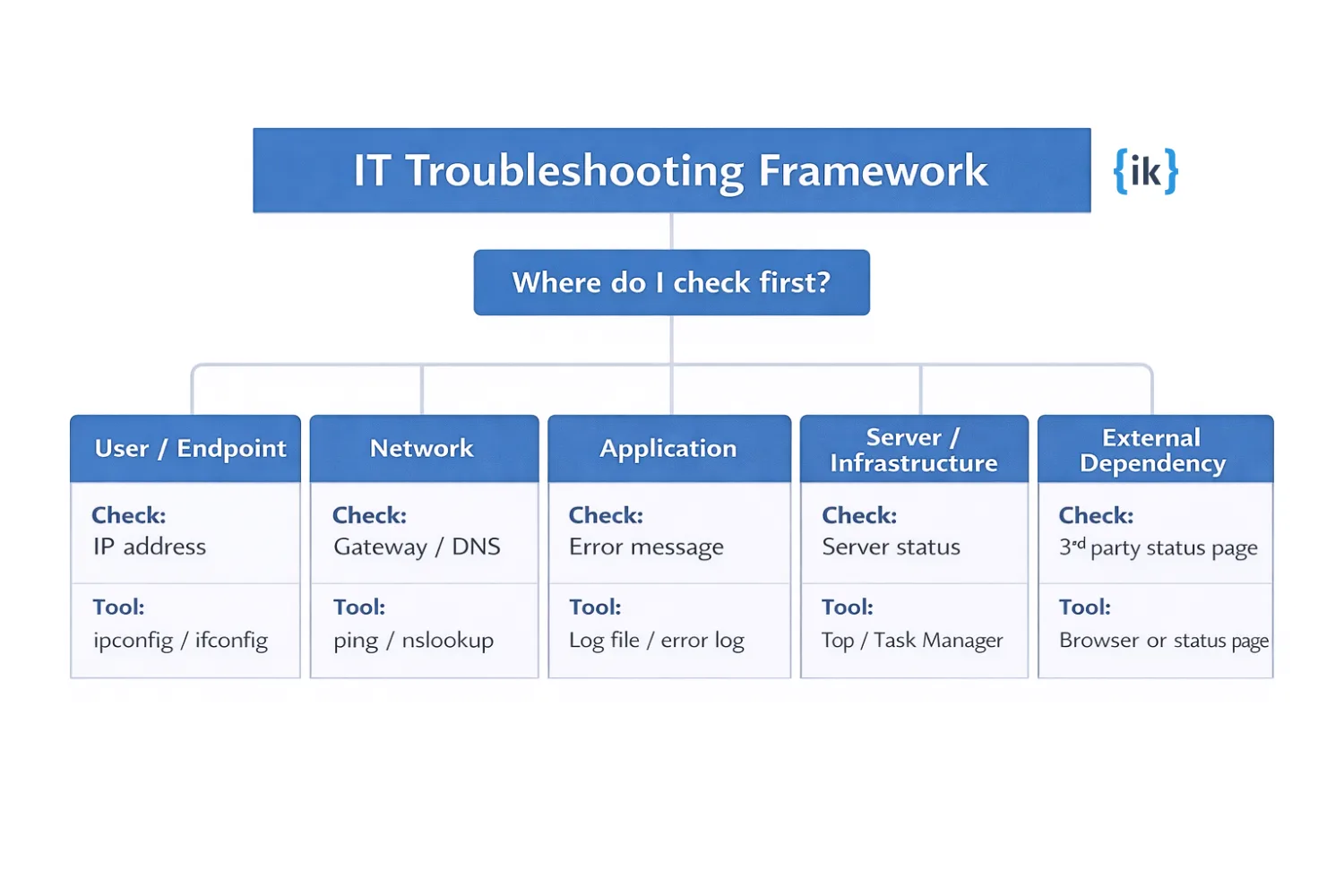
Scenario-based questions assess how you apply your technical knowledge under the pressure of real-world constraints. Interviewers look for a methodical, layered approach that prioritizes system uptime and clear communication over trial-and-error guessing.
Q43 A user reports they cannot connect to the internet. Walk me through how you would diagnose this.
You can mention the following steps during the interview:
- Confirm whether the issue affects one user, one area, or multiple users.
- Check the physical connection and Wi-Fi status on the device.
- Run ipconfig to verify the device has a valid IP address.
- Use ping to test the gateway, then an external IP like 8.8.8.8.
- Run nslookup and tracert to isolate DNS or network path failures.
Tools: ping, ipconfig, nslookup, tracert.
Interviewer is testing: Whether the candidate uses a systematic, layered approach or jumps to solutions without isolating the problem.
Q44. A user’s computer is running slowly. What do you check first and in what order?
During the interview, you can mention the following steps to answer this question:
- Check Task Manager or Resource Monitor for high CPU, RAM, or disk usage.
- Review available disk space and cleanup needs.
- Disable unnecessary startup programs.
- Check for OS or driver updates.
- Run a malware scan.
- Check drive health with SMART status.
Tools: Task Manager, Resource Monitor, Disk Cleanup, Malwarebytes.
Q45. Your company’s email is down. It is 9 am on a Monday, and 300 users cannot send or receive. Walk me through your response.
When asked this question during the interview, you can mention the following steps:
- Send an outage notice through Slack, Teams, or another backup channel.
- Check Microsoft 365 or Google Workspace status pages.
- Verify internal DNS records and mail routing with nslookup.
- Test ISP and SMTP connectivity to narrow the failure point.
- Escalate to the provider and give regular stakeholder updates.
Q46. You receive a security alert that a user’s account has been compromised. What do you do?
During the IT interviews, you can mention the following to explain your thinking and the steps you would take to handle such a situation:
- Disable the account in Active Directory or the identity provider.
- Reset the password and revoke all active sessions and tokens.
- Review login history, mailbox rules, and recent data exports.
- Notify the security team and the affected user.
- Document the incident and check for lateral movement.
Q47. A new employee starts tomorrow, and their laptop and access are not set up. IT missed it. How do you handle this?
To explain how you would handle this situation, you can mention the following:
- Provision a loaner laptop and core access immediately.
- Inform the hiring manager and set clear expectations.
- Confirm the employee can work on day one with minimum access.
- Review the onboarding workflow to find where the request failed.
- Add an alert for upcoming start dates.
Q48. You are asked to migrate 500 users from one email system to another over a weekend. How do you plan it?
The following steps will help you explain how you would migrate 500 users from one email system to another over a weekend:
- Build a pre-migration checklist and a verified rollback plan.
- Choose a low-impact window and notify users in advance.
- Run a pilot migration with a small test group.
- Execute the cutover in batches and validate mail flow, calendars, and permissions.
- Staff the help desk for Monday support and login issues.
IT Concepts Every Interviewer Tests: Quick Cheat Sheet
When preparing for common IT interview questions, you can use the following cheat sheet and crack the interview round:
| Concept | One-Line Definition |
Why Interviewers Ask About It |
| OSI Model | A 7-layer framework that explains how network communication flows from hardware to application | Helps you structure troubleshooting instead of guessing |
| DNS | Converts domain names into IP addresses that machines can use | Tests whether you understand why websites fail even when networks are working fine |
| DHCP | Automatically assigns IP addresses on a network | DHCP failure = users cannot get network access |
| TCP/IP | Core protocol suite that enables communication between devices | Validates your understanding of how data moves across systems |
| VPN | Creates a secure, encrypted tunnel between a user and a network | Used to test knowledge of remote access and secure connectivity |
| Active Directory | Centralized system for managing users, devices, and permissions in Windows environments | Checks if you understand identity and access management in practice |
| RAID | A framework for managing IT services through structured processes | Checks if you understand how IT operations are standardized |
| ITIL | Filters incoming and outgoing network traffic based on rules | Test your understanding of basic network security control |
| Firewall | A defined agreement on service responses is standardized | Helps assess your understanding of support priorities and accountabilities |
| SLA | A defined agreement on services | Evaluates your awareness of modern security approaches |
| Zero Trust | A security model that assumes no user or device is trusted by the system | Checks your practical understanding of backup and recovery strategies |
Conclusion
For deeper preparation for infrastructure, cloud, and engineering roles at top tech companies, move next into Interview Kickstart’s interview prep program to build stronger systems thinking, troubleshooting ability, and real-world operational judgment.
Pair that with focused practice through our CI/CD and DevOps interview prep to strengthen your understanding of deployment workflows, pipelines, and production reliability expectations that consistently show up in high-bar technical interviews.
FAQs: Common IT Interview Questions
Q1. What are common IT interview questions?
Common IT interview questions usually cover troubleshooting, DNS, DHCP, IP addresses, Active Directory, ticketing systems, and how you explain technical issues to nontechnical users.
Q2. How do I answer basic IT interview questions and answers about troubleshooting?
Use a clear order: confirm the issue, isolate the cause, test a fix, verify the result, and document the resolution.
Q3. What do IT support interview questions usually focus on?
IT support interview questions usually focus on basic IT interview questions and answers, user communication, common device issues, and practical troubleshooting steps.
Q4. How do I prepare for typical IT interview questions?
Review technical fundamentals, practice scenario-based answers, and be ready to explain how you handle outages, slow computers, login problems, and frustrated users.
Q5. What IT concepts should I revise before an interview?
Focus on DNS, DHCP, TCP/IP, Active Directory, VPN, RAID, ITIL, firewall basics, SLAs, and the 3-2-1 backup rule.
References
Recommended Reads:


