
Article written by Nahush Gowda under the guidance of Alejandro Velez, former ML and Data Engineer and instructor at Interview Kickstart. Reviewed by Swaminathan Iyer, a product strategist with a decade of experience in building strategies, frameworks, and technology-driven roadmaps.
Everyone wants to build the next great AI agent from scratch. The idea is intoxicating: a system that can reason, plan, and act on its own, handling everything from answering questions to booking flights or even running parts of a business.
But here’s the uncomfortable truth. Most people who start building AI agents from scratch hit the same wall. Their projects either fail quietly, loop endlessly, or crumble the moment they leave the demo stage.
Why? Because the journey from “I can connect an LLM to a few tools” to “I’ve built a reliable, production-ready agent” is filled with traps. And those traps aren’t always obvious until it’s too late. Developers overestimate what their agent can do, pile on too many tools, skip critical guardrails, or ignore the gritty details of context, monitoring, and testing.
This article is here to save you time, money, and headaches. Whether you’re a solo builder or part of a team, I’ll walk you through the most common mistakes to avoid when building AI agents from scratch.
The Reality of Building AI Agents
The term AI agent has become one of the hottest buzzwords in tech circles. Blogs, demos, and Twitter threads paint a picture of agents as autonomous digital workers who can plan, reason, and act without supervision.
On the surface, it feels like magic: connect a large language model (LLM) to a handful of tools, give it a goal, and watch it figure things out. But anyone who’s tried building AI agents from scratch knows the story isn’t that simple. Early experiments often reveal two hard truths:
- AI agents are not truly autonomous. They are still powered by stateless LLMs, which means they don’t “remember” unless you explicitly manage context.
- Complexity scales badly. The more tools, APIs, or goals you pile on, the more fragile the system becomes. Instead of behaving like a tireless digital employee, the agent starts to stumble, hallucinate, or spin in loops.
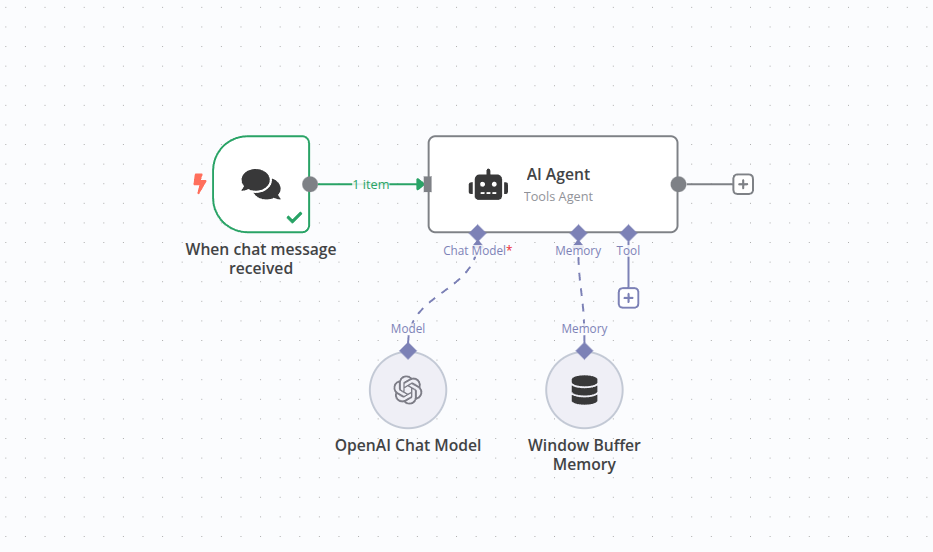
Take, for example, a developer who gave their agent access to dozens of tools, expecting it to act like a Swiss Army knife. Instead, the model struggled to decide which tool to use, wasted tokens asking itself redundant questions, and often returned nonsense.
Far from an all-purpose assistant, the result was a sluggish, confused system that cost more to run than it saved.
This is the messy reality: AI agents are powerful, but not magical. They require careful design, practical constraints, and an understanding of where it falls apart.
Also Read: Step-by-Step Guide to Building AI Agents in n8n Without Code
Mistake #1: Overestimating the Agent’s Capabilities
One of the most common traps when building AI agents from scratch is assuming they’re smarter or more autonomous than they really are. It’s easy to fall into this mindset. After all, large language models can sound remarkably confident and human-like. But polished text isn’t the same as reliable reasoning.
A developer I spoke with gave their freshly built agent a simple task: “Search the database, summarize customer complaints, and suggest improvements.” It sounded straightforward. The agent was connected to the right APIs, the prompt seemed clear, and expectations were high.
What happened?
The agent hallucinated non-existent data, skipped relevant results, and confidently suggested fixes that made no sense. In testing, it “solved” problems that didn’t exist and overlooked the ones that did.
The problem wasn’t the database or the tools; it was the assumption that the agent could “figure it out” like a human analyst. In reality, the LLM was just predicting words in sequence, without any true grasp of the data or task.
Why This Happens
- LLMs don’t have goals. They only generate the next best token based on context. That means their “plans” are fragile and easily derailed.
- Overconfidence in outputs. LLMs will fill in gaps with plausible-sounding but incorrect details, which we call hallucinations.
- Shaky reasoning under complexity. Ask an agent to combine too many steps or juggle vague instructions, and reliability plummets.
The Fix
Instead of expecting your agent to act like an autonomous problem-solver, treat it as a specialized tool. Give it narrowly defined tasks, provide explicit instructions, and always design with the assumption that errors will happen.
Build in checks and balances, like validation layers, structured outputs, or human-in-the-loop reviews, to catch mistakes before they cascade.
In other words, don’t ask your agent to be a genius. Ask it to be competent at one well-scoped job.
Mistake #2: Trying to Build One Super-Agent to Rule Them All
After realizing an agent can’t magically do everything, many developers still make a related mistake: they try to cram every possible function into one mega-agent.
On paper, it sounds efficient. Why not give your agent access to a dozen tools and let it handle everything from searching documents, calling APIs, processing data, writing emails, and maybe even booking a flight?
For example, if you want to create a “company-wide assistant” and connect your agent to Slack, Salesforce, Google Docs, a calendar API, and an internal database. The goal is to take any request from employees and execute it.
The result? Chaos. The agent struggled to choose the right tool, often misused APIs, and bogged down in irrelevant reasoning loops.
Instead of saving time, employees had to double-check everything they did. What was meant to be a universal assistant turned into a universal bottleneck.
Why This Happens
- Tool overload. Each new tool adds cognitive load for the LLM, increasing the chances it chooses poorly.
- Context bloat. Explaining all the available tools eats up prompt tokens, driving up costs and latency.
- No specialization. A single agent trying to do everything ends up mediocre at all tasks instead of excellent at one.
The Fix: Specialization + Orchestration
The better pattern is a multi-agent architecture: instead of one “super-agent,” you build several specialized agents and use an orchestrator to route tasks.
- Specialized agents handle focused domains (e.g., one for customer support, one for data queries, one for scheduling).
- The orchestrator, often a lightweight controller, decides which agent to delegate to, based on the request.
This approach mirrors real-world teams: you wouldn’t expect one employee to be your lawyer, accountant, and engineer all at once. You hire specialists and let a manager coordinate. AI agents are no different.
By breaking your system into smaller, sharper agents, you reduce confusion, increase accuracy, and make debugging far easier.
Mistake #3: Poor Tool Naming & Instruction Clarity
Even when developers wisely avoid the “super-agent” trap, they often trip on something that feels trivial: how they name and describe tools. But this small detail can make or break how an agent performs.
For instance, let’s say an engineer built an AI agent to help teammates pull technical documentation. They gave the agent access to a tool named simply “Docs Agent.” The description? Something vague like “use this to find information in documents.”
The outcome was predictable: the agent almost never picked the tool when it should. Instead, it tried to answer questions directly, hallucinating content that didn’t exist. The tool sat idle, not because the agent was broken, but because the instructions were too ambiguous.
When the developer renamed the tool to “Search_API_Docs” with a clear description like “Use this to look up official API documentation before answering a technical question,” the agent suddenly started using it correctly. Same system, same model; just better clarity.
Why This Happens
- LLMs rely on surface cues. If tool names are vague, the model can’t easily match them to user queries.
- Ambiguity kills precision. Without strong hints, the agent will often default to “guessing” an answer instead of calling the right tool.
- Descriptions get overlooked. Developers write tool descriptions as an afterthought, but for an LLM, they’re a critical context.
The Fix
Think of tool names and descriptions as part of your prompt engineering. They should be explicit, action-oriented, and unambiguous. A few best practices:
- Name tools descriptively. Instead of “Docs Agent,” use “Search_API_Docs.”
- Be clear in purpose. State exactly when the agent should use the tool.
- Avoid overlap. If two tools sound similar, the agent may pick randomly.
Don’t assume the agent will “figure it out.” Spell it out. The clearer the naming and guidance, the more reliable your system becomes.
Mistake #4: Neglecting Context, Prompts, and the Stateless Nature of LLMs
Another major pitfall when building AI agents from scratch is ignoring how language models actually process information. Unlike humans, LLMs don’t have memory or goals.
They’re stateless systems: each time you send a prompt, the model only “knows” what’s in that input window. If you don’t supply the right context, the agent forgets past steps instantly.
For example, let’s say you build an AI agent to analyze customer feedback over multiple turns. In the first request, you ask it to summarize key complaints. In the second request, you ask it to suggest solutions.
If you don’t pass the first summary back into the second prompt, the agent has no idea what it previously said. It will guess, often producing inconsistent or irrelevant answers.
Now imagine the same issue at scale, with multiple steps and tools. If you don’t manage context carefully, the agent may lose track of what it was doing, repeat itself, or wander into hallucinations.
Why This Happens
- LLMs are stateless. They don’t inherently “remember” previous calls unless you include that history.
- Context windows are limited. Even the largest models can only handle so much input before costs spike and responses slow down.
- Poor prompt design. Vague or underspecified prompts compound the problem by leaving the model too much room to invent.
The Fix
To avoid these pitfalls, treat context as a limited, valuable resource:
- Summarize past steps. Instead of passing full transcripts, feed concise summaries back into the agent.
- Be deliberate with prompts. Write instructions that are specific and action-oriented, leaving little room for ambiguity.
- Use memory modules wisely. If your agent needs long-term recall, implement external memory systems instead of overloading the context window.
Building effective AI agents is less about throwing everything into the prompt and more about curating exactly the right information. Handle context intentionally, and your agent will perform far more consistently.

Also Read: How to Build Financial AI Agents with n8n: A Complete Guide for Financial Services
Mistake #5: Ignoring Production Realities: Flashy Demos vs Robust Systems
Many people get excited when their first prototype agent works in a demo. A simple scripted scenario looks smooth: the agent calls the right tools, responds quickly, and appears to reason like a pro. But what works once in a controlled setting often falls apart in real-world use.
For example, let’s say you build an agent that queries a database and emails a summary report. In a demo, it works perfectly. But once you put it in production:
- The database times out, and the agent fails silently.
- An unexpected input format crashes the pipeline.
- The email service returns an error that no one notices because there’s no logging.
- Users phrase requests in ways you never anticipated, and the agent generates nonsense.
The same system that looked polished in a test run becomes unreliable when exposed to real-world edge cases.
Why This Happens
- Overconfidence in demos. Developers assume one smooth run means the system is production-ready.
- Lack of monitoring. Without logs or metrics, failures go unnoticed.
- No fallback strategies. When a tool call fails, the agent has no graceful way to recover.
- Skipping tests. Edge cases aren’t simulated, so errors surface only after deployment.
The Fix
If you want your agent to work reliably outside a demo, you need to design for robustness:
- Add logging and monitoring. Track every action the agent takes so you can debug issues.
- Plan for fallbacks. If a tool call fails, the agent should retry or escalate gracefully.
- Test edge cases. Simulate bad inputs, service outages, and unexpected behaviors before launch.
- Think about scale. What happens when dozens of users call the agent at once?
The goal is to build an agent that people can depend on daily. That means production-grade thinking: redundancy, observability, and resilience.
Mistake #6: Hiding Abstraction and Using Frameworks Without Understanding Them
Frameworks for building AI agents from scratch have exploded in popularity. Libraries and platforms promise quick setups: connect an LLM, drop in some tools, and you’ve got an “autonomous agent.”
While these frameworks can save time, they also create a dangerous illusion: you feel like you understand what’s happening under the hood, when in reality, you don’t.
For example, let’s say you use a popular agent framework that automatically handles prompt construction, tool routing, and memory management. Your agent works until it doesn’t.
Suddenly, it chooses the wrong tool, loops endlessly, or ignores instructions. When you dig in, you realize you don’t fully understand the prompts the framework is generating or how decisions are being made. Debugging becomes guesswork.
Why This Happens
- Abstraction hides complexity. Frameworks often generate hidden prompts, chain logic, and handle state in ways you can’t easily see.
- Black-box debugging. When the agent fails, you don’t know whether the issue lies in your code, the framework, or the LLM itself.
- Over-reliance. Developers skip learning the basics of prompt engineering, tool design, or context management, leaving them stuck when custom needs arise.
The Fix
Frameworks are useful, but they should come after you understand the basics. To avoid this mistake:
- Start simple. Build a minimal agent yourself with a direct LLM call, a few tools, and clear prompts.
- Inspect prompts. If you use a framework, look at the actual prompts it sends; understanding this is key to debugging.
- Don’t outsource reasoning. Know how context windows, tool selection, and planning actually work before you let a library automate them.
Think of frameworks as accelerators, not substitutes. They can make you faster, but only if you already know the road.
Mistake #7: Skipping Iteration and Realistic Testing
Perhaps the biggest trap in building AI agents from scratch is assuming that once it “works,” you’re done. But AI agents are not static systems. They evolve through iteration. Skipping structured testing is like shipping software without QA: things will break the moment real users arrive.
For example, let’s say you create an agent that generates weekly business summaries. You test it a few times with sample inputs, everything looks fine, and you move on. Then users start giving it real prompts:
- One manager phrases a question differently, and the agent fails to use the right tool.
- Another uploads a file format the agent hasn’t seen before, and it crashes.
- A third asks a multi-step question, and the agent loops endlessly.
What looked solid in controlled testing collapses under realistic conditions.
Why This Happens
- Overconfidence after early success. Developers assume one working case means general reliability.
- Lack of stress testing. Edge cases, malformed inputs, and noisy environments are never simulated.
- No feedback loops. Without systematic evaluation, issues repeat instead of getting fixed.
The Fix
To avoid these pitfalls, make iteration part of the process:
- Simulate edge cases. Test with unexpected inputs, missing data, or ambiguous requests.
- Iterate on prompts. Refine instructions continually based on where the agent fails.
- Collect feedback. Log user interactions and review them to identify weak spots.
- Measure performance. Track accuracy, reliability, and cost across versions.
Think of it this way: you don’t just “build” an agent, you raise it. Each round of feedback and testing makes it more capable. Skipping iteration means your agent never matures beyond a fragile prototype.
Mistake #8: Security, Alignment, and Ethical Oversights
When excitement runs high, security and safety are often an afterthought. But giving an AI agent autonomy without safeguards is like handing the keys of a car to someone who just learned how to steer. The risk isn’t just that the agent fails—it’s that it fails in ways that cause harm, leak data, or open your system to abuse.
For example, let’s say you build an agent with access to internal documents, a company Slack channel, and an external API. At first, it seems helpful. But soon you notice problems:
- A clever user prompts the agent to reveal sensitive internal data.
- The agent sends malformed requests to the API, triggering rate limits.
- In Slack, it repeats private messages out of context, creating confusion.
None of this was malicious, but the agent wasn’t designed with guardrails. Small oversights created security and ethical risks.
Why This Happens
- Prompt injection vulnerabilities. Malicious instructions hidden in user inputs can trick the agent into bypassing restrictions.
- Unrestricted tool access. Without scoped permissions, an agent can call APIs or read files it shouldn’t.
- No alignment checks. Agents may pursue instructions too literally, ignoring broader goals or user intent.
- Ethics overlooked. Developers often focus on technical performance without considering misuse or unintended consequences.
The Fix
Avoiding these pitfalls requires putting security and alignment front and center:
- Sandbox tools. Restrict access so the agent only touches what it needs.
- Validate inputs and outputs. Check for prompt injection attempts, malformed requests, or dangerous instructions.
- Add human-in-the-loop steps. Sensitive actions (like sending emails or transferring data) require approval.
- Consider ethical implications. Ask: What harm could misuse cause, and how can I mitigate it?
Agents are powerful because they act, but that also makes them risky. Safety isn’t optional; it’s part of engineering.
Conclusion
The dream of building AI agents from scratch is powerful. We imagine digital teammates that can reason, act, and handle complex tasks with minimal supervision. But as we’ve seen, reality is less glamorous. Without careful design, agents hallucinate, loop, misuse tools, or collapse the moment they leave a demo environment.
The good news? Every mistake we covered is avoidable. The builders who succeed don’t just write code; they think like engineers raising a system that needs constraints, clarity, and continuous improvement.
Learn How to Build AI Agents That Actually Work
If you want to go beyond theory and actually build reliable AI agents, the Learn How to Build AI Agents from Scratch masterclass is a solid next step. You’ll get hands-on experience with tools like Docker, LangChain, Sagemaker, and Vector DB while working on production-ready projects.
Along the way, you’ll also see how these projects can accelerate a career move into AI and what top recruiters actually look for in candidates. Led by industry, it’s a practical way to turn ideas into working systems and working systems into career growth.


