
Article written by Nahush Gowda under the guidance of Satyabrata Mishra, former ML and Data Engineer and instructor at Interview Kickstart. Reviewed by Swaminathan Iyer, a product strategist with a decade of experience in building strategies, frameworks, and technology-driven roadmaps.
AI agents are reshaping how businesses handle repetitive or multi‑step tasks, especially in fast‑moving industries like retail, where speed and real‑time data really matter. Instead of just giving responses, these agents can now take action, whether it’s looking up info, triggering processes, or making decisions on the fly.
One of the top frameworks for building these kinds of agents is LangChain. It lets you use large language models (LLMs) to go beyond chat, giving them the power to interact with tools, follow logic, and complete tasks without constant oversight.
In this article, we’ll walk through how to build a custom AI agent using LangChain, tailored for a retail use case. The goal: create an intelligent assistant that can help manage inventory, respond to customer questions, and suggest related products in real time.
What Is LangChain and How It Works
LangChain is an open-source framework built to help developers use large language models (LLMs) in more powerful, structured ways. Instead of just generating text in response to a prompt, LangChain lets you build agents, LLM-driven systems that can think through tasks, make decisions, and interact with tools to actually get things done.
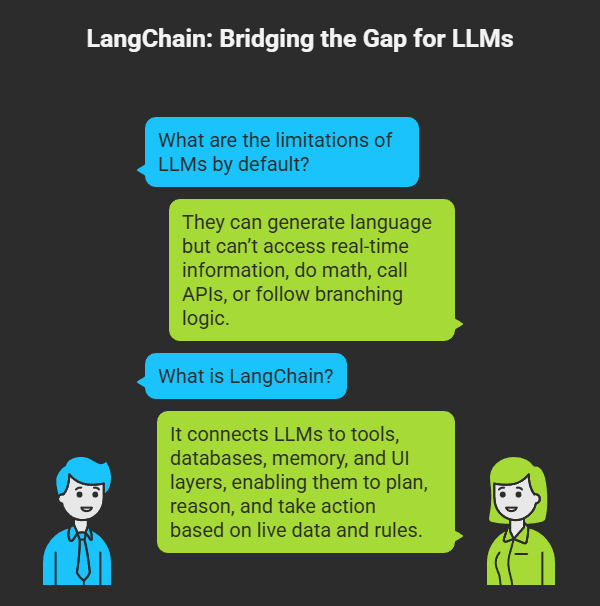
By default, LLMs are great at generating language but not much else. They can’t look up real-time information, do math, call an API, or follow branching logic on their own.
That’s where LangChain comes in.
It acts as the glue between an LLM and everything else, tools, databases, memory, and even UI layers. With LangChain, you’re not just chatting with a model. You’re building smart systems that can plan, reason, and take action based on live data and defined rules.
Core Concepts in LangChain
Here are some core concepts in LangChain that you need to be familiar with.
Chains
A chain is a sequence of steps where each component feeds into the next. For example, you might take a user query, generate a prompt, pass it to the LLM, and then post-process the result. LangChain makes these chains modular and reusable.
Agents
Agents are more dynamic than chains. Instead of executing a fixed set of steps, agents decide what to do next based on the input and the tools available. The LLM effectively acts as a reasoning engine.
For example, an agent can:
- Receive a query like “Do we have red sneakers in size 9?”
- Choose to call a stock-checking tool
- Interpret the response
- Reply with a confident answer or follow-up question
Tools
Tools are external functions the agent can use, like API calls, database queries, search functions, or even Python code execution. You register tools like:
python
from langchain.agents import Tool

tools = [
    Tool(
        name="InventoryChecker",
        func=check_inventory_function,
        description="Checks inventory for a given SKU"
    )
]
Memory
LangChain supports multiple memory types, so your agent can remember previous conversations, facts, or states across a session. This is key for maintaining context in customer service or retail chatbots.
TLDR; LangChain essentially lets you wrap logic, memory, and tool use around an LLM, creating applications that behave more like intelligent assistants than just chatbots.
Core Components of LangChain Agents?
Before we dive into building the retail AI agent, it’s critical to understand the key building blocks that power LangChain agents. Each of these components works together to turn a language model from a passive responder into an active problem-solver.
1. Language Model (LLM or Chat Model)
At the core of any LangChain agent is a language model, such as OpenAI’s gpt-4, gpt-3.5-turbo, or open models like Anthropic’s Claude or Meta’s LLaMA.
LangChain provides wrappers like ChatOpenAI or OpenAI:
python
from langchain.chat_models import ChatOpenAI

llm = ChatOpenAI(model="gpt-4", temperature=0.3)
The model generates natural language output and also powers the reasoning engine that decides which tool to invoke in agent workflows.
2. Prompt Templates
Prompts structure the input to the model. LangChain offers flexible PromptTemplate and ChatPromptTemplate classes to format queries consistently.
Example:
python
from langchain.prompts import ChatPromptTemplate

prompt = ChatPromptTemplate.from_messages([
    ("system", "You are a helpful retail assistant."),
    ("human", "{input}")
])
This makes prompts reusable and dynamic across different user inputs.
3. Tools
Agents use tools to get things done—like calling an API, querying a database, or running Python logic.
You define tools as Python functions and register them using the Tool class:
python
from langchain.agents import Tool

def check_inventory(sku: str) -> str:
    # Your logic here
    return f"Inventory for {sku}: 42 units"

inventory_tool = Tool(
    name="CheckInventory",
    func=check_inventory,
    description="Checks current inventory for a given product SKU."
)
Tools can be anything: search engines, order systems, vector stores, or even spreadsheets.
4. Agent Types
LangChain supports several agent types. For most retail use cases, we use the AgentType.ZERO_SHOT_REACT_DESCRIPTION (also known as ReAct) which combines reasoning with action.
python
from langchain.agents import initialize_agent, AgentType

agent = initialize_agent(
    tools=[inventory_tool],
    llm=llm,
    agent=AgentType.ZERO_SHOT_REACT_DESCRIPTION,
    verbose=True
)
This lets the agent read the prompt, plan what to do, and call the correct tool.
5. Memory
If your agent needs to remember what the user asked 3 turns ago, or store facts across a session, you use memory:
python
from langchain.memory import ConversationBufferMemory

memory = ConversationBufferMemory(memory_key="chat_history", return_messages=True)
You can plug this into the agent so it maintains conversation state, essential for multi-turn dialogs like:
User: “I want to buy those shoes you showed me earlier.”
Next, we’ll define our retail use case and show how to implement it with these parts.
Also Read: Best 7 Retail AI Agent Tools You Need to Know About
Step-by-Step Guide to Building the Agent
Let’s build a working AI agent that can help customers check stock, track orders, and get product recommendations, using LangChain and Python.
1. Environment Setup
To get started, you’ll need a Python environment with a few key libraries installed. We’ll be using:
- langchain — core framework
- openai — to access a GPT model
- python-dotenv — for managing environment variables
- pydantic or dataclasses — for tool I/O schemas
- tqdm, rich, etc. — optional, for CLI UX
Install Dependencies
Use pip:
bash
pip install langchain openai python-dotenv
Optional (for enhanced formatting or local API simulation):
bash
pip install rich tqdm
📁 Folder Structure (Optional Suggestion)
/retail_agent/
├── .env
├── main.py
├── tools/
│   ├── inventory.py
│   ├── orders.py
│   └── recommend.py
├── prompts/
│   └── system_prompt.txt
Set Up OpenAI Key
LangChain uses environment variables to keep API keys secure. Create a .env file:
env
OPENAI_API_KEY=sk-xxxxx
Then in your script:
python
from dotenv import load_dotenv
load_dotenv()
LangChain will automatically detect the OpenAI key from environment variables.
2. Defining the LLM
The large language model (LLM) is the brain of your agent. It handles all reasoning, decision-making, and tool selection.
We’ll use OpenAI’s GPT-3.5-Turbo via LangChain’s ChatOpenAI interface.
LLM Setup Example
python
from langchain.chat_models import ChatOpenAI

llm = ChatOpenAI(
    model='gpt-3.5-turbo',
    temperature=0.2
)
- model controls the version used (you can substitute gpt-4 if needed).
- temperature affects randomness: lower values (0–0.3) make the agent more predictable and factual, ideal for retail tasks.
This model will power all the decisions the agent makes, from deciding which tool to call, to phrasing natural language responses.
3. Creating Prompt Templates
Prompt templates are how you tell the language model what role it should play, how to behave, and how to handle user input. They are essential for grounding your AI agent and keeping its responses consistent with your goals, in this case, behaving like a smart retail assistant.
System Prompt: Set the Agent’s Identity
The system prompt defines the agent’s personality and responsibilities. Here’s a simple version for a retail agent:
python
from langchain.prompts import ChatPromptTemplate

prompt = ChatPromptTemplate.from_messages([
    ("system", "You are a helpful and knowledgeable retail assistant. You help customers check stock, track orders, and recommend accessories."),
    ("human", "{input}")
])
You can store the system message in a separate file (system_prompt.txt) and load it at runtime to make iteration easier.
Input Placeholder
The {input} variable gets replaced by the user’s question or command at runtime. This lets the agent handle any number of scenarios with the same structure.
Example usage:
python
prompt.format_messages(input="Do you have size 9 black boots?")
This creates a structured message the model understands and builds on.
💡 Tips
Avoid overly open-ended instructions. Be direct and guide the agent’s function:
✅ “You assist with stock lookups, order status, and product recommendations.”
❌ “You are an AI that can do anything.”
4. Building Tools
Tools are how your LangChain agent interacts with the real world. Instead of just chatting, the agent can do things like call an API, search a database, or trigger a Python function.
We’ll build three tools for our retail agent:
- check_inventory – Look up product stock
- track_order – Retrieve order status
- recommend_products – Suggest related items
Each tool is a Python function wrapped in a Tool() object that LangChain can call dynamically.
1. Inventory Check Tool
python
from langchain.agents import Tool

def check_inventory(sku: str) -> str:
    inventory = {
        "sku-123": 12,
        "sku-456": 0,
    }
    return f"Stock for {sku}: {inventory.get(sku, 'Not found')}"

inventory_tool = Tool(
    name="CheckInventory",
    func=check_inventory,
    description="Checks inventory for a product SKU."
)
You can replace the hardcoded dictionary with a database lookup or an API call to your inventory system.
2. Order Tracking Tool
python
def track_order(order_id: str) -> str:
    order_db = {
        "ORD123": "Shipped via UPS, tracking #1Z999AA101",
        "ORD124": "Processing, expected to ship tomorrow"
    }
    return order_db.get(order_id, "Order not found")

order_tool = Tool(
    name="TrackOrder",
    func=track_order,
    description="Tracks an order using an order ID."
)
This simulates backend order status retrieval.
3. Product Recommendation Tool
python
def recommend_products(sku: str) -> str:
    related = {
        "sku-123": ["Socks-001", "Laces-009"],
        "sku-456": ["Sneaker Cleaner-500"]
    }
    return f"Recommended items: {', '.join(related.get(sku, [])) or 'None'}"

recommend_tool = Tool(
    name="RecommendProducts",
    func=recommend_products,
    description="Recommends accessories for a given product SKU."
)
You can later swap this with a vector search or embedding-based similarity search using something like FAISS or Pinecone.
Once the tools are defined, combine them in a list for use with the agent:
python
tools = [inventory_tool, order_tool, recommend_tool]
These are now callable by the agent as needed during conversation flow.
5. Initializing the Agent
Now that you’ve defined your tools, LLM, and prompt template, it’s time to initialize the agent. This is the component that ties all parts together and lets the LLM decide when and how to use your tools based on the user’s input.
Agent Type: ReAct (Zero-Shot)
For this use case, we’ll use AgentType.ZERO_SHOT_REACT_DESCRIPTION. It enables the agent to:
- Parse the user’s request
- Choose the correct tool from your list
- Invoke it with the right inputs
- Generate a final response
LangChain provides a helper function: initialize_agent(…).
Agent Initialization Example
python
tools = [inventory_tool, order_tool, recommend_tool]
- tools: list of tools defined earlier
- llm: your ChatOpenAI object
- agent: the agent type, in this case, ReAct
- verbose: helpful for debugging, shows tool calls and reasoning steps in the console
Running the Agent
You can now pass user input directly to the agent:
python
response = agent.run("Do you have sku-123 in stock?")
print(response)
The agent will:
- Analyze the question
- Decide that it needs to check the inventory
- Use the CheckInventory tool with sku-123
- Return the final answer to the user
At this point, the core logic of your retail AI agent is up and running. But to enable richer conversations, we need memory.
6. Adding Memory
Without memory, your agent is short-sighted. It treats every user message as a new, unrelated request. But retail conversations are rarely single-shot:
“Do you have size 9 red sneakers?”
“Great. Can you recommend matching socks?”
“Add both to my cart.”
To handle this, we’ll use LangChain’s ConversationBufferMemory, which stores the full interaction history and makes it available to the LLM at each step.
Why Use Memory?
- Maintains user intent and reference across turns (“those shoes” = previous product)
- Supports upsells, follow-ups, and clarifications
- Enables more human-like, helpful conversations
Setup Example
python
from langchain.memory import ConversationBufferMemory

memory = ConversationBufferMemory(
    memory_key="chat_history",
    return_messages=True
)
Then, pass this memory into the agent:
python
agent_with_memory = initialize_agent(
    tools=tools,
    llm=llm,
    agent=AgentType.ZERO_SHOT_REACT_DESCRIPTION,
    verbose=True,
    memory=memory
)
Now, the agent will remember past turns and use that context when deciding what to do next.
Example Dialog With Memory Enabled
python
agent_with_memory.run("Do you have sku-123 in stock?")
# ➜ Yes, we have 12 units of that item.

agent_with_memory.run("Cool. What would go well with it?")
# ➜ Based on sku-123, I recommend Socks-001 and Laces-009.
Notice how the second input doesn’t mention the product again—but the agent still knows what you’re talking about.
That’s it for memory. Next, we’ll cover how to test and iterate your agent with real examples and tips.
7. Testing and Iteration
Once your LangChain agent is wired up with tools, memory, prompts, and the LLM, the next step is to put it through real-world testing.
This is where you evaluate:
- Does the agent call the right tools at the right time?
- Does it understand follow-up messages?
- Are responses accurate, fast, and helpful?
Test Scenarios
Start with focused use cases. Here are a few to run:
1. Inventory Query
python
agent.run("Do you have sku-456 in stock?")
# Should call CheckInventory and return a response like:
# "Sorry, sku-456 is currently out of stock."
2. Order Tracking
python
agent.run("Where is my order ORD123?")
# Should call TrackOrder and return the correct status.
3. Upsell Flow (Multi-turn)
python
agent.run("Do you have sku-123?")
agent.run("Cool, recommend something to go with it.")
# Should remember sku-123 and call RecommendProducts with the same SKU.
Debugging Tips
Enable verbose mode when running your agent:
python
agent = initialize_agent(..., verbose=True)
This shows the internal reasoning trace, like:
yaml
Thought: I should check inventory.
Action: CheckInventory
Action Input: sku-123
Helpful for:
- Confirming tool calls
- Spotting prompt misunderstandings
- Fixing bad tool descriptions or missing edge cases
Iteration Advice
- Refine prompts: Tweak the system message if the agent misbehaves or sounds off-brand
- Update tool descriptions: The LLM uses these to decide which tool to call
- Add validation: Add error handling to tool functions (e.g. SKU not found)
- Test edge cases: Wrong SKUs, vague inputs, mixed intents
Once you’re satisfied with its performance in your notebook or CLI, you’re ready to deploy (optional).
Also Read: Step-by-Step Guide to Building AI Agents in n8n Without Code
Retail Use Case Overview: AI Agent for Inventory + Order Support
Retail operations are packed with repetitive, time-sensitive queries—perfect territory for AI agents. Instead of building a static chatbot with pre-programmed answers, we’ll create a LangChain-powered AI agent that can understand user intent, call real tools, and respond dynamically.
Use Case: Smart Retail Assistant
We’ll build an AI agent that can do the following:
- Check product availability from an inventory system
- Track order status using a mock API or database lookup
- Upsell related items using a recommender function or product search
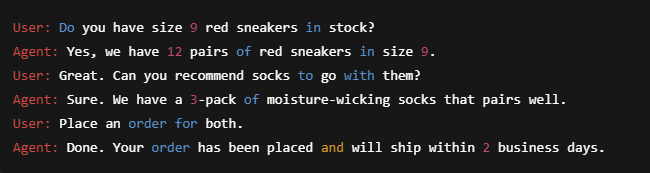
- Maintain context through multi-turn conversations (e.g., suggest accessories after a product is confirmed in stock)
Example Conversation:
Conclusion
Learning how to build AI agents using LangChain gives you a practical edge in today’s AI-powered world. LangChain simplifies the complex process of connecting large language models to real-world tools, memory, and logic—making it possible to create intelligent systems that go beyond basic chatbot responses.
In the context of retail, this means developing agents that can check inventory, track orders, recommend products, and even handle multi-turn conversations with customers, automating tasks that used to require human intervention. With the right tools and structure, LangChain enables developers to turn large language models into action-driven agents that solve real business problems.
Whether you’re an engineer, product manager, or AI enthusiast, knowing how to build AI agents using LangChain opens the door to smarter applications, better customer experiences, and future-ready career opportunities.
Learn How to Build AI Agents Using Langchain
If you’re ready to take your AI skills beyond theory and into the real world, Interview Kickstart’s Building a Retail AI Agent with LangGraph masterclass is your next step. Taught by FAANG+ experts like Rishabh Misra—ML tech lead and author with over 800 citations—this live, hands-on session walks you through building intelligent retail agents, orchestrating multi-agent workflows, and applying real AI solutions to online shopping.
You’ll gain insider strategies for crafting a portfolio that hiring managers want to see, plus exclusive access to frameworks, mentorship, and live Q&As. Whether you’re transitioning into AI roles or doubling down on your career path, this masterclass gives you the practical tools and expert guidance to stand out.
Register now and start building the future of agentic AI.








