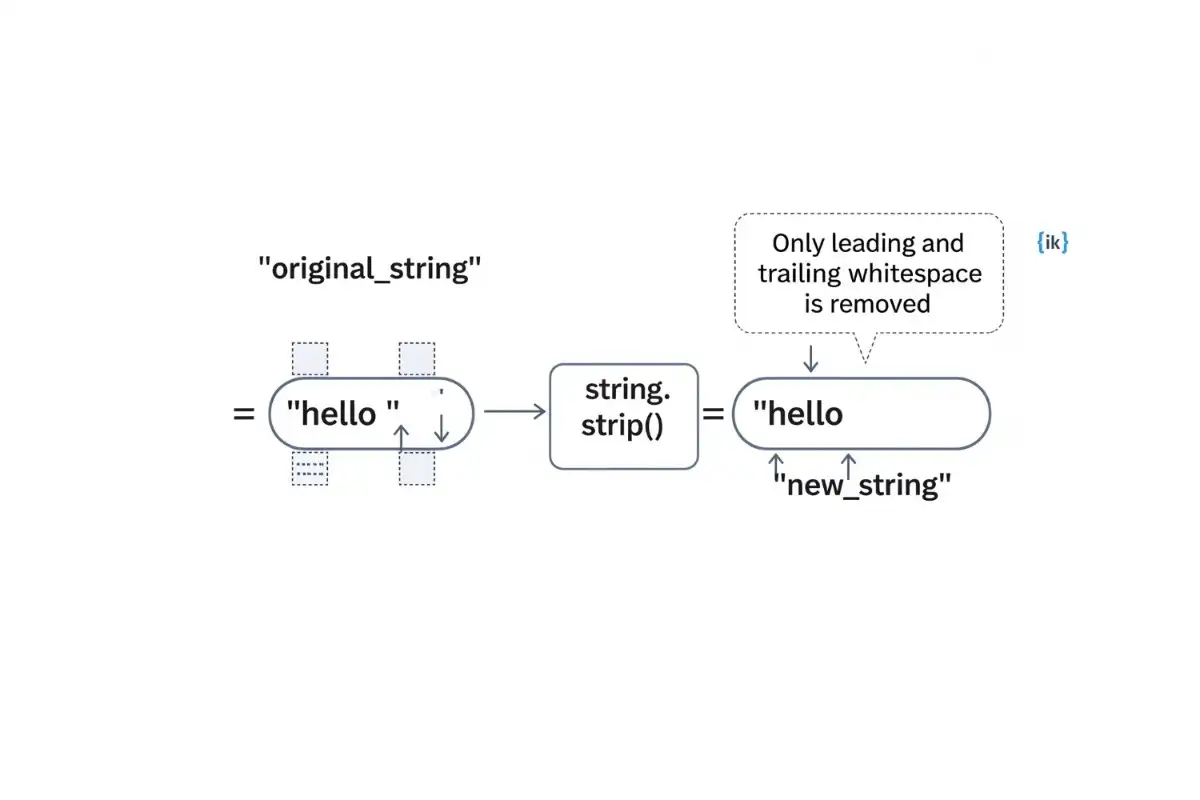
This is the default behavior and the most frequent use of the method, typically used to clean up strings where extra spaces might have been accidentally added during data entry.
You can tell Python exactly which characters to target by passing a string into the method.
Whitespace isn’t just the spacebar. It includes invisible formatting characters like tabs (\t) and newlines (\n).
This is where many developers get confused. If you pass multiple characters, Python treats them as a set, not a specific sequence.
One of the most common real-world applications is cleaning up data directly from a user.
Users often accidentally hit the spacebar at the end of their name or email address. If you are comparing their input to a database, those hidden spaces will cause the comparison to fail. Using .strip() immediately after input() ensures you only save the actual text the user intended to provide.
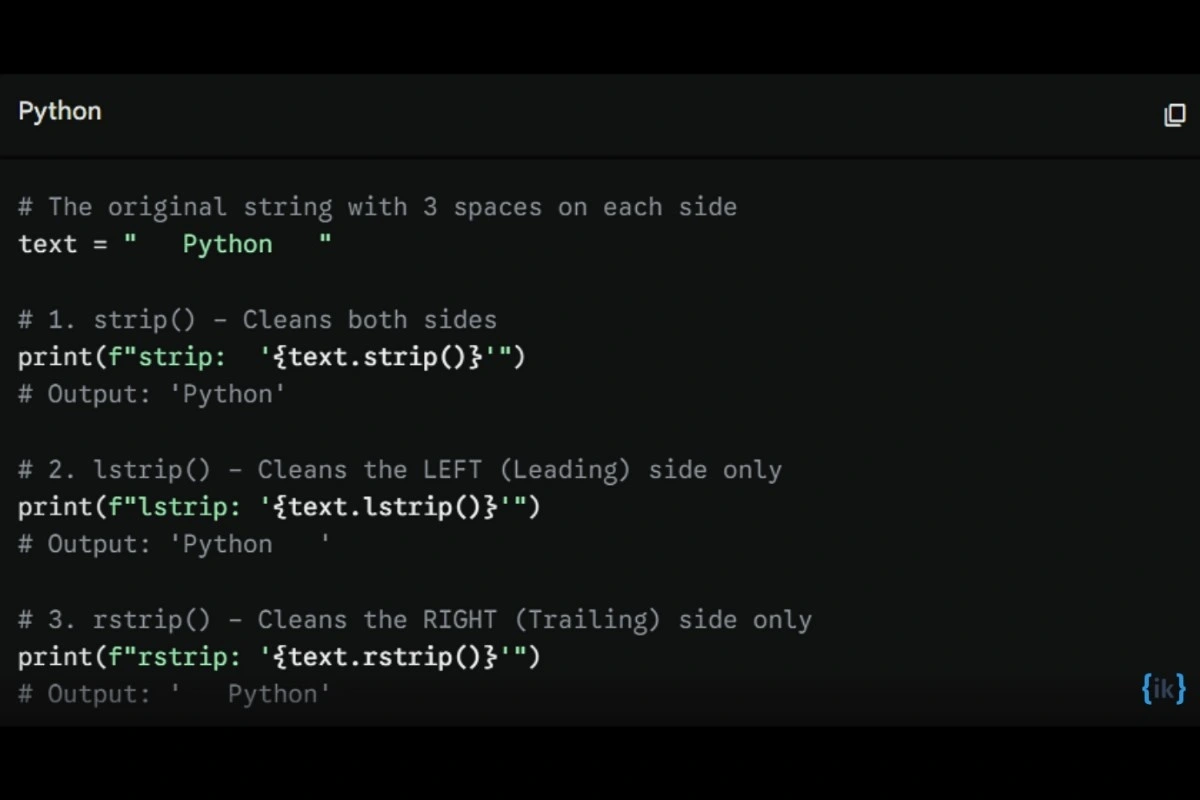
These methods are essential when you want to preserve formatting on one side of your data, such as indentation on the left, while cleaning up messy characters or whitespace on the other.
To truly see the difference, look at how each method processes the same string. Notice how the padding remains or disappears depending on the method used:
If you are transitioning to Python from another programming language, you might be looking for a specific function to clean up your strings. Here is how Python handles those common tasks and how it compares to other methods.
💡 Pro Tip: Developers coming from JavaScript or Java often search for Python trim out of habit. Just remember: strip() IS Python’s trim().
strip() vs replace()
While strip() handles the edges of a string, the replace() function is a more aggressive tool used for modifications across the entire string.
- strip(): Only removes characters from the start and end. It leaves internal spaces untouched.
- replace(): Searches the entire string and replaces every instance of a character with something else, or nothing at all.
Comparison Table
| Method |
What It Does |
Removes From |
strip() |
Removes specific characters (default: whitespace) |
Edges only (Leading/Trailing) |
replace() |
Swaps one substring for another |
Everywhere (Start, middle, and end) |
Code Example: strip() vs replace()
Notice how strip() leaves the gap between the words, while replace() collapses the entire string:
text = "  hi  world  "

# Using strip (Python's trim)
print(f"strip:   '{text.strip()}'")
# Output: 'hi  world'  (middle space remains)

# Using replace to remove ALL spaces
print(f"replace: '{text.replace(' ', '')}'")
# Output: 'hiworld'    (middle space is gone)
By using the strip function Python provides, you ensure that you aren’t accidentally mangling the data inside your strings while trying to clean up the formatting on the outside.
What Is the Difference Between strip() and split() in Python?
While they sound similar, these two methods perform completely different operations. The strip function Python provides is used for cleaning the ends of a single string, whereas split() is used for breaking a string into multiple parts.
- strip(): Removes leading and trailing characters and returns a new string.
- split(): Divides a string into a list of strings based on a separator such as a space or comma.
data = "  apple, banana, cherry  "

# strip() cleans the edges (returns a string)
cleaned_data = data.strip()
print(f"strip result: '{cleaned_data}'")
# Output: 'apple, banana, cherry'

# split() breaks it apart (returns a list)
split_data = cleaned_data.split(", ")
print(f"split result: {split_data}")
# Output: ['apple', 'banana', 'cherry']
Also Read: The split() Function in Python
Common Mistakes When Using strip() in Python
Even seasoned developers can trip up on the nuances of this method. Understanding these common pitfalls will save you hours of debugging.
1. strip() Does Not Remove Characters From the Middle
One of the most frequent errors is assuming the strip function Python uses will clean the entire string of whitespace.
text = " hello world "
print(text.strip())
# Output: 'hello world'
Beginners often expect the output to be 'helloworld'. Remember, strip() stops as soon as it hits a character that isn’t in its target set. It treats the internal space as a barrier that it cannot cross.
2. chars Is a Character Set, Not a Substring
When you pass multiple letters to strip(), Python doesn’t look for that specific word. It looks for any of those letters.
text = "abcxyz"
print(text.strip("az"))
# Output: 'bcxy'
The Mistake: If you expected abcxyz because az isn’t a substring, you’ve hit the #1 misconception again! Python saw the 'a' at the start (it’s in the set "az") and removed it. Then it saw 'z' at the end (also in the set) and removed it. It treats the argument as a bag of individual characters, not a word to match.
3. strip() Returns a New String
Because strings are immutable, you cannot change a string in place.
s = "  hi  "
s.strip()
print(f"'{s}'")
# Output: '  hi  '  (the original is unchanged!)
The Fix: You must always assign the result back to a variable.
s = s.strip()
print(f"'{s}'")
# Output: 'hi'
4. strip() on Non-String Types Raises an Error
The strip() method belongs specifically to the string class. Trying to use it on numbers or lists will cause your program to crash.
number = 123
# number.strip() -> Raises AttributeError: 'int' object has no attribute 'strip'
If you need to strip a value that might not be a string, convert it using the str() function first: str(number).strip().
Practical Use Cases for strip() in Python
The strip function Python provides isn’t just for toy examples. It is a foundational tool for data integrity in professional software development. Here is how it is used in the field.
1. Cleaning User Input
User-provided data is notoriously messy. Whether it’s an extra space at the end of an email or a tab before a username, strip() ensures your logic doesn’t break due to invisible characters.
# Standard pattern for capturing clean input
email = input("Enter your email: ").strip()
# Without strip(), "user@example.com " would fail a login check.
2. Processing CSV or Text File Data
When you read a file line-by-line in Python, each line typically ends with a newline character (\n). If you don’t remove this, your data will contain unwanted breaks.
with open('data.txt', 'r') as file:
    for line in file:
        # Removes the \n at the end of every line
        clean_line = line.strip()
        print(f"Processing: {clean_line}")
3. Web Scraping and HTML Cleanup
HTML often contains significant whitespace around the actual text you want to scrape. strip() is the first line of defense in cleaning up scraped data.
# Simulated scraped text from a <div>
scraped_title = "\n\t\tBreaking News: Python is Awesome! \t\n"
print(f"'{scraped_title.strip()}'")
# Output: 'Breaking News: Python is Awesome!'
4. Data Preprocessing for Machine Learning
Before feeding text into a machine learning model, the data must be uniform. Using pandas, you can strip an entire column of data in a single line of code.
import pandas as pd

df = pd.DataFrame({'names': [' Alice ', ' Bob', 'Charlie  ']})

# Apply strip to the entire column
df['names'] = df['names'].str.strip()
print(df['names'].tolist())
# Output: ['Alice', 'Bob', 'Charlie']
5. Cleaning Lists of Strings
When you have a collection of strings, perhaps from a split operation or a database query, a list comprehension is the most Pythonic way to clean them all at once.
raw_tags = [" python ", " coding", "  development  "]

# List comprehension to strip every element
clean_tags = [tag.strip() for tag in raw_tags]
print(clean_tags)
# Output: ['python', 'coding', 'development']
Using strip() with Other String Methods
The true power of the strip function Python offers is revealed when you chain it with other string methods. Chaining allows you to perform multiple cleaning and formatting steps in a single, readable line of code.
1. strip() + lower()
This is the golden rule for processing user input such as usernames or search queries. It ensures that extra spaces and inconsistent capitalization don’t break your logic.
user_input  = "  Admin  "
clean_input = user_input.strip().lower()
print(f"'{clean_input}'")
# Output: 'admin'
What does strip().lower() do?
It first removes all leading and trailing whitespace, then converts the remaining characters to lowercase. This makes it easy to compare strings. Example, if clean_input == “admin”:
2. strip() + split()
Sometimes you need to clean a string before breaking it into parts. This is common when dealing with data separated by commas or pipes that might have messy exterior spacing.
raw_data = "  apple, banana, cherry  "

# Clean the edges first, then split by comma
fruits = raw_data.strip().split(", ")
print(fruits)
# Output: ['apple', 'banana', 'cherry']
Why chain them? If you split() first, the first and last elements in your resulting list would still carry the leading and trailing spaces from the original string.
3. strip() in Loops and Conditions
A very common Pythonic pattern is using strip() within an if statement to filter out lines that contain only whitespace.
lines = ["First line", "   ", "\n", "Second line", ""]

for line in lines:
    # If the stripped string is not empty, it evaluates to True
    if line.strip():
        print(f"Valid data: {line.strip()}")

# Output:
# Valid data: First line
# Valid data: Second line
Here’s the logic: In Python, an empty string "" is falsy. By stripping a line that only contains spaces or newlines, you turn it into an empty string, allowing the if condition to automatically skip it.
Also Read: How to Find the Length of a String in Python
Conclusion
The strip function Python provides is an essential built-in tool for removing leading and trailing whitespace or specific character sets from the ends of a string. While it is perfect for cleaning up edges, remember that it does not affect the middle of a string. For internal changes, use replace(), and for one-sided cleaning, use lstrip() or rstrip().
By mastering these subtle differences, you can ensure your data remains clean, consistent, and ready for processing across any Python application.
For a deeper dive into all available string methods, visit the Official Python Documentation.
FAQs: Strip Function Python
Q1. Does strip() remove \n in Python?
Yes. By default, strip() removes whitespace characters such as \n, \t, \r, and spaces from both ends of the string.
text = "\n hello \n"
print(text.strip())
Q2. What does input().strip() do in Python?
It takes user input and removes any leading or trailing whitespace before storing it. This is useful when you want to clean up extra spaces right away
name = input("Enter your name: ").strip()
Q3. What are the 3 methods to trim a string in Python?
The three main methods are strip(), lstrip(), and rstrip(). strip() removes characters from both ends, lstrip() removes from the left, and rstrip() removes from the right.
text = " hello "

print(text.strip())   # 'hello'   — removes both sides
print(text.lstrip())  # 'hello '  — removes left side only
print(text.rstrip())  # ' hello'  — removes right side only
Q4. Can strip() remove characters from the middle of a string?
No. strip() only removes characters from the beginning and end of a string. To remove characters from the middle, use replace() or another string-processing method.
text = "hello world"
print(text.replace(" ", ""))
Q5. What is the difference between strip() and replace() in Python?
strip() removes characters only from the edges of a string. replace() removes or changes all matching occurrences throughout the entire string.
text = " hello "
print(text.strip())

text2 = "hello world"
print(text2.replace(" ", ""))
Q6. Does strip() modify the original string?
No. Strings are immutable in Python, so strip() returns a new string instead of changing the original one.
s       = " hi "
cleaned = s.strip()

print(s)        # ' hi '  — original unchanged
print(cleaned)  # 'hi'    — stripped copy
Q7. What is the difference between strip() and split() in Python?
strip() removes characters from the edges and returns a string. split() breaks a string into a list of substrings based on a delimiter or whitespace.
text = " hello world "

print(text.strip())   # 'hello world'          — trims edges, returns string
print(text.split())   # ['hello', 'world']     — splits on spaces, returns list
Q8. Can I use strip() on a list in Python?
Not directly. strip() works on strings, so for a list of strings, use a list comprehension instead.
my_list = [" apple ", " banana ", " cherry "]
cleaned = [s.strip() for s in my_list]
print(cleaned)  # ['apple', 'banana', 'cherry']
Recommended Reads