30+ Salesforce Interview Questions and Answers (2026)
30+ Salesforce Interview Questions and Answers (2026)
Last updated by Vartika Rai on Apr 15, 2026 at 09:11 AM
|
Reading Time: 3 minute
Article written by Kuldeep Pant, under the guidance of Marcelo Lotif Araujo, a Senior Software Developer and an AI Engineer. Reviewed by Manish Chawla, a problem-solver, ML enthusiast, and an Engineering Leader with 20+ years of experience.
Last updated on Apr 15, 2026 at 09:11 AM
|
Reading Time: 3 minutes
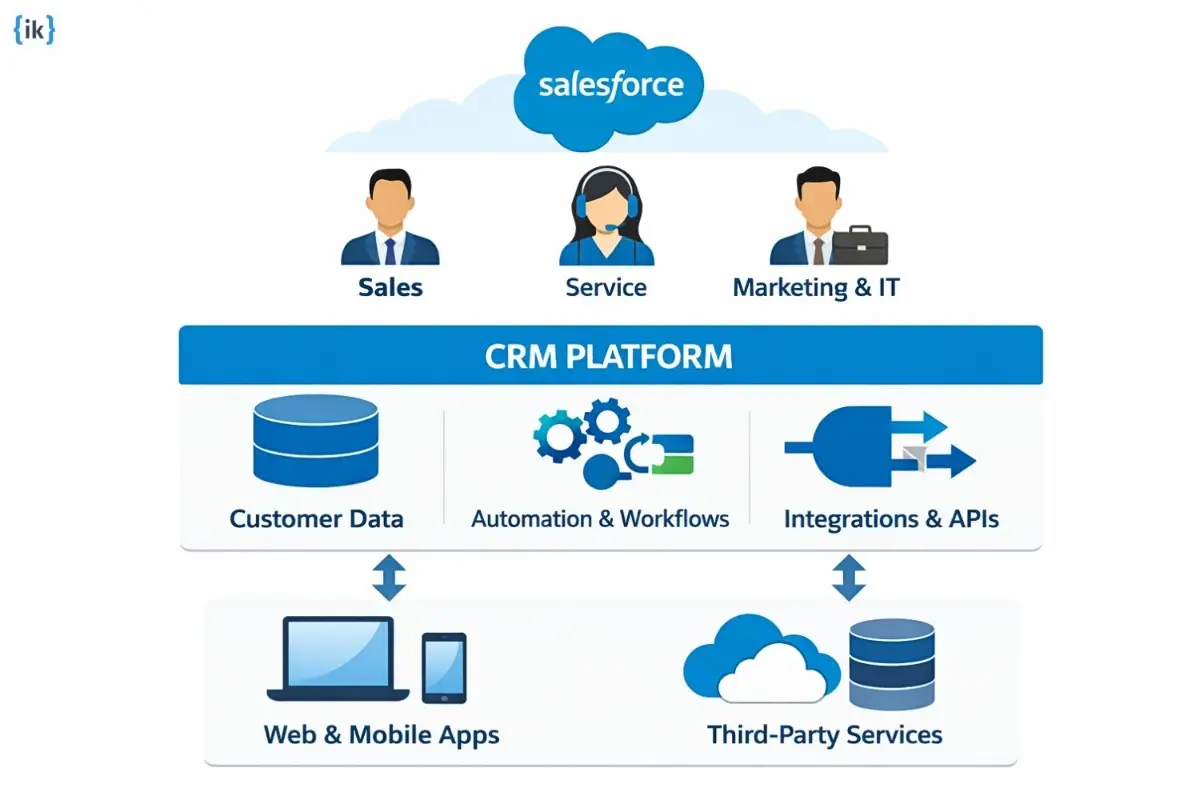
Salesforce is a cloud-based CRM platform that helps businesses manage customer relationships across sales, service, marketing, commerce, and IT from one shared view of the customer.
Salesforce itself describes the platform as the world’s leading CRM technology and positions it as a unified system for bringing customer data and teams together.
That broad use across business functions is one reason Salesforce skills remain highly valuable. Salesforce’s own Trailhead career paths highlight roles such as Salesforce Admin, Developer, Consultant, and Architect, along with role-specific credentials designed to help professionals build and showcase their expertise.
In this article, we will walk through Salesforce interview questions from beginner level to advanced topics so that you can build confidence step by step.
Key Takeaways
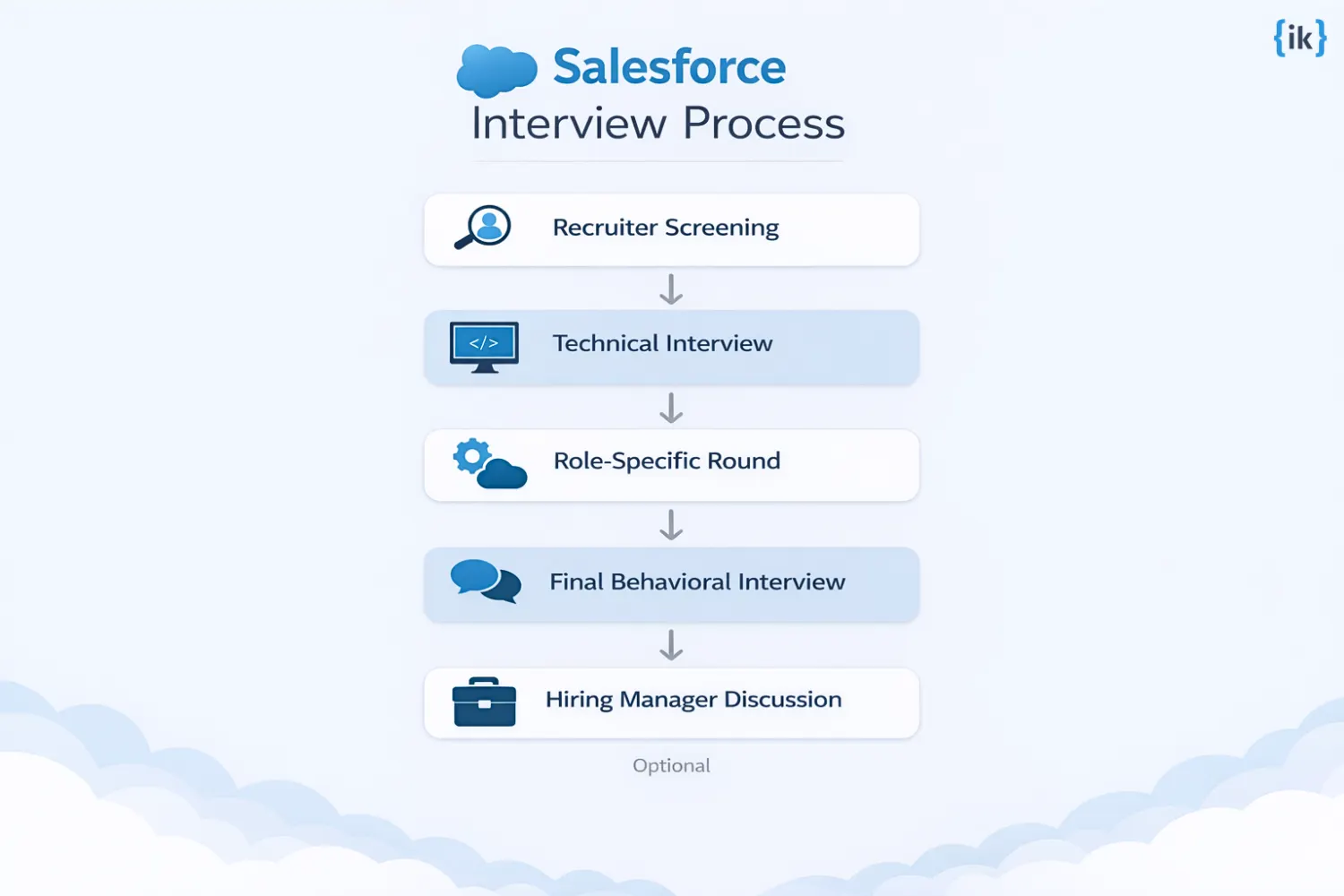
Salesforce interviews usually move from recruiter screening to technical rounds, then into a final behavioral or hiring manager conversation.
Admin roles lean on access control, validation, reporting, dashboards, and automation setup.
Developer roles go deeper into Apex, Lightning Web Components, SOQL, SOSL, APIs, governor limits, and batch processing.
Scenario-based questions matter because interviewers want to see how you handle migration, automation, integrations, and large data volumes in real situations.
Strong answers combine technical depth with clear behavioral examples, especially in the final round.
Salesforce Interview Process
The Salesforce interview process usually follows a familiar path, but the exact rounds depend on the role, company, and level of seniority.
Most candidates begin with a recruiter screen, move into technical interviews, and finish with a final round that checks communication, problem-solving, and culture fit.
If you are preparing for Salesforce interview questions, it helps to know that different roles are evaluated differently. A Salesforce Admin interview will often focus on business processes, automation, reports, permissions, and user support.
A Salesforce developer interview usually goes deeper into Apex, Lightning Web Components, APIs, testing, and data handling.
Typical Salesforce interview rounds:
Recruiter screening
Technical interview
Role-specific platform round
Final behavioral round
Hiring manager discussion, in some cases
Q.1 What happens in the Salesforce phone screening interview?
The phone screening is usually the first conversation in the hiring process. A recruiter or talent partner wants to confirm that your background matches the role and that you have the right level of interest in the Salesforce ecosystem.
This round is usually not heavy on deep technical detail, but you should still expect a few basic questions about Salesforce and cloud concepts. Common topics include what Salesforce is used for, which clouds you have worked on, and how your experience lines up with the role.
For Salesforce interview questions and answers, this is the stage where a short, clear explanation matters more than a long technical response.
Q.2 What happens in Salesforce technical interviews?
The technical round is where the interview gets more specific. This is the stage where the hiring team checks how well you understand the platform and how you solve real problems.
For Salesforce Developer Questions, expect topics such as Apex, Lightning Web Components, triggers, SOQL, APIs, test classes, and governor limits.
For Salesforce Admin Interview Questions, the focus is usually on objects, validation rules, flows, workflows, reports, dashboards, sharing rules, and user access.
The best answers usually show both platform knowledge and practical judgment. A strong technical interview answer often follows a simple pattern.
Explain the concept
Show how you used it
Connect it to a business outcome
That approach works well for both admin and developer roles, and it also helps with more advanced Salesforce interview questions because it shows depth without sounding memorized.
Q.3 What happens in the final Salesforce interview round?
The final round is usually less about platform syntax and more about how you work with people. Interviewers often ask behavioral questions to understand how you handle pressure, communication, deadlines, and conflict.
This round matters a lot because Salesforce roles often sit between business teams and technical teams. If you are applying for a developer or admin position, the interviewer may want to hear how you handled a messy requirement, supported a rollout, or improved a process for end users.
In many cases, this is where strong candidates stand out by showing clear thinking, ownership, and collaboration.
For Salesforce interview questions and answers, the final round is where your examples should sound specific and real. Talk about what happened, what you did, and what changed because of it.
Basic Salesforce Interview Questions
These Salesforce interview questions cover the core ideas you are expected to know before moving into deeper platform topics. If you are applying for a Salesforce admin, Salesforce developer, or even a more hybrid role, this is usually where the interview starts.
The questions below focus on the fundamentals, and each answer includes a simple example so the concepts feel easier to remember in a real interview.
Q.4 What is Salesforce?
Salesforce is a cloud-based CRM platform used by businesses to manage customer relationships, sales, service, marketing, and other day-to-day operations. In simple terms, it helps teams store customer data, track activity, automate work, and see what is happening across the pipeline in one place.
A good way to think about Salesforce is as the central system a company uses to organize customer information and turn that information into action.
Q.5 What are the benefits of Salesforce?
Salesforce is popular because it brings several business functions into one platform. It helps teams work faster, stay organized, and make better decisions with customer data.
Benefit
Explanation
Cloud based
Accessible from anywhere with an internet connection
Automation
Automates repetitive workflows and approvals
Reporting
Provides dashboards and analytics for better visibility
Scalability
Grows with the business as needs expand
Collaboration
Helps sales, service, and operations teams work from the same data
For Salesforce interview questions and answers, this is a common starter topic because interviewers want to know whether you understand why businesses choose Salesforce in the first place.
Q.6 What is a Salesforce object? <h3>
A Salesforce object is a database structure used to store information. You can think of it like a table in a spreadsheet or database. Objects hold related data in rows and columns.
There are two main types of objects:
Type
Meaning
Example
Standard object
Built in by Salesforce
Account, Contact, Lead
Custom object
Created by a business for its own needs
Student Record, Order History
Example: A company might use the Account object to store customer company details and create a custom object called Project Tracker to store internal project data.
Q.7 What is a Salesforce record?
A Salesforce record is a single entry inside an object. If the object is the table, the record is one row of data. This is one of the most basic Salesforce interview questions because it checks whether you understand how Salesforce stores data.
Example: If Account is the object, then one record might be Acme Corp with its name, phone number, and industry.
Q.8 What are standard objects in Salesforce?
Standard objects are objects that come built into Salesforce. They are ready to use without needing custom setup.
Some common standard objects are:
Account
Contact
Lead
Opportunity
Case
Example: A sales team might use the Lead object to track a new prospect, then convert that lead into an account and contact once the opportunity becomes more serious.
Q.9 What are custom objects?
Custom objects are objects you create to store business-specific data that Salesforce does not provide out of the box. Think of them as custom database tables built for your own use case.
Example: A consulting company might create a custom object called Client Onboarding to track onboarding steps, deadlines, and assigned owners.
This kind of question often appears in Salesforce developer questions and Salesforce admin interview questions because both roles need to understand how to model business data.
Q.10 What is a Salesforce dashboard?
A Salesforce dashboard is a visual display of key metrics and charts pulled from reports. It gives users a quick snapshot of business performance. Dashboards are useful because they make it easier to spot trends without reading raw data row by row.
Example: A sales manager may use a dashboard to see monthly revenue, lead conversion rate, and open opportunities in one place.
Transform Your Tech Career with AI Excellence
Join 25,000+ tech professionals who’ve accelerated their careers with cutting-edge AI skills
Salesforce reports are tools used to analyze and organize data stored in the platform. Reports help users filter, group, and study records based on the information they need.
Example: A report can show all open cases assigned to a support team this week or all opportunities closed this quarter.
Reports are a frequent topic in Salesforce interview questions and answers because they are essential for both admins and business users.
Q.12 What is a workflow rule?
A workflow rule is an automation feature that performs an action when certain conditions are met. It helps teams reduce manual work and keep processes consistent. In modern Salesforce orgs, many teams now prefer Flow for automation, but workflow rules are still a useful concept to understand in interviews.
Example: If a lead status changes to hot, a workflow rule can send an email alert to the sales rep.
Q.13 What is AppExchange?
AppExchange is Salesforce’s marketplace for apps, components, and solutions built by Salesforce and third-party vendors. It works like an app store for the Salesforce ecosystem.
Example: A company might install a customer support app from AppExchange instead of building the same feature from scratch.
This is a smart question to know for Salesforce interview questions because it shows you understand how businesses extend Salesforce beyond the core platform.
Salesforce Developer Interview Questions
Salesforce developer interviews focus less on naming tools like Apex, SOQL, or Lightning and more on how you use them together in real scenarios. Interviewers want to see clear logic, practical decision-making, and the ability to choose the right approach based on scale, automation needs, and platform limits.
That is why these Salesforce developer interview questions often go beyond definitions. You may be asked how you handle large data volumes, when to use asynchronous processing, or how to build efficient, scalable solutions.
Q.14 What is Apex in Salesforce?
Apex is Salesforce’s strongly typed, object-oriented programming language. It runs on Salesforce servers and is used to add custom business logic, especially when declarative tools are not enough.
Example:
public classGreetingService{public staticStringsayHello(Stringname) {return"Hello, "+name;}}
In interviews, this question often leads to Salesforce developer questions about triggers, batch jobs, and governor limits because Apex is the foundation for most custom server-side logic.
Q.15 What are Apex triggers?
Apex triggers let you run custom actions before or after record changes, such as insert, update, or delete. They are commonly used for automation that needs to react to data changes at the database level.
Salesforce also documents that triggers are optimized for bulk processing, so interviewers often expect you to think in sets rather than one record at a time.
A follow-up question may ask how you would avoid recursion, handle bulk data, or use the Trigger context variables, such as Trigger.new.
Q.16 What is a Visualforce page?
Visualforce is Salesforce’s tag-based framework for building custom user interfaces. It is an older UI option, but it still appears in many orgs and in interview discussions, especially when candidates have worked on legacy Salesforce apps.
Example:
<apex:page><h1>Hello Salesforce</h1></apex:page>
If you are preparing for Salesforce interview questions and answers, it helps to know that Visualforce is different from LWC.
💡 Pro Tip: Visualforce is markup-based, while LWC is the modern component model for web, mobile, and digital experiences on the platform.
Q.17 What is a Lightning Component?
A Lightning Component is part of Salesforce’s Lightning component framework for building reusable user interfaces. For new development, Salesforce points developers toward Lightning Web Components, while Aura components still exist in older solutions and in some component ecosystems.
Here’s an example of an LWC concept you may hear about in LWC interview questions:
<template><lightning-cardtitle="Customer Details"><pclass="slds-p-horizontal_small">Welcome to Salesforce</p></lightning-card></template>
Interviewers often use this topic to check whether you understand the shift from Aura to LWC and how modern Salesforce UI development is structured.
Q.18 What is SOQL?
SOQL means Salesforce Object Query Language. It is Salesforce’s query language for pulling records from Salesforce data, and its syntax is similar to SQL but designed specifically for Salesforce objects.
Example:
SELECT Id, Name
FROM Account
WHERE Industry = 'Technology.'
SOQL is one of the most common topics in Salesforce developer interview questions because it tests both data access and platform logic.
Q.19 What is SOSL?
SOSL means Salesforce Object Search Language. It is used for text-based searches across the Salesforce search index when you need to search multiple objects or fields at once. SOSL queries begin with the FIND clause.
A common interview comparison is SOQL versus SOSL, so be ready to explain when to use each one. SOQL is better for precise record retrieval, while SOSL is useful for broader text searches.
Q.20 What are governor limits?
Governor limits are execution limits Salesforce uses to protect the platform in its multitenant environment. They apply per transaction, and they are one of the most important concepts to understand when writing Apex. Salesforce documents common limits such as 100 SOQL queries and 150 DML statements per transaction in synchronous Apex.
In interviews, this question often leads to best practices such as bulkifying code, reducing queries inside loops, and using asynchronous processing when needed.
Q.21 What is batch Apex?
Batch Apex is used to process large data volumes in smaller chunks. Salesforce says you implement the Database. Batchable interface and then invoke the job programmatically. Batch jobs are especially useful when you need to work through thousands or millions of records without hitting synchronous limits.
Example:
global classAccountBatchimplementsDatabase.Batchable<SObject> {
globalDatabase.QueryLocatorstart(Database.BatchableContext bc) {
returnDatabase.getQueryLocator('SELECT Id, Name FROM Account');
}
global voidexecute(Database.BatchableContext bc, List<Account> scope) {
for (Account acc: scope) {
acc.Name = acc.Name + ' Updated';
}
update scope;
}
global voidfinish(Database.BatchableContext bc) {
System.debug('Batch complete');
}
}
This question is a regular part of Salesforce developer questions because it tests scale, limits, and code structure all at once.
Q.22 What is asynchronous Apex?
Asynchronous Apex lets Salesforce run code in the background after the current transaction finishes. Salesforce documents several asynchronous options, and it specifically recommends Queueable Apex over older future methods in many cases.
In interviews, you should be able to explain why asynchronous processing helps with long-running work, callouts, and large jobs without blocking the user experience.
Q.23 What is a Salesforce API?
Salesforce APIs let external systems connect with Salesforce to create, read, update, search, and integrate data. Salesforce provides an API library and integration resources, including REST API and other APIs for different use cases.
A simple interview answer is:
Salesforce APIs are the bridge between Salesforce and other systems. They are used when data needs to move in and out of the platform or when another application needs to interact with Salesforce records.
This is a frequent topic in Salesforce interview questions because integrations are a core part of real Salesforce work.
Admin interviews usually come down to one thing, which is how well you can manage access, maintain data quality, and keep the org easy for users to work in.
A strong way to think about answering these questions is in layers. First comes user access, then field access, then record access, and finally data quality.
That is the logic behind many Salesforce admin interview questions, because interviewers want to know whether you can set up secure, usable configurations instead of just naming features.
Q.24 What is a Salesforce profile?
A profile is the base layer of user access in Salesforce. It controls what a user can do in the org, including permissions tied to objects, fields, and setup access. Salesforce also notes that each user has one profile, while permission sets can be added on top when extra access is needed.
Example: A sales rep profile might allow users to create and edit Leads and Opportunities, but block access to admin setup areas. That is the kind of configuration interviewers expect you to explain clearly in Salesforce interview questions and answers.
Q.25 What is a role in Salesforce?
A role is used to shape record visibility through the role hierarchy. Salesforce describes the hierarchy as a way for users higher in the structure to gain access to records owned by or shared with users below them. Roles are about record access, not general object permissions.
Example: A regional sales manager can usually see the opportunity records owned by the reps in that region because of the role hierarchy. In interviews, this is often the fastest way to show that you understand the difference between user access and record access.
Q.26 What is field-level security?
Field-level security controls whether a user can see or edit a specific field on a record. Salesforce documentation describes it as the way to manage field permissions in both profiles and permission sets, which makes it one of the main tools for protecting sensitive data.
Example: You may allow a support agent to view a customer record but hide the Salary field or make it read-only. That kind of setup is a classic admin example because it shows that you understand data access at the field level, not just at the object level.
Q.27 What is a validation rule?
A validation rule checks data before a record is saved. Salesforce says validation rules verify that the data entered meets the standards you define, which is why admins use them to enforce business logic and prevent incomplete or incorrect entries.
Example: You can require the close date to be filled in when an opportunity moves to a certain stage. That is a simple but very realistic configuration example, and it often shows up in Salesforce interview questions because it proves you understand data integrity, not just navigation.
Q.28 What is a permission set?
A permission set is a collection of settings and permissions that gives users extra access beyond their profile. Salesforce describes permission sets as a way to extend a user’s functional access, and users can have multiple permission sets assigned to them.
Example: A user might stay on a standard sales profile but receive one permission set that allows report export or access to a special app. This is a common interview topic because it shows whether you know how to avoid overloading profiles with exceptions.
Q.29 What is a Salesforce sharing rule?
A sharing rule is used to extend record access to specific groups of users, such as public groups, roles, or territories. Salesforce explains that sharing rules give particular users greater access, which makes them useful when the default access model is too restrictive for business needs.
Example: You might use a sharing rule to open Case records owned by one support team so another regional support team can help during peak volume.
Transform Your Tech Career with AI Excellence
Join 25,000+ tech professionals who’ve accelerated their careers with cutting-edge AI skills
This is where interviews start to feel real. Instead of asking what a feature does, interviewers want to see how you would approach a problem from start to finish.
The strongest answers usually follow a simple pattern, which involves understanding the requirement, choosing the right Salesforce tools, accounting for limits, and explaining how you would validate the outcome.
Q.30 How would you migrate data from another CRM to Salesforce?
Start with structure before tools. Map source data to Salesforce objects and fields, then clean it. Remove duplicates, standardize formats, and fix missing values before anything is imported.
For smaller datasets, use the Data Import Wizard. For larger or more controlled migrations, use Data Loader. After the import, validate everything. Check record counts, relationships, and sample records to confirm accuracy.
A strong answer here shows that you treat migration as a process, not just an upload. This is a common pattern in Salesforce interview questions and answers because data quality issues are very real in production systems.
Q.31 How would you design a Salesforce automation workflow?
Start by defining the trigger and the outcome. For example, when a deal reaches a certain stage, notify the owner and update key fields.
In modern setups, Flow is usually the right choice. Workflow rules may still exist in older orgs, but most new automation is built using Flow for flexibility and scalability.
A good answer also explains why you chose a specific approach. For example, using a record-triggered flow instead of multiple smaller automations to keep things maintainable.
This level of clarity stands out in Salesforce developer questions and admin interviews alike.
Q.32 How would you integrate Salesforce with external systems?
Most integrations today rely on REST APIs. Salesforce exposes endpoints that allow external systems to send and receive data in real time.
A strong answer goes beyond naming APIs. It explains data flow, error handling, and retries. For example, if an external system fails to send data, you would log the failure and retry instead of losing it silently.
This is a common topic across both Salesforce developer interview questions and architecture discussions because integrations are part of almost every real implementation.
Q.33 How would you handle large data volumes in Salesforce?
When data grows, design decisions matter more than code. The first step is to avoid processing everything at once.
Use Batch Apex to process records in chunks. For large imports or updates, Bulk API is often the better option. Inside code, avoid queries inside loops and keep operations bulkified.
A solid answer here shows that you understand limits and design around them, which is a key expectation in Salesforce interview questions at the mid to senior level.
Q.34 How would you optimize Salesforce performance?
Performance issues usually come from inefficient queries, excessive automation, or poor data design. Start by identifying slow queries and checking if filters are indexed. Reduce unnecessary triggers and flows. Move heavy operations to asynchronous processing where possible.
A practical answer might include steps like reviewing query plans, minimizing SOQL calls, and simplifying automation logic. Interviewers look for this kind of thinking because it reflects real troubleshooting experience, not just theory.
A Smarter Way to Prepare for Salesforce Interviews
If you are targeting roles that involve Salesforce development, integrations, or platform-level problem solving, broad interview prep often makes a bigger difference than memorizing Salesforce interview questions.
Program designed by FAANG+ hiring leaders who understand real interview expectations
Strong coverage of data structures, algorithms, and system design that often show up alongside Salesforce developer questions
1:1 coaching support for clearing doubts and refining your approach
Mock interviews with engineers from top tech companies in realistic settings
Structured feedback that helps you fix gaps quickly
Career support, including resume, LinkedIn, and behavioral prep
Instead of preparing in isolation, you train in an environment that mirrors real interviews.
If you are serious about landing a Salesforce role, start with guided prep. Explore the program and take the first step toward a stronger interview performance.
Conclusion
Salesforce interviews test more than definitions. You are expected to understand how CRM concepts, data modeling, access control, and automation come together on the platform. From basic concepts to scenario-based discussions, the focus stays on how you apply your knowledge in real situations.
Strong candidates prepare across both sides of the interview. They can answer technical topics like Apex, Lightning, and APIs, and also explain decisions, tradeoffs, and experience clearly. This balance is what sets apart solid answers in Salesforce interview questions across admin and developer roles.
As you prepare, focus on fundamentals, practice real scenarios, and revisit common Salesforce interview questions and answers. A clear understanding of core concepts, along with hands-on thinking, will make a noticeable difference when the conversation gets deeper.
FAQs: Salesforce Interviews Questions
Q1. Is the Salesforce interview difficult?
It depends on the role. Admin interviews usually focus on configuration and process knowledge, while developer interviews go deeper into Apex, Lightning, and APIs.
Q2. What skills are required for Salesforce jobs?
Most Salesforce roles need a solid grasp of CRM basics, data modeling, automation, and reporting. For developer roles, Apex, SOQL, Lightning, and integration skills matter too.
Q3. How long is the Salesforce hiring process?
It usually takes multiple rounds, starting with recruiter screening and moving into technical and final interviews. The full process can take a few days to a few weeks, depending on the company.
Q4. Do I need coding for Salesforce interviews?
Not always. Coding is important for developer roles, but admin interviews usually focus more on setup, security, workflows, and business use cases.
Q5. Are LWC interview questions common in Salesforce developer interviews?
Yes, especially for modern Salesforce developer roles. LWC often comes up when the job involves building user interfaces or working on newer Salesforce apps.