
When people compare “webhook vs API” in the context of AI agents, they’re really talking about two different pathways an agent uses to interact with the outside world so it can sense, decide, and act beyond its own model.
APIs are the agent’s outbound actions. They’re how the agent reaches out to external systems whenever its reasoning decides it needs something like fetching customer data from a CRM, triggering a payment, querying a vector database, updating a ticket, and so on.
Webhooks, by contrast, are inbound signals. They let external systems tap the agent on the shoulder when something important happens, like “your fine-tuning job finished,” “a new lead just signed up,” “the file you uploaded was processed,” etc., so the agent can respond in real time without polling or wasting resources guessing when an event occurred.
In other words, APIs are how AI agents pull data and perform actions on demand, and webhooks are how other systems push events and updates back into the agent’s workflow. To autonomous and semi-autonomous AI agents, knowing the difference between webhook and API is not merely a technical detail, but it shapes how responsive, efficient, and reliable the overall system feels to its end users.
Key Takeaways
- APIs enable agents to pull data on demand during reasoning for precise control
- Webhooks push external events to trigger agents automatically without polling
- Use APIs for lookups and multi-step tasks where agents control timing
- Use webhooks for sporadic events like new leads or job completions
- Combine both for full AI workflows with tools like Make
What is an API (In the Context of AI Agents)
An API (Application Programming Interface) is simply a structured way for one piece of software to communicate with another over the network, using well-defined rules about what can be requested and how the response is delivered.
For AI agents, an API is the primary channel they use to pull data or trigger actions in external systems: fetching account details from a CRM, creating a charge through a payment gateway, querying a search or vector database, and so on.
You can think of an API as a menu of operations the agent can call whenever its reasoning decides it needs more information or needs to perform a real-world action. The agent sends a request. Something like “Get all open support tickets for this customer” and receives a structured response, usually JSON, that it can parse and incorporate into its next step.
This request–response pattern is what makes APIs so useful for AI agents. APIs give the agent control: control over when to ask for data, what data it needs, and how often it performs an operation. Whenever the agent needs to decide or act intentionally, APIs are the mechanism that lets it reach out and extend its capabilities beyond the model.
What is Webhook (In the Context of AI Agents)
A webhook is a way for the AI agent to automatically send a message to another system the moment a specific event occurs, without being asked. Instead of your AI agent constantly polling “Has anything changed yet?”, the external service simply sends an HTTP request to a predefined URL (your webhook endpoint) when the event fires: “subscription renewed,” “file processed,” “workflow completed,” and so on.
In AI agent architectures, webhooks are how the outside world pushes updates back into the agent or agent platform. For example, an agent might call an API to start a long-running job like model training, a data export, a video render, and then do nothing until it receives a webhook saying, “Your job is finished.” Only then does it resume reasoning or trigger the next step.
This event-driven approach keeps agents responsive and efficient. There’s no wasteful polling, and the agent is notified in near real time whenever something important happens. APIs let the agent act; webhooks let the world talk back.
Also Read: Step-by-Step Guide to Building AI Agents in n8n Without Code
Webhook vs API in Context of AI Agents
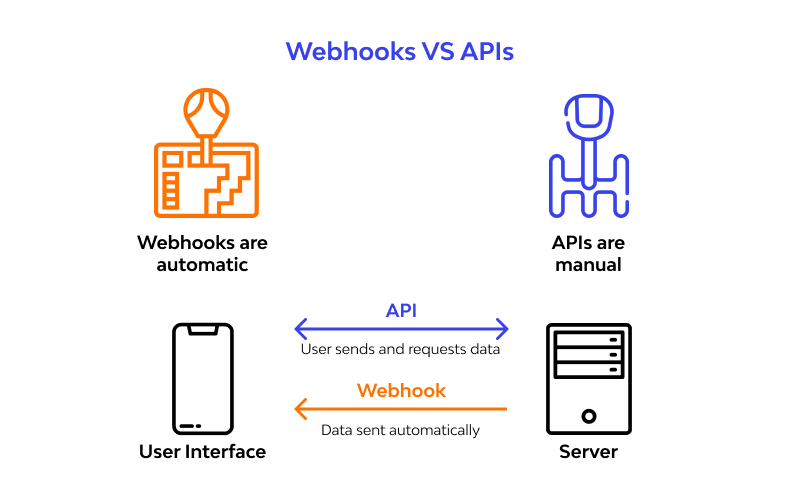
At the core of understanding the difference between webhook vs API, the core difference lies in one simple question: who starts the conversation, and when? For AI agents, that distinction shapes how they sense the world, how quickly they react, and what kind of infrastructure they need around them.
With an API, the agent controls the timing. It pulls data or triggers actions whenever its reasoning says, “I need this now.” That might mean fetching customer details, updating a ticket, or checking the status of a task. This is a classic request–response: the agent sends a request, waits for the response, and uses that information to decide what to do next.
With a webhook, the timing belongs to the external system. It pushes information to the agent (or the agent platform) the moment something important happens, like “your fine-tuning job finished,” “a new support ticket just came in,” “a payment failed,” and so on. Instead of polling an API every few seconds to check if anything changed, the agent can simply react when the webhook arrives. That’s far more efficient for event-driven workflows.
For AI agents, the rule of thumb is straightforward:
- Use APIs when the agent needs to decide when to fetch data or perform an action.
- Use webhooks when the agent, or the agent orchestrator, should respond immediately to real-world events without constant checking.
How APIs Work for AI Agents
An API works through a structured, predictable conversation. The AI agent sends a request to a specific URL (an endpoint), and the external service replies with a response, usually JSON. Each request specifies an HTTP method (like GET to read data, POST to create something, PUT/PATCH to update, or DELETE to remove), plus headers for authentication and an optional body with parameters. This request–response pattern gives the agent precise control over what it asks for and how often it interacts with a tool or service.
In an AI agent workflow, it might look like this: the agent receives a user query, plans its steps, and calls a CRM endpoint such as /customers/{id} to fetch profile information and past interactions.
It might then call a billing API to check subscription status or query a vector database to pull in relevant documents for reasoning. Every API call is an intentional move in the agent’s reasoning loop. The model decides it needs information or needs to act, sends the request, interprets the structured response, and updates its plan accordingly.
You can think of APIs as the tools on the agent’s workbench. Whenever the agent needs to “use a tool” like “look up this customer,” “start a refund,” or “search past tickets”, it selects the right API operation from the menu, sends a clear instruction, and waits for the tool to respond with data it understands and can act on.
How Webhooks Work for AI Agents (In Practice)
A webhook flips the usual flow on its head. Instead of an AI agent reaching out when it needs something, the external system is the one that makes contact. You give that service a URL (your webhook endpoint) and whenever a certain event happens (a job finishes, a new lead is created, an invoice gets paid), it sends an HTTP request to that URL with a small payload describing the event.
Your system receives it, interprets it, and decides what to do next: wake an agent, update internal state, kick off another task, or store the results for later use.
In an AI-agent workflow, this often plays out like this: an agent (or an orchestrator around it) calls an external API to start a long-running job, maybe processing a large document, fine-tuning a model, or exporting data from a third-party app.
Instead of polling every few seconds with “Are you done yet?”, the platform registers a webhook and tells the external system, “Ping me at this URL when the job is complete.” When that webhook request comes in, it becomes the trigger. The system can launch the next agent step, attach a new subtask, or notify the agent that new data is ready.
Key Differences Between Webhook and API
At this point in the article, it helps to put “webhook vs API” side by side so the differences are easy to see, especially in the context of AI agents coordinating with external tools and services. The core ideas are who initiates the communication, when data flows, and how that shapes the agent’s behavior and architecture.
Core behavioral differences
Initiation
- API: The AI agent (or an orchestrator) initiates the interaction. It decides when to ask for data or perform an operation and sends a structured request to another service.
- Webhook: The external system initiates the interaction. It decides when an event is important enough to report and sends a message to your platform when that event occurs.
Data flow model (pull vs push)
- API: “Pull” model. The agent explicitly pulls the latest data whenever it needs it. This is ideal when the agent must control the timing and frequency of data access, such as during a planning or reasoning loop.
- Webhook: “Push” model. The external system pushes event data into your platform as soon as something happens. This is ideal for event-driven behavior, where agents should react to changes in near real time.
Timing and cadence
- API: The agent chooses the cadence by calling once per request, on a schedule, or multiple times within a single reasoning chain. This can be more resource-intensive if the agent has to repeatedly check for changes.
- Webhook: The cadence is event-based, where messages only arrive when an event is triggered. This reduces unnecessary checks and is more efficient for sporadic or long-running processes.
Architectural and UX impact for AI agents
Control vs responsiveness
- API: Gives the agent fine-grained control over what to fetch and when, which is crucial for tasks like multi-step planning, reconciling data from multiple systems, and orchestrating tool calls within a single conversation.
- Webhook: Gives the system high responsiveness to external changes, which is ideal for kicking off or augmenting agent runs when new events occur (new customer, status change, job completion) without waiting for the user to ask.
Error handling and reliability
- API: Errors (timeouts, bad requests, rate limits) are handled directly where the agent calls the operation. The agent or orchestrator can retry, back off, or choose a fallback strategy in line with its reasoning.
- Webhook: Reliability shifts toward your inbound infrastructure. You need to handle retries, verify authenticity, store events safely, and ensure idempotency so that agents are not triggered twice for the same event.

Typical AI-agent use in practice
APIs:
- Fetching live context (customer records, knowledge snippets, transaction history) during a conversation.
- Performing direct actions (create a ticket, send an email, update a subscription) as steps in an agent’s plan.
Webhooks:
- Triggering or resuming agent workflows when something important happens elsewhere (new lead, payment outcome, finished processing).
- Streaming or batching events into an event store that agents can read from or be scheduled on top of.
In short, for AI agents, APIs are the tools they choose to use during reasoning, while webhooks are the external events that wake them up or change their environment. Both are essential: APIs give agents the ability to act with intent, while webhooks give the system the ability to respond intelligently to the real world as it changes.
When to Use an API for AI Agents
APIs are the better choice when your AI agent needs control, flexibility, and predictable access to data or actions. In these scenarios, the agent is actively reasoning about a task and decides, step by step, which external capability it needs to call next.
This is ideal when the agent must fetch specific data on demand, combine information from multiple systems, or perform precise operations in a particular order.
Common situations where APIs are a strong fit for AI agents include:
- On-demand data lookup: The agent needs the latest customer profile, order status, or configuration details during a conversation or workflow.
- Multi-step operations: The agent must create, update, and then verify resources across tools (for example, create a ticket, attach logs, then update its status).
- Complex querying or filtering: The agent needs to search or filter data with specific parameters (date ranges, statuses, segments) that are best expressed as request parameters.
From an architecture perspective, APIs work well as tools the agent can reliably call inside its reasoning loop. You define them in your tool schema (or similar interface), the model learns when to invoke them, and the orchestrator handles authentication, rate limits, and error retries.
Whenever you want the agent to “go and get exactly what it needs, when it needs it,” or “do something specific in another system right now,” you are almost always talking about integrating via an API rather than relying on webhooks.
Also Read: Common Mistakes to Avoid When Building AI Agents from Scratch
When to Use a Webhook for AI Agents
Webhooks make the most sense when your AI agent ecosystem should react to events, not constantly check for them. Instead of an agent or orchestrator repeatedly asking, “Has anything changed yet?”, a webhook lets external systems notify your platform the moment something important happens. This event-driven style is ideal when updates are sporadic, long-running, or user-driven, and you want agents to respond quickly without wasting compute on polling.
Typical scenarios where webhooks are a strong fit for AI agents include:
- Event-triggered workflows: A new lead signs up, a subscription renews or fails, or a user uploads a document. Each of these events can trigger an agent to enrich the lead, draft an outreach email, or summarize the document.
- Long-running or asynchronous jobs: A model fine-tune, large batch processing, or external analytics job might take minutes or hours; a webhook can notify your platform when it’s done, so an agent can continue its workflow or notify the user.
- System-to-agent notifications: Monitoring systems, CI/CD pipelines, or data pipelines can emit webhooks when thresholds are crossed, deployments finish, or data loads complete, prompting agents to generate reports, alerts, or follow-up actions.
From an architectural view, webhooks act as entry points into your agent platform. They typically feed an event bus, queue, or workflow engine that decides which agent (or which skill within an agent) should handle each event.
The simplest way to think about it is: use a webhook whenever you want your AI agents to “wake up and do something” automatically when the outside world changes, without needing a human to ask or the system to keep checking on its own.
Conclusion
Stepping back, the “webhook vs API” question for AI agents is really about how agents interact with the outside world over time. APIs let agents behave like active decision makers: they choose when to reach out, what information to request, and which actions to perform as part of a reasoning loop.
Webhooks, on the other hand, make the agent environment event-driven: external systems can wake agents up or feed them fresh context the moment something meaningful happens, without any constant checking.
Ready to Build Your First AI Agent?
Unlock hands-on mastery of building AI agents with Interview Kickstart’s Learn How to Build AI Agents from Scratch. Led by Rishabh Misra (Ex-Amazon/Twitter ML Tech Lead, ICML Program Committee), you’ll build production-ready AI agents using Docker, LangChain, SageMaker, and Vector DBs, covering 2025 AI trends, FAANG+ hiring insights, and career transition strategies that prioritize projects over certifications.
FAQs: Webhook vs API for AI Agents
1. What’s the main difference between webhook and API in AI agents?
APIs let agents pull data on demand during reasoning; webhooks push events from external systems to trigger agent actions in real time.
2. When should I use APIs over webhooks for my AI agent?
Use APIs for on-demand lookups, multi-step operations, or when the agent controls timing like fetching customer data mid-conversation.
3. Can AI agents use both webhooks and APIs together?
Yes. You can use APIs for agent-initiated actions, and webhooks for event-driven triggers. Many platforms, like Make, combine both for full orchestration.
4. Are webhooks more efficient than APIs for AI workflows?
Webhooks save resources by avoiding polling, ideal for sporadic events; APIs offer precise control but can increase API calls if overused.
5. How do I secure webhooks in an AI agent platform?
Verify signatures, use HTTPS, handle retries idempotently, and log payloads to ensure reliable, tamper-proof event delivery.








