
Article written by Rishabh Choudhary under the guidance of Alejandro Velez, former ML and Data Engineer and instructor at Interview Kickstart. Reviewed by Swaminathan Iyer, a product strategist with a decade of experience in building strategies, frameworks, and technology-driven roadmaps.
I once watched a brilliant infrastructure engineer, someone who could rebuild networks in the dark and diagnose server issues instinctively, freeze at the sight of a Python script. Despite decades of technical mastery, the moment he was asked to automate a task using code, his confidence faltered. That experience is all too common: it’s not AI that scares professionals, but the belief that to use it, you must first become a programmer.
This aspect is where AI without coding becomes transformative. The traditional approach demands fluency in machine grammar before creation can begin, but Vibe Coding turns that model on its head. With Vibe Coding, you start with plain language: tell the AI what you want, and it generates the logic. Instead of wrestling with syntax, you’re directing outcomes. You’re no longer a solo coder; you’re a co-creator with an AI agent, collaborating through intent rather than instruction.
This shift is opening doors. Researchers, educators, marketers, and career switchers are already stepping into the role of AI Agent Specialist without writing a line of code. Using No-code AI tools, they’re automating workflows, launching intelligent assistants, and building real solutions. The barrier isn’t technical ability anymore; it’s imagination. And thanks to Vibe Coding, that’s all you really need.
Key Takeaways
- AI without coding allows anyone to build tools using natural language instead of programming syntax.
- Vibe Coding accelerates development, enabling rapid prototypes and real-time refinements.
- Non-technical professionals can create custom AI workflows without hiring developers.
- Vibe Coding lowers barriers, empowering domain experts to innovate directly.
- Awareness of limitations, security, logic, and testing is crucial for reliable outcomes.
How Is Vibe Coding Empowering AI Development Without Code
What is Vibe Coding?
Vibe coding is an AI-powered development method where natural language prompts replace manual code. Building software doesn’t have to mean staring at rigid syntax anymore. These days, you can just explain what you need in plain English. For example, you might say, “Spin up a REST API with JWT authentication, hook it up to a PostgreSQL database for saving user info, and toss in a few tests to catch incorrect inputs.” Instead of manually writing the code, the system takes the prompt, whips up the code, runs it, and then lets you keep refining. It’s a bit like telling a coworker what you want built and watching them throw together a first draft for you. The process is simple:
Why it’s powerful:
- Creative, not mechanical: Focus on what the product should do, not on syntax.
- Productivity: Prototypes that once took weeks can be built in a day.
- Accessible: Open to designers, founders, students, and non-tech professionals.
- Collaborative: More like brainstorming with a partner who knows every programming language.
As Andrej Karpathy says, the spirit is “code first, refine later.” With vibe coding, you get speed from AI scaffolding and add guardrails as you go. For learners, entrepreneurs, or anyone switching careers, it offers a way into software creation without years of technical study.
Analyst firms echo this momentum. Gartner1 frequently highlights the democratization of technology, forecasting that by the end of the decade, most software will be created by people outside of traditional IT departments. AI is at the center of this transformation. Coding is no longer just for people who know how to program. It has become a language of ideas that anyone can use.
When you put together Karpathy’s ideas, Chen’s forecasts, and Gartner’s analysis, you get a clear picture: vibe coding isn’t just a fad; it’s a fundamental change in how people and machines work together to produce things.
Traditional Programming vs. No Code AI (expanded)
The table below shows the differences between traditional programming and no-code AI.
| Feature | Traditional Programming | No Code AI |
| Code Creation | Manual line-by-line coding | AI-generated via natural-language prompts |
| Developer/User Role | Architect, implementer, debugger | Prompter, guide, tester, refiner |
| Coding Expertise Required | Deep syntax and architecture | Outcome-focused; accessible |
| Speed & Prototyping | Methodical, slower iterations | Rapid MVPs, instant experimentation |
| Error Handling | Manual debugging, static review | Conversational refinement and iterative fixes |
| Security & Governance | Structured reviews, strict processes | Requires AI guardrails, scanning, and governance |
| Learning Curve | Steep for non-coders | Lower, intuitive; domain experts can start faster |
| Maintenance | Driven by coding standards and best practices | Dependent on AI output quality + human oversight |
| Use Cases | Enterprise apps, robust architectures | MVPs, CI/CD pipelines, infra-as-code, quick prototypes |
| Security Risks | Managed by peer reviews and tools | Hidden bugs possible; validation critical |
| Collaboration | Style guides, code reviews | Shared prompt libraries, prompt reviews |
| Tooling Dependency | IDEs, compilers, custom scripts | Copilot/Replit/Duet AI with cloud-native hooks |
AI for Non-Coders: Why You No Longer Need to Be a Developer to Build Great Tools
AI provides non-coders a way to build without needing to become programmers first. Let’s look at some of the key reasons why you don’t need to be a developer to build great tools:
- Too high overheads
- Dependency on others
- Long waiting time
- Customization feels impossible
- Steep learning curve, even for experienced
1. The overhead is too high
Building software isn’t as simple as picking up a new tool. You have to learn syntax, frameworks, and version control, and then deal with debugging and deployment. For someone who already has a career, say a teacher, shop owner, or researcher, that’s a huge ask for what might just be a small project or personal workflow.
2. Relying on others
If you can’t code, you usually have to pay someone else to do it. That might mean hiring a developer, outsourcing the work, or buying software that only partly solves your problem. It’s not just expensive; you also end up explaining your idea to someone who may never fully understand the details of your world.
The waiting game
Even when you do bring in help, it can take weeks or months to get a working prototype. And if the first version isn’t right, you go back and forth again, adding more time and cost. For people who want to experiment with multiple ideas, that pace can be discouraging.
Customization feels impossible
The most valuable ideas are often the smallest and most personal, a custom app for a These options include a classroom setup, automation for a small business, or a research tool designed for a niche study. Off-the-shelf products rarely fit perfectly, and custom development feels out of reach for most non-coders.
The intimidation factor
Even professionals who are curious and eager to learn quickly find themselves overwhelmed. Documentation is dense, error messages are cryptic, and tutorials assume a lot of background knowledge. Many people give up before they even start.
These challenges collectively form an invisible barrier. Too often, we shut out the experts who understand problems the best, the domain experts, from building solutions. This is exactly why AI matters for non-coders: it lowers the barrier and makes building possible through natural language, not programming jargon.
AI Skills for Non-Technical Professionals and Career Switchers
This is where vibe coding is apt for professionals who want to take charge of their ideas, solve their own challenges, or transition into AI-related fields.
Let’s imagine a few professionals:
- A teacher who wants to build adaptive learning quizzes that adjust based on student responses. With Vibe coding, she can choose templates, define logic for branching, and use AI to generate hints, all without writing code.
- A marketing manager seeks a content scheduling tool that seamlessly integrates with social media, streamlines post drafting, and optimizes posting times. She can stitch together APIs (through no‑code connectors), use AI to generate drafts, and define logic for triggers, all via visual tools and prompts.
- A health coach who wants to build a journaling bot that remembers past entries, suggests reflections, and sends reminders. Again, this is a workflow with data, triggers, and user interaction, but it is possible without code.
Vibe coding may be most inspiring because it gives those who felt left out of technology a way to get involved. Collaboration, not coding, is the most important talent. It’s enough to know how to utilize AI to explain ideas, evaluate results, and improve things.
These professionals are experts in their fields; they know what’s needed. What these professionals often lack is access to the necessary technical machinery. Vibe coding hands that machinery over to them.
Where It’s Already Working
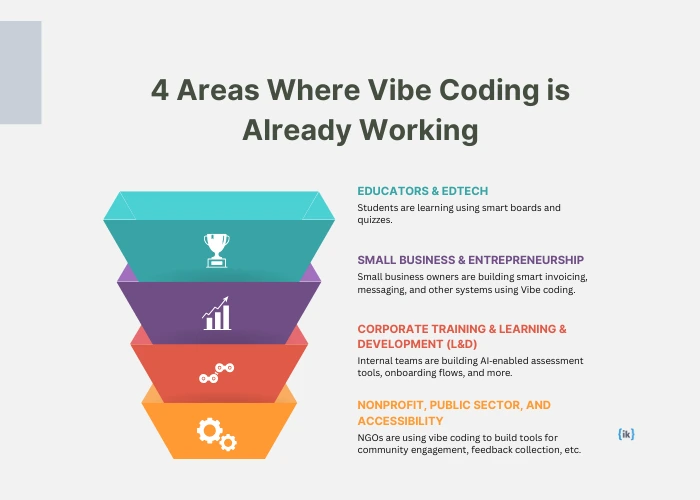
Seeing is believing. Here are real‑world examples of vibe coding in action.
Educators & edtech
Teachers are making smart learning experiences by using quiz systems that change based on student input, dashboards that show how the class is doing, and messaging bots that answer student inquiries outside of class. No developer is required, just tools, templates, and iterative improvement.
Small business & entrepreneurship
A crafts business owner builds an order‑management workflow linked with invoicing and client messaging. A fitness instructor sets up class scheduling and reminder workflows. A consultant builds a proposal generator specific to their services. The power of building custom tools without external spending is visible.
Corporate training and learning & development (L&D)
Internal teams are building AI‑enabled assessment tools, onboarding flows, feedback collection tools, and even chat agents that respond to employees’ questions. All built in‑house via low/no‑code coding tools, which are accelerating deployment, reducing cost, and improving customization.
Nonprofit, public sector, and accessibility
Organizations with limited technical budgets are leveraging vibe coding to build tools for community engagement, beneficiary registrations, feedback collection, and data dashboards. Because vibe coding lowers infrastructure and developer costs, these lean teams can deliver more.
These cases show that the model works across a variety of fields and scales.
Benefits: Cost, Speed, and Experimentation

Here’s where AI coding delivers real leverage.
Cost efficiency
- At Y Combinator, one of the world’s top startup accelerators, around 25% of startups in the latest batch built their apps almost entirely with AI. One in four founders started with intent, not code.
- Most AI platforms come with tiered plans, and many even have free starter levels. You can test ideas without burning cash.
- Small or medium projects don’t need a full development crew anymore; AI lets non-coders handle the first build themselves.
Speed of delivery
- You may prototype in hours or days instead of weeks or months.
- Quick iteration, so you can make changes directly without having to go through developer cycles.
- Faster validation: You can quickly test with real professionals, obtain feedback, and make changes.
Experimentation & custom fit
- Try multiple ideas without a huge sunk cost.
- Tailor tools precisely to your workflow. For example, a teacher or consultant can define exactly how they want automated reminders or chat responses without compromise.
- Tool use and actual needs are much more closely aligned since the creator is also the subject matter expert.
Together, these “superpowers” offer non‑tech professionals a competitive advantage: the ability to innovate, iterate, and solve niche problems that big tools usually miss.
Challenges: What Non-Tech Users Should Know
Vibe coding is promising but not perfect. If you’re considering using it, these are points to be aware of:
- Logical thinking is still important
- There are limitations to each platform
- Focus on security, privacy, and maintainability
- Quality & understanding dictate your vibe coding
- The risk of becoming overconfident
1. Thinking logically still matters
Regardless of coding, it is essential to design user flows, anticipate edge circumstances, and strategize triggers and data flows. In the absence of effective design, tools developed with Vibe coding may exhibit fragility or ambiguity.
2. Platform limitations & lock‑in
Some tools have limits on integrations, capacity, or performance. As your project expands, you may encounter obstacles. Moreover, reliance on particular platforms might engender dependencies that are challenging to move away from.
3. Security, privacy, and maintainability
For apps handling sensitive data or for public‑facing tools, you need to consider database management and security. Maintaining the tool over time (updates, bug fixes, user feedback) still matters. Without understanding the underlying logic, changes may become difficult.
4. Quality & understanding
Vibe coding typically uses “AI guesses” or templates, which means that things could operate on the surface but break when they are pushed to their limits. Testing, gathering user input, and monitoring remain crucial. The last 20% is where it becomes challenging.
5. Overconfidence risks
Occasionally, those who make things may trust “everything AI generates” without checking it carefully. That can cause professionals to act in the wrong ways, incur costs that are higher than intended, or cause moral problems. Being aware, thinking things through, and trying them out again and again might help you avoid problems.
Conclusion
No Code AI empowers non‑technical professionals to explore the field of artificial intelligence by deploying solutions without having hands-on experience in programming languages. It represents freedom, agency, and opportunity. It lets domain experts build, experiment, and solve real problems without being blocked by the need to know code.
In terms of the upskilling roadmap, from a non-technical background to an AI specialist, Vibe Coding can be the entrance. Whether you remain someone who uses AI tools or grow into leading AI agents, orchestrating systems, and designing prompt pipelines, vibe coding gives you both the foundation and the confidence.
AI without coding is evolving every day and is empowering businesses and professionals.
Don’t wait for a developer to improve your idea, workflow, or business process. Investigate the possibilities of vibe coding. You might find that the power to build was in your hands all along.
Build Apps Without Writing a Single Line of Code
Vibe Coding is reshaping the way we interact with technology. It is helping non-tech professionals to use natural language to create fully functional apps. If you want to move from reading about it to actually building your own AI-powered applications, our Vibe Coding with Google Firebase Studio masterclass is the place to start. You’ll learn how to design a smart To-Do app live, decode its architecture, and see how AI agents bring no-code workflows to life.
Led by Ahmed Elbagoury, Senior ML Engineer at Google, this masterclass goes deeper than tools. You’ll gain insider insights from FAANG+ experts, hands-on exposure to agentic AI frameworks, and the strategies to position yourself at the forefront of the no-code AI revolution.
FAQs: AI without Coding
1. Can a non-tech person really learn AI?
Yes, and honestly, most experts already use it without realizing it, think of smart assistants, grammar checkers, or recommendation engines. The “learning AI” part isn’t about writing complex code; it’s about getting comfortable with tools and knowing how to guide them. If you can articulate your needs clearly in plain English, you are already halfway to achieving your goal.
2. Do I need coding knowledge to build with AI?
Not at all. Coding helps if you want to get into advanced stuff, but most AI tools today let you start by just describing what you need. It’s like giving instructions to a friend: “Make me a quiz for my class” or “Set up reminders for my clients.” The tool translates your request into something that works.
3. What kind of tools can I make with AI if I’m not a programmer?
There are numerous everyday items that can be created using AI. I’ve seen teachers whip up custom quizzes, shop owners automate invoices, and even fitness coaches create chatbots that remind clients about workouts. They didn’t hire a developer, just described what they needed and refined it along the way.
4. How is AI different from traditional coding for beginners like me?
Coding is like learning a new language; you start with rules and grammar before writing full sentences. AI flips that. You start with your idea, and the system drafts something for you. Instead of stressing over a missing semicolon, you spend your energy shaping the outcome.
5. Is AI a safe way for non-coders to build apps and workflows?
It can be, as long as you stay mindful. AI doesn’t always get things perfect, so testing, double-checking, and being cautious about sensitive data are musts. Think of AI like a helpful intern: smart and fast but still needs your oversight.








