What if one tricky SQL query decided your dream data role? Advanced SQL interview questions do just that; they test if you can thrive under pressure. This guide for 2026 has over 40+ advanced SQL interview questions and answers that help you get the job of your dream career.
Understanding advanced SQL interview questions is essential to succeed at technical interviews for challenging jobs in databases. It is about how well you deal with difficult data manipulations in real-time, such as optimizing slow queries or creating effective database models. They test how well you can resolve performance problems using SQL in real life rather than applying just the basics of SQL programming.
Here is the blog post where you will learn how to answer advanced conceptual SQL questions and will have hands-on query challenges for practical practice.
This article covers the most commonly asked and additional advanced SQL interview questions for you to practice.
Key Takeaways
- Get to know that advanced SQL interviews are based on problem-solving within real-world constraints, particularly in performance, scalability, and correctness. You should be able to optimize queries, understand execution plans, and trade-offs (e.g., between JOIN and subquery, index and write cost), depending on size and application.
- Find out how optimization and indexing form an important part of senior positions. Concepts such as sargability, not applying any functions to indexed columns, returning only those columns that you require, and clustered versus non-clustered indexes are all essential.
- Understand the role of window functions and CTEs as basic tools of analysis. The functions such as RANK, ROW_NUMBER, LAG, LEAD, and rolling aggregates are vital to master to solve problems involving ranking, trend analysis, and time-series without losing the detail of rows.
- Recognize that the relationship between data and complex joins cannot be overlooked. Self-joins, anti-joins, correlated subqueries, and cross joins are just some examples of tools utilized in actual situations to combat fraudulent behavior or analyze customer retention.
- Understand that scenario-oriented thinking distinguishes good candidates. It is expected that the interviewer tests you on how you turn real business problems into efficient SQL statements and explain your reasoning process.
Most Commonly Asked SQL Advanced Interview Questions
In advanced SQL interviews, there are four main concepts that need to be tested: query tuning, indexing, window functions & CTEs, and joins & keys. In advanced SQL queries, the candidate is tested based on their ability to tune queries, schema optimization, and dashboard logic writing. This module will give you everything required to handle tough SQL queries in interviews.
Indexing and Query Optimization Question
These are the most commonly asked questions during the Advanced SQL Interview round, as they have direct implications for the scalability of your queries over large data sets. The objective here is to test how effectively you fetch information from your database.
Some of the advanced SQL interview questions related to indexes and query optimization have been listed below.
Q1. What is an index in SQL, and why does it matter?
In SQL, the indexing technique is similar to an index in a book. The index consists of many data points, such as the ID of customers and pointers that could guide the search for the row containing the data points. Indexing is essential in cases of huge volumes of data, as one would not have to go through the whole table.
Q2. What is the difference between a clustered and a non‑clustered index?
The table below to understand the comparison between the two basic types of indexes.
| Aspect |
Clustered Index |
Non‑Clustered Index |
| Physical order |
Table data is physically sorted by the index key. |
Data stays in original order; index is separate. |
| Number per table |
Only one per table, because the table can only be sorted once. |
Many, since each is an extra structure. |
| Query performance |
Faster for range queries (between and greater than). |
Faster for specific point lookups (equal to). |
| Analogy |
Like arranging a book’s pages in alphabetical order |
Like a separate index page that tells you where to find topics |
Q3. What are the different types of indexes in SQL?
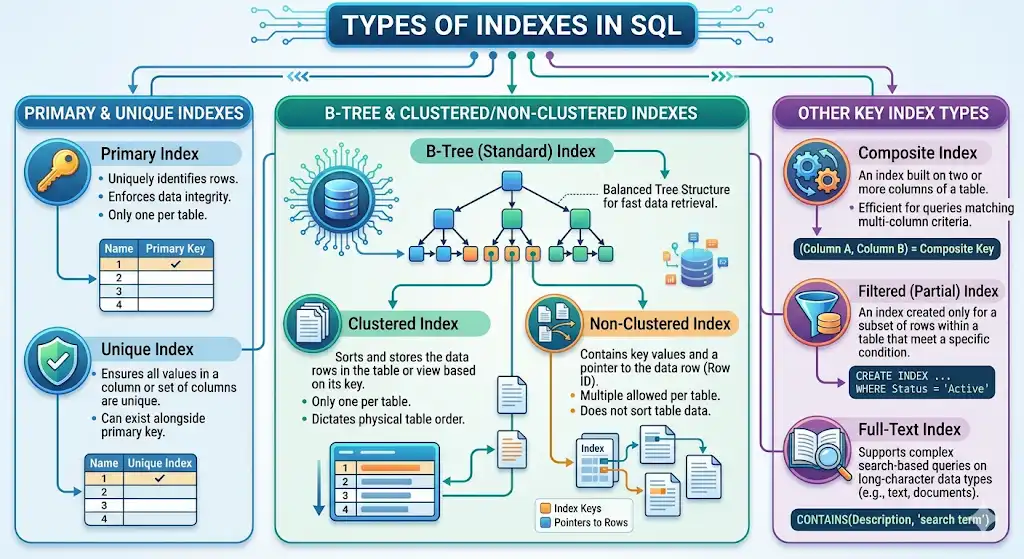
Popular index types across major SQL engines include:
- B‑tree / Standard Index: Default for most columns; speeds up equality and range lookups.
- Primary Index: Created automatically based on primary keys
- Unique index: Ensures there are no duplicates in the data table.
- Composite Index: Composite index is the combination of different columns, for instance, (last name, first name).
- Filtered / Partial Index: This index includes only those records that satisfy some conditions (like active users).
- Clustered Index: Keeps track of the physical location of actual records.
- Non-Clustered Index: Organizes and stores record pointers for a table
- Full-Text Index: Uses for efficient search in text-based columns
This list shows all the major types of SQL indexes that appear in SQL-related interviews focused on optimizing certain queries.
Q4. When should you avoid adding an index?
Adding indexes is not always better. You need to refrain from creating or dropping indexes under conditions like:
- When the table is small, a full scan takes less time than index maintenance.
- When the column is not used often enough in filters or joins, hence making the index unused.
- The table column gets frequently updated; hence, the expense of updating the indexes is more than their reading cost.
- Too many indexes exist, causing a slowdown in writing processes and making the query optimizer inefficient.
Some advanced SQL interview questions involve answering deletion of indexes and not the creation.
Q5. What is query optimization, and how do you approach it?
Query optimization is the process of determining the most efficient way for a database to execute a query. Below is an excellent checklist for query optimization to pass SQL interview tests:
- Use only necessary columns (do not use SELECT *)
- Indexing columns that will be often used in filters
- Reducing joins and subqueries if not necessary
- Filter data early using WHERE
- Using effective filtering criteria (ranges rather than functions)
It will help you make the SQL query shorter and more effective while meeting the requirements of the tests during the interview.
Q6. What is a query execution plan, and how do you read it?
An SQL query execution plan is a roadmap that the database engine uses to execute a query efficiently. It’s a step-by-step strategy that outlines how the database will process the query, including which indexes or table scans will be used, the order of operations, and how data will be joined and filtered.
Full table scan happens when the database engine does not access any of the indexes but scans through all rows in the table, which may take time in case of large tables. In interviews, understanding execution plans is critical.
Q7. What is sargability in SQL, and why does it matter for performance?
Sargability is where you write your queries in a manner such that your database can utilize its indexes effectively. In case the query is not sargable, then your database cannot utilize the indexes properly, and it will be forced to go through all the tables.
The next is the comparison between a sargable SQL statement and a non-sargable SQL statement in which a filter is put on an indexed column (created_date).
-- Sargable: index can be used directly
SELECT *
FROM orders
WHERE created_date >= '2026-01-01';

-- Non-sargable: index is typically not used
SELECT *
FROM orders
WHERE YEAR(created_date) = 2026;
The former query will run quicker as it will be possible to utilize the index on the created date.
Short example output (for sargable version):
| order_id |
created_date |
| 1001 |
2026-01-05 |
| 1002 |
2026-02-10 |
Sargability is crucial when writing advanced SQL statements that maintain their speed even as data increases.
Q8. What is the difference between an optimized and a non‑optimized version of the same query?
An optimized query gives the same result as a non-optimized query, but it is fast and requires less processing power. In real-life scenarios, an unoptimized query may lead to serious delays in performance when searching a customer’s purchase order in a gigantic database of orders.
Here is a real‑world example using a large orders table:
-- Non-optimized: slow on large tables
SELECT *
FROM orders
WHERE YEAR(order_date) = 2026
  AND customer_id = 1001;

-- Optimized: index-friendly and efficient
SELECT order_id, order_date, total_amount
FROM orders
WHERE order_date >= '2026-01-01'
  AND order_date < '2027-01-01'
  AND customer_id = 1001;
Example Output of optimized version:
| order_id |
order_date |
total_amount |
| 1001 |
2026-01-05 |
150.00 |
| 1002 |
2026-02-10 |
75.00 |
In the optimal code, there is no usage of any function on the column; thus, the database will be able to utilize indexes effectively for enhanced efficiency. In an interview, you must have the knowledge of converting non-optimal advanced SQL queries into optimized versions using indexes.
Window Functions and CTEs Questions
Window functions and CTEs are employed to make calculations based on the rows that are connected without compromising the information in each row.
🧠 Pro Tip: Window functions do not decrease the number of rows generated, which often confuses many people when working on advanced SQL questions in interviews.
The following questions cover practical applications of window functions and Common Table Expressions for advanced SQL tasks.
Q9. What is a window function in SQL?
Window functions perform operations on a set of rows that are related to the current row in some manner, but do not combine them into a single value.
SELECT
    employee_name,
    department,
    salary,
    RANK() OVER (
        PARTITION BY department
        ORDER BY salary DESC
    ) AS dept_rank
FROM employees;
Example Output:
| employee_name |
department |
salary |
dept_rank |
| Alice |
Sales |
90000 |
1 |
| Bob |
Sales |
85000 |
2 |
| Carol |
Sales |
85000 |
2 |
The idea is typically applied to SQL interview puzzles and leaderboard problems.
Q10. What is the difference between ROW_NUMBER, RANK, and DENSE_RANK?
| Function |
How it handles ties |
Gaps in output |
| ROW_NUMBER |
Allocates unique numbers to each observation, irrespective of any value being repeated. |
There will be no ties; no repetition in ranks, thus no gaps. |
| RANK |
Ranks tied observations equally and leaves out the next ranks. |
It has spaces between ties (e.g., 1, 2, 2, 4). |
| DENSE_RANK |
Tied observations are ranked equally, without any ranks being skipped. |
No gaps exist; ranks are compressed (as, 1, 2, 2, 3). |
It is one of the most frequently asked window functionality interview questions in advanced SQL interviews since it evaluates the understanding of ranking operations and gaps.
The code snippet below illustrates the usage of the three functions on the same data set that concerns the monthly sales of the salespersons.
SELECT
    employee_name,
    monthly_sales,
    ROW_NUMBER() OVER (ORDER BY monthly_sales DESC) AS row_num,
    RANK()       OVER (ORDER BY monthly_sales DESC) AS rank,
    DENSE_RANK() OVER (ORDER BY monthly_sales DESC) AS dense_rank
FROM sales_team;
Example Output:
| employee_name |
monthly_sales |
row_num |
rank |
dense_rank |
| Alice |
8000 |
1 |
1 |
1 |
| Bob |
7000 |
2 |
2 |
2 |
| Carol |
7000 |
3 |
2 |
2 |
| David |
6000 |
4 |
4 |
3 |
| Eve |
5000 |
5 |
5 |
4 |
From the above results, you can observe that the rows with ties (Bob and Carol) have the same value for RANK and DENSE_RANK; however, RANK will have a gap (i.e., 3), while DENSE_RANK does not. This is precisely what the interviewer expects from you.
Q11. What is PARTITION BY, and how is it different from GROUP BY?
The use of PARTITION BY in a window function divides data into different groups, but it maintains all the records, whereas GROUP BY summarizes data, thereby reducing the number of records.
Comparison table:
| Aspect |
PARTITION BY (window) |
GROUP BY (aggregation) |
| Purpose |
Run calculations within groups without collapsing rows. |
Collapse rows into summary rows by group. |
| Output rows |
Keeps all original rows and adds a calculated column. |
Usually returns one row per group. |
| Typical use case |
Ranking, running totals, and per-region metrics. |
Summarising totals, averages, and counts by group. |
| Example pattern |
RANK() OVER (PARTITION BY region …) |
SUM(sales) FROM … GROUP BY region |
Example: Ranking salespeople within each region
-- PARTITION BY: ranking salespeople within each region
SELECT
    salesperson,
    region,
    sales,
    RANK() OVER (
        PARTITION BY region
        ORDER BY sales DESC
    ) AS rank_in_region
FROM sales_team;
Example Output (PARTITION BY):
| salesperson |
region |
sales |
rank_in_region |
| Alice |
North |
9000 |
1 |
| Bob |
North |
7000 |
2 |
| Carol |
South |
8500 |
1 |
| David |
South |
7500 |
2 |
-- GROUP BY: total sales per region (no individual rankings)
SELECT
    region,
    SUM(sales) AS total_sales
FROM sales_team
GROUP BY region;
Example Output (GROUP BY):
| region |
total_sales |
| North |
16000 |
| South |
16000 |
This contrast shows why PARTITION BY is essential for advanced SQL interview questions that require per‑group analytics without losing detailed rows.
Q12. What is the difference between LAG and LEAD?
LAG and LEAD are window functions used to access data from other rows without using joins. LAG retrieves values from a previous row, while LEAD retrieves values from a next row. For example, in revenue analysis, you can compare this month’s revenue with the previous or next month.
SELECT
    month,
    revenue,
    LAG(revenue)  OVER (ORDER BY month) AS previous_month_revenue,
    LEAD(revenue) OVER (ORDER BY month) AS next_month_revenue
FROM revenue_data;
Example Output:
| month |
revenue |
previous_month_revenue |
next_month_revenue |
| Jan |
1000 |
NULL |
1200 |
| Feb |
1200 |
1000 |
1500 |
| Mar |
1500 |
1200 |
NULL |
Note: In order to analyze changes or trends, use LAG for a backward analysis and LEAD for a forward analysis.
In complex SQL interviews, LAG and LEAD functions have been seen in tests involving the analysis of trends, comparison of months-on-month, and even spotting any abnormalities in sales or revenue.
Q13. How do you calculate a running total using a window function?
Cumulative sum or running total is determined through addition of the values of previous rows into the value of the current row. This kind of formula usage is common in finance dashboards and cumulative sales charts when you have to calculate the amount of sales/revenue/orders/users, etc.
SELECT
    month,
    revenue,
    SUM(revenue) OVER (ORDER BY month) AS running_total
FROM monthly_revenue;
Example Output:
| month |
revenue |
running_total |
| Jan |
10000 |
10000 |
| Feb |
12000 |
22000 |
| Mar |
11000 |
33000 |
Note: The SUM() OVER (ORDER BY date) works to create a running total by summing the value from each record along with all records above it.
In an advanced SQL interview setting, the interviewer expects candidates to code this construct without any errors and understand that the order by clause plays an important role here.
Q14. How do you calculate a moving average in SQL?
Moving averages determine the average of a certain number of rows prior to the current row, thus allowing one to identify the trend of events. The moving average pattern is commonly applied in web analytics and dashboard reporting, where one wants to see stable trends rather than daily fluctuations.
SELECT
    day,
    daily_active_users,
    AVG(daily_active_users)
      OVER (
        ORDER BY day
        ROWS BETWEEN 2 PRECEDING AND CURRENT ROW
      ) AS moving_avg_3d
FROM daily_metrics;
Example Output:
| day |
daily_active_users |
moving_avg_3d |
| 1 |
1000 |
1000.00 |
| 2 |
1200 |
1100.00 |
| 3 |
1100 |
1100.00 |
| 4 |
950 |
1083.33 |
Advanced SQL interviews consider this moving average example to be one of the essential skills of a data analyst.
Q15. What is a CTE, and when would you use one instead of a subquery?
A CTE stands for “Common Table Expression,” which is a temporary table result set that can be used inside a query. The CTE will be chosen over the nested subquery if the logic is complicated, multi-step, or should be reused more than once, since the code becomes easier to read and understand.
Below is an example of the same business logic written as a CTE and nested subquery.
-- Option 1: Using a CTE (better readability and reuse)
WITH filtered_sales AS (
    SELECT
        region,
        salesperson,
        sales
    FROM sales_team
    WHERE sales >= 5000
)
SELECT
    region,
    salesperson,
    sales,
    AVG(sales) OVER (PARTITION BY region) AS avg_sales_in_region
FROM filtered_sales
ORDER BY region, sales DESC;
-- Option 2: Same logic with a nested subquery (harder to read)
SELECT
    region,
    salesperson,
    sales,
    AVG(sales) OVER (PARTITION BY region) AS avg_sales_in_region
FROM (
    SELECT
        region,
        salesperson,
        sales
    FROM sales_team
    WHERE sales >= 5000
) AS filtered_sales
ORDER BY region, sales DESC;
Both queries return the same result, but CTEs are easier to read, especially when multiple steps or transformations are involved.
Q16. What is a recursive CTE?
A recursive CTE is a Common Table Expression that refers to itself in order to process hierarchical or tree-structured data. It is commonly used when data has parent-child relationships, such as an organization chart or folder structure. This pattern is commonly tested at advanced SQL interviews because it shows you can handle nested, self‑referential data without writing procedural code.
Real‑world example:
Suppose you have an employees table where each employee has a manager_id pointing to another employee (or NULL for the CEO). You can use a recursive CTE to list every employee with their full path up to the CEO or their level in the hierarchy.
WITH RECURSIVE emp_hierarchy AS (
    -- Anchor: start with top-level manager (no manager)
    SELECT
        id,
        name,
        manager_id,
        1 AS level
    FROM employees
    WHERE manager_id IS NULL

    UNION ALL

    -- Recursive part: join each employee to their manager’s row
    SELECT
        e.id,
        e.name,
        e.manager_id,
        eh.level + 1 AS level
    FROM employees e
    JOIN emp_hierarchy eh ON e.manager_id = eh.id
)
SELECT
    level,
    id,
    name,
    manager_id
FROM emp_hierarchy
ORDER BY level, name;
Example Output (org-chart style):
| level |
id |
name |
manager_id |
| 1 |
1 |
CEO |
NULL |
| 2 |
2 |
Alice |
1 |
| 2 |
3 |
Bob |
1 |
| 3 |
4 |
Carol |
2 |
This approach starts from the top of the hierarchy and repeatedly joins the table to find all levels of reporting structure.
Q17. What is the difference between a CTE and a temporary table?
A CTE and a temporary table are both used to store intermediate results, but they differ in scope, usage, and storage behavior. CTEs are best for readability within a single query, while temporary tables are useful when you need to reuse data multiple times.
| Feature |
CTE (Common Table Expression) |
Temporary Table |
| Lifespan |
Exists only during query execution |
Exists for session or until dropped |
| Use case |
Simple, readable query structuring |
Repeated use of intermediate data |
| Performance |
No physical storage |
Stored physically in temp space |
| Reusability |
Single query only |
Can be reused multiple times |
💡 Pro Tip: Use a CTE for readability and single-use logic, and a temporary table when working with large datasets or repeated operations within a session.
Joins and Subquery Questions
Advanced join and subquery questions focus on edge cases and performance tradeoffs, not just definitions, so you must think about correctness, readability, and index usage.
Below are some questions focusing on how to work with related tables and nested queries, testing your ability to handle real-world data relationships and edge cases in SQL.
Q18. What is a self-join, and when do you use one?
A self-join is when a table is joined with itself to compare rows within the same table. It is useful for hierarchical or relationship-based problems, such as employees sharing the same manager or detecting duplicate payments in a time window.
Real‑world scenario (fraud detection):
You have a payments table and want to flag payments made by the same customer within a 10‑minute window, which might indicate duplicate or fraudulent transactions.
SELECT
    p1.customer_id,
    p1.payment_id AS first_payment,
    p1.payment_time AS first_time,
    p2.payment_id AS second_payment,
    p2.payment_time AS second_time,
    ABS(TIMESTAMPDIFF(MINUTE, p1.payment_time, p2.payment_time)) AS minutes_diff
FROM payments p1
JOIN payments p2
    ON p1.customer_id = p2.customer_id
    AND p1.payment_id < p2.payment_id
    AND TIMESTAMPDIFF(MINUTE, p1.payment_time, p2.payment_time) <= 10;
Example Output:
| customer_id |
first_payment |
first_time |
second_payment |
second_time |
minutes_diff |
| 1001 |
5001 |
2026‑04‑12 10:05:00 |
5002 |
2026‑04‑12 10:10:00 |
5 |
In senior‑level interviews, showing a self‑join like this for fraud detection or reporting chains (such as employees under the same manager) is a strong differentiator because it demonstrates comfort with edge‑case joins and time‑based constraints.
Q19. What is an anti-join, and how do you write one in SQL?
An anti-join is used to find records in one table that do not have matching records in another table. It is commonly used when you want to identify missing relationships, such as customers who have never placed an order.
Real‑world example:
Find customers who have never placed an order.
SELECT c.customer_id, c.name
FROM customers c
LEFT JOIN orders o
    ON c.customer_id = o.customer_id
WHERE o.customer_id IS NULL;
Example Output:
| customer_id |
name |
| 201 |
Rahul |
| 202 |
Meena |
Anti-joins are widely used in business analytics to find inactive users, missing transactions, or unconverted customers.
Q20. What is the difference between a correlated and a non-correlated subquery?
A subquery is a query inside another query. The key difference is whether it depends on the outer query for its execution.
| Subquery Type |
Depends on Outer Query |
Execution Pattern |
| Non-correlated |
No – runs once independently |
Runs once, result reused |
| Correlated |
Yes – references outer query |
Runs once per row of outer query |
| Scalar subquery |
No – returns a single value |
Returns one value, used inline |
Non-correlated Subquery:
SELECT name, salary
FROM employees
WHERE salary > (
  SELECT AVG(salary)
  FROM employees
);
Example Output:
| employee_name |
department |
salary |
| Alice |
Sales |
90000 |
| Bob |
Sales |
85000 |
This subquery runs once, and its result is reused for all rows.
Correlated Subquery:
SELECT e1.name, e1.salary
FROM employees e1
WHERE salary > (
  SELECT AVG(salary)
  FROM employees e2
  WHERE e1.department_id = e2.department_id
);
Example Output:
| employee_name |
department |
salary |
| Alice |
Sales |
90000 |
| David |
Marketing |
82000 |
This subquery runs once for each row in the outer query because it depends on department_id.
Scalar subquery (returns one value, used inline):
SELECT
    employee_name,
    department,
    salary,
    (SELECT AVG(salary) FROM employees) AS overall_avg
FROM employees;
Example Output:
| employee_name |
department |
salary |
overall_avg |
| Alice |
Sales |
90000 |
75000.00 |
| Bob |
Sales |
85000 |
75000.00 |
In advanced SQL interviews, you are expected to see the pattern quickly: non‑correlated for one‑off computations, correlated for row‑by‑row checks, and scalar for single values in expressions.
Q21. When should you use a JOIN instead of a subquery?
You should use a JOIN instead of a subquery when you need to combine and return data from multiple tables efficiently. JOINs are generally preferred in large datasets because they allow the database optimizer to create a more efficient execution plan. Subqueries can be easier to write, but may be slower depending on how they are executed.
Example task: Find customers and their latest order amount.
Using a JOIN (often clearer and more efficient)
SELECT
    c.customer_id,
    c.customer_name,
    MAX(o.order_amount) AS latest_order_amount
FROM customers c
JOIN orders o ON c.customer_id = o.customer_id
GROUP BY c.customer_id, c.customer_name;
Example Output:
| customer_id |
customer_name |
latest_order_amount |
| 1001 |
Alice |
150.00 |
| 1002 |
Bob |
200.00 |
Using a subquery (also valid, but can be slower on large data):
SELECT
    customer_id,
    customer_name,
    (
        SELECT MAX(order_amount)
        FROM orders
        WHERE orders.customer_id = customers.customer_id
    ) AS latest_order_amount
FROM customers;
Example Output (same semantics):
| customer_id |
customer_name |
latest_order_amount |
| 1001 |
Alice |
150.00 |
| 1002 |
Bob |
200.00 |
In most real-world scenarios, JOINs perform better because they reduce repeated lookups and allow the database to process data in a more optimized way, especially on large tables.
Q22. What is a cross join, and when is it actually useful?
A cross join returns all possible combinations of rows from two tables. This means every row in the first table is paired with every row in the second table. While it can create very large result sets, it is useful in specific scenarios where all combinations are needed.
Real‑world scenario:
You want to generate a skeleton report row for every product in every region, even if no actual sales exist yet, so that downstream tools can populate zeros or placeholders.
SELECT
    p.product_name,
    r.region_name
FROM products p
CROSS JOIN regions r
ORDER BY p.product_name, r.region_name;
Example Output:
| product_name |
region_name |
| Laptop |
North |
| Laptop |
South |
| Phone |
North |
| Phone |
South |
Cross joins are useful in reporting, testing data combinations, and generating complete option sets, but should be used carefully due to the risk of large result sizes.
Q23. How do you find records that exist in one table but not another?
To find records in one table that do not have a match in another, three common patterns are LEFT JOIN + IS NULL, NOT IN, and NOT EXISTS. For large tables, NOT EXISTS typically performs best because it can stop as soon as it proves non‑existence per outer row and often uses indexes efficiently, while NOT IN can be slow or unsafe if the subquery contains NULLs, and LEFT JOIN + IS NULL is usually clear and well-optimized when keys are indexed.
1. LEFT JOIN + NULL
SELECT
    c.customer_id,
    c.customer_name
FROM customers c
LEFT JOIN orders o
    ON c.customer_id = o.customer_id
WHERE o.customer_id IS NULL;
Use Case: Customers who have never placed an order.
2. NOT IN (caution with NULLs)
SELECT
    c.customer_id,
    c.customer_name
FROM customers c
WHERE c.customer_id NOT IN (
    SELECT o.customer_id
    FROM orders o
);
Pitfall: If any o.customer_id is NULL, NOT IN returns no rows, so this is fragile on large, real‑world data.
3. NOT EXISTS (often best for large tables)
SELECT
    c.customer_id,
    c.customer_name
FROM customers c
WHERE NOT EXISTS (
    SELECT 1
    FROM orders o
    WHERE o.customer_id = c.customer_id
);
Note: NOT EXISTS usually performs best on large tables because it stops as soon as a match is disproved and works correctly even if the subquery returns NULLs. In advanced SQL interviews, you should explain this performance and safety difference clearly.
Stored Procedures, Triggers, and Transactions Questions
These topics cover how SQL handles reliability, automation, and data integrity through transactions, procedures, and automatic code attached to data changes.
Here are these questions, focusing on how SQL manages transactions, automation, and data integrity in real-world systems through procedures, triggers, and isolation controls.
Q24. What are the ACID properties in SQL?
ACID is a set of four properties that ensure reliable, consistent database transactions even when errors or concurrency occur. In advanced SQL interviews, you should be able to describe each property in plain language and give a simple business example.
Definitions and examples:
- Atomicity: A transaction is “all or nothing.” If any part fails, the entire transaction is rolled back.
- Example: A bank transfer must either complete both the debit and credit, or neither.
- Consistency: The database always moves from one valid state to another, enforcing rules and constraints.
- Example: A customer’s balance cannot go below zero if the schema enforces a minimum‑balance constraint.
- Isolation: Concurrent transactions do not interfere with each other in unwanted ways.
- Example: Two users updating the same order at the same time should not overwrite each other’s changes incorrectly.
- Durability: Once a transaction is committed, its changes are permanent even if the system crashes.
- Example: After you successfully pay for an online order, the payment record stays in the system even if the server restarts.
ACID properties at a glance
| Property |
Plain‑language meaning |
Real‑world example idea |
| Atomicity |
All steps of a transaction succeed or all are undone. |
Bank transfer: debit and credit both happen or neither. |
| Consistency |
Data always follows defined rules and constraints. |
Balance cannot go negative if the schema forbids it. |
| Isolation |
Concurrent transactions don’t trample on each other. |
Two users updating the same order correctly. |
| Durability |
Committed changes survive crashes and restarts. |
Paid order record persists after a server reboot. |
ACID ensures that database transactions are safe, predictable, and reliable even under failures or concurrent usage.
Q25. What is the difference between COMMIT and ROLLBACK?
COMMIT is used to permanently save changes made during a transaction, while ROLLBACK is used to undo those changes before they are saved. In simple terms, COMMIT is like saving your work, and ROLLBACK is like undoing everything back to the previous state.
Think of COMMIT as clicking “Save” on a document: the changes become permanent. Think of ROLLBACK as clicking “Undo all changes” before saving: the edits disappear as if they never happened.
-- Example transaction with COMMIT and ROLLBACK
START TRANSACTION;

UPDATE accounts
SET balance = balance - 100
WHERE account_id = 1001;

UPDATE accounts
SET balance = balance + 100
WHERE account_id = 1002;

-- If everything looks correct:
COMMIT;

-- If something is wrong instead:
-- ROLLBACK;
🧠 Pro Tip: Use COMMIT when the transaction is correct and complete, and ROLLBACK when an error occurs or the operation should not be applied.
Q26. What are transaction isolation levels?
Transaction isolation levels define how much one transaction is isolated from others when multiple transactions run at the same time. They control issues like dirty reads, non-repeatable reads, and phantom reads.
| Isolation level |
What it allows or prevents |
| READ UNCOMMITTED |
Allows reading uncommitted (“dirty”) data, so you can see changes that might be rolled back. |
| READ COMMITTED |
It only lets you read committed data; each read sees the latest committed value, not in‑progress changes. |
| REPEATABLE READ |
Ensures that if you read the same row twice in a transaction, you get the same value (no “non‑repeatable reads”), but new rows may appear. |
| SERIALIZABLE |
The strictest level: transactions behave as if they run one after the other, preventing dirty reads, non‑repeatable reads, and phantom reads. |
Most commonly used in production: Read Committed, because it balances performance and data consistency in most real-world systems.
Q27. What is a stored procedure, and when would you use one?
A stored procedure is a pre-written set of SQL statements stored in the database that can be executed repeatedly. It helps automate common tasks, reduce repetition, and improve consistency in database operations. You would use a stored procedure when the same logic needs to be executed multiple times, such as generating reports or processing business transactions.
Real‑world use case:
A stored procedure that resets and recalculates monthly sales figures for a region, updating several tables in one transaction.
-- Example: basic stored procedure syntax (ANSI-like pattern)
CREATE PROCEDURE recalculate_monthly_sales (
    IN input_month DATE
)
AS
BEGIN

    -- Delete old monthly summary for the month
    DELETE FROM monthly_sales_summary
    WHERE sale_month = input_month;

    -- Recalculate and insert new summary
    INSERT INTO monthly_sales_summary (region, sale_month, total_sales)
    SELECT
        region,
        input_month,
        SUM(sale_amount)
    FROM sales
    WHERE sale_date >= input_month
      AND sale_date < input_month + INTERVAL '1' MONTH
    GROUP BY region;

    -- Optionally log the run
    INSERT INTO procedure_log (procedure_name, run_date)
    VALUES ('recalculate_monthly_sales', CURRENT_DATE);

END;
Stored procedures are commonly used in applications to centralize business logic and reduce repeated SQL code across different systems.
Q28. What is the difference between a stored procedure and a function?
Stored procedures and functions both contain reusable SQL logic, but they differ in how they are used and what they return.
| Feature |
Stored Procedure |
Function |
| Return value |
May or may not return a value |
Must return a value |
| Usage |
Called independently |
Used inside SQL queries |
| Purpose |
Handles business logic |
Used for calculations or values |
| Transactions |
Can manage transactions |
Cannot manage transactions |
In simple terms, stored procedures are used for operations, while functions are used for computations inside queries.
Q29. What is a trigger in SQL?
A trigger is a special type of stored program that automatically executes when a specific event happens in a table, such as an INSERT, UPDATE, or DELETE. It is used to enforce rules, maintain logs, or automate actions without manual intervention.
Real‑world example:
A trigger can automatically record changes in a log table whenever a row is deleted from an employee’s table.
CREATE TRIGGER log_deleted_orders
AFTER DELETE ON orders
FOR EACH ROW
BEGIN

    INSERT INTO orders_log (
        order_id,
        customer_id,
        delete_time,
        action
    )
    VALUES (
        OLD.order_id,
        OLD.customer_id,
        CURRENT_TIMESTAMP,
        'DELETE'
    );

END;
Triggers are commonly used for auditing, logging changes, and maintaining data integrity automatically. In interviews, you should explain that triggers run automatically, can be BEFORE or AFTER the main event, and are often used for logging, soft deletes, or enforcing referential actions.
Q30. What is the difference between a BEFORE and AFTER trigger?
A BEFORE trigger runs before a data change is applied to a table, while an AFTER trigger runs after the data change has been completed.
When to choose:
- Use BEFORE for validation, default‑value generation, or data‑quality checks.
- Use AFTER for audit logging, notifications, or updating derived tables.
BEFORE trigger example (validation/modification):
CREATE TRIGGER prevent_negative_balance
BEFORE UPDATE ON accounts
FOR EACH ROW
BEGIN

    IF NEW.balance < 0 THEN
        SIGNAL SQLSTATE '45000'
        SET MESSAGE_TEXT = 'Balance cannot be negative';
    END IF;

END;
This checks the new balance before the update; if it is negative, the operation is blocked.
AFTER trigger example (logging)
CREATE TRIGGER log_balance_changes
AFTER UPDATE ON accounts
FOR EACH ROW
BEGIN

    INSERT INTO account_audit (
        account_id,
        old_balance,
        new_balance,
        change_time
    )
    VALUES (
        NEW.account_id,
        OLD.balance,
        NEW.balance,
        CURRENT_TIMESTAMP
    );

END;
This records the change only after the update has succeeded, which is typical for audit trails. In interviews, you should be able to say clearly that BEFORE is for prevention and modification, while AFTER is for logging and side effects.
Advanced SQL Features and Miscellaneous Questions
This section covers additional advanced SQL concepts that are important for interviews but do not fit into earlier topic groups.
These questions cover important advanced SQL concepts such as data formatting, system behavior, and database-specific features that are often tested in senior-level interviews.
Q31. What is dynamic SQL and when would you use it?
Dynamic SQL is SQL code that is constructed and executed at runtime instead of being fixed in advance. It is useful when query conditions or table names are not known beforehand, such as building flexible reports or filtering based on user input. However, it must be handled carefully because unsafe input can lead to SQL injection attacks.
Real‑world example:
A reporting procedure that dynamically chooses which table or columns to query based on a parameter, letting a single routine serve many similar reports.
-- Example in a procedural language (ANSI-style pattern)
DECLARE
    v_sql TEXT;
    v_table_name VARCHAR(50) := 'sales_north';
BEGIN

    v_sql := 'SELECT region, total_sales FROM ' || v_table_name ||
             ' WHERE year = 2026';

    EXECUTE v_sql;

END;
⚠️ Security caution:Because dynamic SQL is built by concatenating strings, it can be vulnerable to SQL injection if user input is directly pasted into the query. For example, an attacker passing ‘sales; DROP TABLE orders; –‘ could delete data if the input is not validated or parameterized. In interviews, you should mention that dynamic SQL should be handled carefully, using whitelisting, parameterized templates, or strict input validation whenever possible.
Q32. What is collation in SQL, and why does it matter?
Collation in SQL defines how string data is compared and sorted in a database. It controls rules such as case sensitivity, accent sensitivity, and alphabetical ordering. This matters because the same query can return different results depending on the collation setting. For example, in a case-sensitive collation, searching for “apple” will not match “Apple,” which can lead to unexpected missing results in searches or filters.
Q33. What is the difference between AUTO_INCREMENT and IDENTITY?
AUTO_INCREMENT and IDENTITY are both used to generate unique numeric values automatically for primary key columns, but they are used in different database systems.
| Feature |
AUTO_INCREMENT (MySQL) |
IDENTITY (SQL Server) |
| Database support |
MySQL, PostgreSQL (variant), MariaDB |
SQL Server, some T‑SQL dialects |
| Syntax style |
Column attribute |
Column definition property |
| Control |
Simple increment |
More configurable (seed, step) |
AUTO_INCREMENT (MySQL example)
CREATE TABLE users (
    id INT AUTO_INCREMENT PRIMARY KEY,
    username VARCHAR(50)
);
Real‑world context:
Every time you insert into users without specifying id, the database assigns the next available integer, commonly used for user IDs, order IDs, or log IDs.
IDENTITY (SQL Server example):
CREATE TABLE users (
    id INT IDENTITY(1,1) PRIMARY KEY,
    username VARCHAR(50)
);
Here IDENTITY(1,1) means start at 1 and increment by 1. Like AUTO_INCREMENT, this is the standard way to auto‑generate primary keys when you want a simple, always‑increasing numeric ID.
Q34. What is the difference between DISTINCT and GROUP BY?
DISTINCT and GROUP BY are both used to remove duplicate values, but they work differently. DISTINCT is used only to eliminate duplicates from result rows, while GROUP BY is used to group rows for aggregation and analysis.
| Feature |
DISTINCT |
GROUP BY |
| Purpose |
Remove duplicate rows |
Group data for aggregation |
| Use case |
Simple deduplication |
Aggregations like SUM, COUNT |
| Flexibility |
Limited |
Supports aggregate functions |
Example: unique regions vs. sales per region
Assume a sales table:
| region |
salesperson |
sale_amount |
| North |
Alice |
1000 |
| North |
Bob |
1500 |
| South |
Carol |
1200 |
| North |
Alice |
800 |
Using DISTINCT:
SELECT DISTINCT region
FROM sales;
Output:
This gives you only the unique regions, with no extra information.
Using GROUP BY:
SELECT
    region,
    COUNT(*) AS total_orders,
    SUM(sale_amount) AS total_sales
FROM sales
GROUP BY region;
Output:
| region |
total_orders |
total_sales |
| North |
3 |
3300 |
| South |
1 |
1200 |
In interviews, examiners often ask you to choose between DISTINCT and GROUP BY depending on whether you just need uniqueness or also aggregation; here, GROUP BY is the right choice when you want counts or sums per region.
💡 Pro Tip: Use DISTINCT when you only need unique values, and GROUP BY when you need summaries or calculations per group.
Q35. What are NVL() and NVL2() in SQL?
NVL(a, b) returns b if a is NULL, and returns a otherwise; it is a simple way to replace NULL values with a default. NVL2(expr, if_not_null, if_null) is more flexible: it returns if_not_null when expr is not NULL, and returns if_null when expr is NULL, so you can specify different outcomes for each case.
These functions are mainly used in Oracle, with NVL also supported or emulated in some other databases such as MariaDB and certain data‑warehouse systems.
NVL example
SELECT
    employee_name,
    NVL(commission, 0) AS commission_safe
FROM employees;
Example Output:
| employee_name |
commission_safe |
| Alice |
500 |
| Bob |
0 |
Here, NVL replaces NULL commissions with 0 so calculations or reports do not break.
NVL2 example
SELECT
    employee_name,
    NVL2(commission, 'Commissioned', 'Fixed salary') AS pay_type
FROM employees;
Example Output:
| employee_name |
pay_type |
| Alice |
Commissioned |
| Bob |
Fixed salary |
NVL2 lets you classify rows based on whether a value is present or NULL in one step. In interviews, you should mention that NVL is for simple NULL substitution, while NVL2 is for conditional logic on NULL vs non‑NULL.
Q36. What is a synonym in SQL?
A synonym in SQL is an alias or alternate name for a database object, such as a table, view, or procedure. It is used to simplify long or complex object names and make queries easier to write and read. Synonyms are especially useful when working across different schemas or databases.
Synonyms help improve readability and reduce complexity when referencing frequently used or long-named database objects.
Q37. What is a recursive stored procedure?
A recursive stored procedure is a stored procedure that calls itself to solve problems involving hierarchical or repeating structures. It is used when data is organized in parent-child relationships, such as product categories, organizational charts, or file systems. However, in modern SQL, recursive CTEs are generally preferred because they are simpler to write and easier to maintain.
Real‑world example:
You have a categories table where each category has a parent_id, and you want to list all subcategories under a given top‑level category.
-- Example pattern (SQL Server–style, simplified)
CREATE PROCEDURE list_subcategories (
    @category_id INT
)
AS
BEGIN

    -- Base case: list direct children
    SELECT category_id, category_name
    FROM categories
    WHERE parent_id = @category_id;

    -- Recursive case: call procedure for each child
    DECLARE @child_id INT;

    DECLARE cur CURSOR FOR
        SELECT category_id
        FROM categories
        WHERE parent_id = @category_id;

    OPEN cur;
    FETCH NEXT FROM cur INTO @child_id;

    WHILE @@FETCH_STATUS = 0
    BEGIN
        EXEC list_subcategories @child_id;
        FETCH NEXT FROM cur INTO @child_id;
    END;

    CLOSE cur;
    DEALLOCATE cur;

END;
While recursive stored procedures exist, most modern SQL systems prefer recursive CTEs for handling hierarchical data due to better readability and control.
Q38. What is the SQL query execution flow from submission to result?
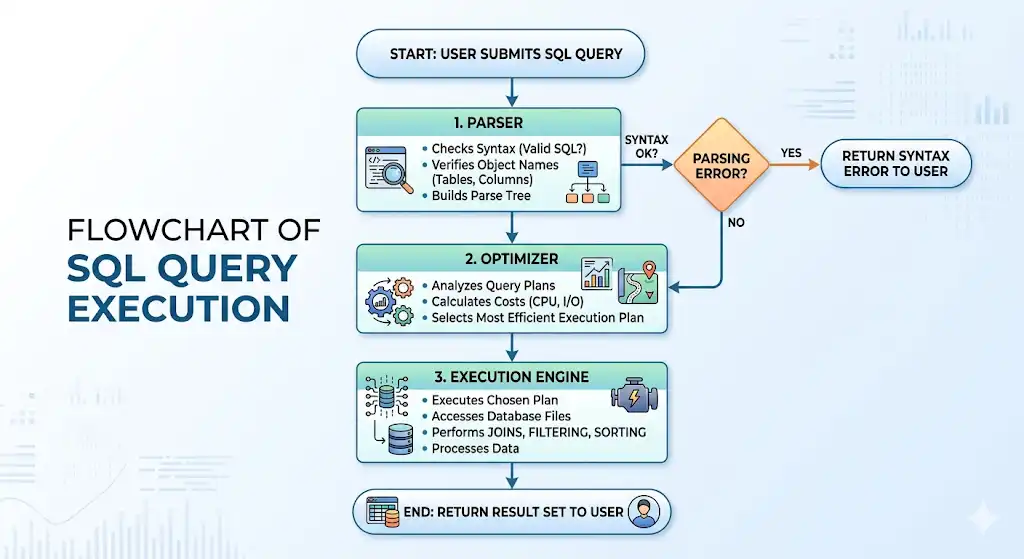
When a SQL query is executed, it goes through a structured internal process inside the database engine to ensure correctness and efficiency. This flow helps the database validate the query, optimize it, and then return the final result.
First, the parser ensures the query is syntactically correct. Then the optimizer decides the most efficient way to run it. Finally, the execution engine processes the data and returns the result to the user.
Scenario-Based SQL Interview Questions
Scenario-based questions test whether the candidate can apply SQL knowledge to real business problems, not just recite definitions. These questions evaluate logical thinking, query design, and real-world data handling skills.
Q39. Write a query to find the top 3 products by revenue in each category.
Example schema (sales table):
| product_id |
product_name |
category |
quantity_sold |
unit_price |
| 101 |
Laptop |
Electronics |
50 |
800.00 |
| 102 |
Headphones |
Electronics |
120 |
100.00 |
| 103 |
Coffee Mug |
Kitchen |
200 |
20.00 |
| 104 |
Blender |
Kitchen |
80 |
150.00 |
| 105 |
Book |
Books |
300 |
25.00 |
| 106 |
Notebook |
Books |
500 |
10.00 |
Revenue per row = quantity_sold × unit_price.
SQL solution (top 3 products by revenue per category):
SELECT
    category,
    product_name,
    revenue
FROM (
    SELECT
        category,
        product_name,
        quantity_sold * unit_price AS revenue,
        RANK() OVER (
            PARTITION BY category
            ORDER BY quantity_sold * unit_price DESC
        ) AS rank_in_category
    FROM sales
) ranked
WHERE rank_in_category <= 3;
Example output (top‑3 by revenue per category):
| category |
product_name |
revenue |
| Electronics |
Laptop |
40000 |
| Electronics |
Headphones |
12000 |
| Kitchen |
Blender |
12000 |
| Kitchen |
Coffee Mug |
4000 |
| Books |
Notebook |
5000 |
| Books |
Book |
7500 |
In complex SQL interview questions, this pattern (ranking per group and then filtering by rank <= N) is very common for product‑performance, customer‑ranking, or region‑level reporting questions.
Q40. Write a query to detect duplicate payments within a 10-minute window.
This is a common fraud detection scenario used in senior SQL interviews where the goal is to identify repeated payments made by the same user within a short time interval.
Example schema (payments table):
| payment_id |
customer_id |
amount |
payment_time |
| 5001 |
1001 |
100.00 |
2026‑04‑12 10:05:00 |
| 5002 |
1001 |
100.00 |
2026‑04‑12 10:07:00 |
| 5003 |
1002 |
200.00 |
2026‑04‑12 11:15:00 |
| 5004 |
1001 |
100.00 |
2026‑04‑12 12:30:00 |
Real‑world context:
This pattern is used in fraud detection to flag payments that repeat for the same customer, amount, and time window, which may indicate duplicate or malicious transactions.
SQL solution (self‑join with 10‑minute window):
SELECT
    p1.customer_id,
    p1.payment_id AS first_payment_id,
    p1.payment_time AS first_time,
    p2.payment_id AS second_payment_id,
    p2.payment_time AS second_time,
    ABS(TIMESTAMPDIFF(MINUTE, p1.payment_time, p2.payment_time)) AS minutes_diff
FROM payments p1
JOIN payments p2
    ON p1.customer_id = p2.customer_id
    AND p1.amount = p2.amount
    AND p1.payment_id < p2.payment_id
    AND TIMESTAMPDIFF(MINUTE, p1.payment_time, p2.payment_time) <= 10;
Example output (duplicate payments within 10 minutes):
| customer_id |
first_payment_id |
first_time |
second_payment_id |
second_time |
minutes_diff |
| 1001 |
5001 |
2026‑04‑12 10:05:00 |
5002 |
2026‑04‑12 10:07:00 |
2 |
In SQL interview questions for experienced professionals, this self‑join + time‑condition pattern is a strong differentiator for senior roles because it combines joins, time arithmetic, and anti‑fraud thinking.
Q41. Write a query to calculate the 7-day rolling average of daily active users.
This is a common product analytics use case where we smooth daily fluctuations in user activity to understand trends better. It is widely used in dashboards to track engagement over time.
Example schema (daily_metrics table):
| day |
daily_active_users |
| 1 |
10000 |
| 2 |
11000 |
| 3 |
10500 |
| 4 |
12000 |
| 5 |
11500 |
| 6 |
12500 |
| 7 |
13000 |
| 8 |
12800 |
| 9 |
13200 |
Real‑world context:
This pattern is used in product analytics dashboards to smooth day‑to‑day noise and show stable trends in user activity over time.
SQL solution (7‑day rolling average):
SELECT
    day,
    daily_active_users,
    AVG(daily_active_users)
      OVER (
        ORDER BY day
        ROWS BETWEEN 6 PRECEDING AND CURRENT ROW
      ) AS rolling_avg_7d
FROM daily_metrics
ORDER BY day;
Example Output:
| day |
daily_active_users |
rolling_avg_7d |
| 1 |
10000 |
10000.00 |
| 2 |
11000 |
10500.00 |
| 3 |
10500 |
10500.00 |
| 4 |
12000 |
10875.00 |
| 5 |
11500 |
11000.00 |
| 6 |
12500 |
11250.00 |
| 7 |
13000 |
11500.00 |
| 8 |
12800 |
12100.00 |
| 9 |
13200 |
12557.14 |
In interviews, this window‑function pattern is a core skill for senior SQL candidates working on product analytics or time‑series dashboards.
Q42. Write a query to find customers who placed orders in January but not in February.
This question tests anti-join patterns, where you need to include records from one set and exclude matches from another. It is commonly used in customer retention and cohort analysis scenarios.
Example schema (orders table):
| order_id |
customer_id |
order_date |
| 1001 |
1001 |
2026‑01‑05 |
| 1002 |
1002 |
2026‑01‑12 |
| 1003 |
1001 |
2026‑02‑08 |
| 1004 |
1003 |
2026‑02‑15 |
| 1005 |
1004 |
2026‑01‑20 |
Real-world context:
This tests your ability to use an anti‑join pattern to answer “in A but not in B” questions, common in marketing and retention analysis.
Approach 1: NOT EXISTS (clean and often efficient)
SELECT DISTINCT
    o1.customer_id
FROM orders o1
WHERE o1.order_date >= '2026-01-01'
  AND o1.order_date < '2026-02-01'
  AND NOT EXISTS (
      SELECT 1
      FROM orders o2
      WHERE o2.customer_id = o1.customer_id
        AND o2.order_date >= '2026-02-01'
        AND o2.order_date < '2026-03-01'
  );
Approach 2: LEFT JOIN + NULL (also common in interviews)
SELECT DISTINCT
    o_jan.customer_id
FROM (
    SELECT customer_id
    FROM orders
    WHERE order_date >= '2026-01-01'
      AND order_date < '2026-02-01'
) o_jan
LEFT JOIN (
    SELECT customer_id
    FROM orders
    WHERE order_date >= '2026-02-01'
      AND order_date < '2026-03-01'
) o_feb
    ON o_jan.customer_id = o_feb.customer_id
WHERE o_feb.customer_id IS NULL;
Both approaches are valid; NOT EXISTS is often preferred for large tables because it can short‑circuit and avoid full scans of the February data for each customer.
Q43. Write a query to find the manager with the most direct reports.
This question tests self-join and aggregation skills, commonly used in organizational hierarchy analysis. The goal is to identify which manager supervises the highest number of employees.
Example schema (employees table):
| employee_id |
employee_name |
manager_id |
| 1001 |
CEO |
NULL |
| 1002 |
Alice |
1001 |
| 1003 |
Bob |
1001 |
| 1004 |
Carol |
1002 |
| 1005 |
David |
1002 |
| 1006 |
Eve |
1003 |
Real‑world context:
This tests your understanding of self‑joins and aggregation: you treat the manager_id column as a foreign key pointing back to another employee and count how many rows use each manager.
SQL solution (self‑join pattern):
SELECT
    e1.employee_id AS manager_id,
    e1.employee_name AS manager_name,
    COUNT(e2.employee_id) AS direct_reports
FROM employees e1
JOIN employees e2
    ON e1.employee_id = e2.manager_id
GROUP BY e1.employee_id, e1.employee_name
ORDER BY direct_reports DESC
LIMIT 1;
Example Output:
| manager_id |
manager_name |
direct_reports |
| 1001 |
CEO |
2 |
This query uses a self-join to connect employees with their managers and then aggregates the count of direct reports to find the top manager.
Q44. Write a query to pivot a monthly sales table from rows to columns.
This question tests your ability to transform row-based data into a columnar format, which is commonly used in reporting dashboards and spreadsheet-style outputs.
Before (normalized “rows” format):
| category |
month |
sales |
| Electronics |
1 |
50000 |
| Electronics |
2 |
55000 |
| Electronics |
3 |
60000 |
| Kitchen |
1 |
30000 |
| Kitchen |
2 |
32000 |
| Kitchen |
3 |
35000 |
After (pivoted “columns” format):
| category |
sales_month_1 |
sales_month_2 |
sales_month_3 |
| Electronics |
50000 |
55000 |
60000 |
| Kitchen |
30000 |
32000 |
35000 |
SQL solution (pivoting months into columns):
SELECT
    category,
    SUM(CASE WHEN month = 1 THEN sales END) AS sales_month_1,
    SUM(CASE WHEN month = 2 THEN sales END) AS sales_month_2,
    SUM(CASE WHEN month = 3 THEN sales END) AS sales_month_3
FROM monthly_sales
GROUP BY category
ORDER BY category;
Real‑world context:
This pattern is used when preparing data for spreadsheets, Excel reports, or BI tools that expect a wide (column‑per‑period) format instead of a tall, normalized one.
Q45. Write a query to identify the first and last purchase date for each customer.
This question tests aggregation and window function knowledge, commonly used in customer lifecycle and retention analysis.
Example schema (orders table):
| order_id |
customer_id |
order_date |
| 1001 |
1001 |
2026‑01‑05 |
| 1002 |
1001 |
2026‑02‑10 |
| 1003 |
1001 |
2026‑03‑15 |
| 1004 |
1002 |
2026‑01‑12 |
| 1005 |
1002 |
2026‑02‑20 |
| 1006 |
1003 |
2026‑01‑18 |
Real‑world context:
This is used in customer lifecycle analysis to compute “first purchase” and “last purchase” dates, which feed into metrics like retention, churn, and customer‑age buckets.
SQL solution (using aggregation):
SELECT
    customer_id,
    MIN(order_date) AS first_purchase_date,
    MAX(order_date) AS last_purchase_date
FROM orders
GROUP BY customer_id
ORDER BY customer_id;
Example Output:
| customer_id |
first_purchase_date |
last_purchase_date |
| 1001 |
2026‑01‑05 |
2026‑03‑15 |
| 1002 |
2026‑01‑12 |
2026‑02‑20 |
| 1003 |
2026‑01‑18 |
2026‑01‑18 |
In interviews, this pattern tests whether you can use simple aggregates (MIN/MAX) per customer instead of over‑complicating the query with window functions when they are not needed.
Additional Advanced SQL Interview Questions for Practice
Working through a structured question bank is one of the most effective ways to prepare for senior-level technical interviews. Practicing SQL query interview questions grouped by topic helps you identify weak areas and sharpen your problem-solving approach systematically.
For those targeting data-focused roles, it’s important to go beyond syntax and understand how queries serve business decisions. SQL interview questions for data analysts tend to emphasize aggregation, filtering, and deriving insights from complex datasets.
Window Functions Practice
- Find the top 2 highest-paid employees in each department using a window function.
- Calculate the running total of sales for each product over time.
- Assign a rank to employees based on salary within each department.
- Calculate the difference in sales between the current and previous row for each product.
- Find the first order placed by each customer using a window function.
- Calculate a 5-day moving average of website traffic.
- Identify duplicate rows using ROW_NUMBER and filter them out.
Joins and Subqueries Practice
- Find customers who have placed orders but do not exist in the customers table.
- Retrieve employees who earn more than the average salary of their department.
- Find all products that have never been ordered.
- Write a query to return employees and their manager names using a self-join.
- Identify customers who placed more than one order on the same day.
- Use a correlated subquery to find employees with above-average salaries in their department.
- Find orders that do not have matching payment records.
Query Optimization Practice
- Rewrite a query that uses functions in the WHERE clause to make it index-friendly.
- Identify why a query using SELECT * is inefficient and rewrite it.
- Optimize a query that uses multiple nested subqueries.
- Rewrite a query to replace a subquery with a JOIN for better performance.
- Identify performance issues in a query that uses NOT IN with NULL values.
- Optimize a query that performs a full table scan on a large dataset.
- Suggest indexing strategies for a frequently queried orders table.
Scenario-Based Practice
- Write a query to find the top-selling product in each region.
- Identify users who logged in for 5 consecutive days.
- Find customers whose total purchase amount exceeds a specific threshold.
- Detect duplicate transactions occurring within a 5-minute window.
- Calculate the monthly revenue growth percentage for each product.
- Find users who signed up but never completed a purchase.
- Identify the most active user in each month based on login count.
- Write a query to calculate the customer retention rate month-over-month.
- Generate a report showing daily active users and new users.
Conclusion
This guide on advanced sql interview questions covered key topics including query optimisation, indexing, window functions, CTEs, joins, and real-world scenario-based problems. You explored both conceptual explanations and hands-on query examples to build practical understanding.
However, reading alone is not enough, consistent practice by writing and testing queries is essential to succeed in interviews. Focus on solving real datasets and improving query efficiency over time. To go further, consider structured preparation through Interview Kickstart’s data engineering and SQL-focused programs.
FAQs: Advanced SQL Interview Questions
Q1. What topics come up most in advanced SQL interviews?
Advanced SQL interviews most often focus on query optimization, indexing, window functions, CTEs, and joins. Interviewers test your ability to write and tune queries that handle large data and complex analytics patterns.
Q2. How is an advanced SQL interview different from a basic one?
Advanced SQL interviews go beyond simple queries and definitions, focusing on problem-solving, performance tuning, and real-world data scenarios. At the senior level, you are expected to write efficient queries and clearly explain your approach.
Q3. Do I need to know window functions for a senior SQL interview?
Yes, window functions are considered core for analytics and reporting roles. The most frequently tested ones are ROW_NUMBER, RANK, DENSE_RANK, LAG, LEAD, and rolling aggregates like SUM and AVG.
Q4. How do I practice for advanced SQL interviews?
Solve real-world problems on platforms that offer SQL challenges and scenario-based questions. Focus on window functions, CTEs, self-joins, and optimization patterns, and supplement with deep dives into indexes and query plans.
Q5. Are scenario-based SQL questions common at the senior level?
Yes, they are very common at the senior level. These questions test your ability to apply concepts to real business problems like fraud detection or retention reports, choosing the right joins and window functions for each context.
References
- SQL Skills That Get You Hired in 2026
- Average SQL Developer Salary
Recommended Reads:








