
AI tools for data engineering are reshaping how teams ingest, transform, govern, and deliver data and compress weeks of pipeline work into days while improving reliability and cost efficiency.
From AI copilots that generate dbt models and Airflow DAGs to platforms like Snowflake, BigQuery, and Databricks that embed generative and agentic capabilities directly into the data layer, the modern stack is becoming both smarter and more autonomous.
In this article, we will highlight the top AI tools for data engineering, why they’re used, how AI enhances their value, and where they fit in a practical end-to-end data engineering stack today.
Use of AI in Data Engineering
As of 2025, AI has become an integral part of the data engineering toolkit rather than an optional add-on. Many tools used for data engineering are integrating AI capabilities, and data engineers are increasingly using AI to automate boilerplate code generation, optimize SQL, and improve data pipelines.
AI tools for data engineering are shrinking the time it takes to go from design to deployment while improving reliability and keeping costs in check. Data Engineers increasingly rely on AI copilots to scaffold dbt models, Airflow DAGs, data contracts, and tests, letting them move faster without sacrificing quality.
Meanwhile, platform-native AI features like Snowflake Cortex, BigQuery with Gemini, and Databricks Mosaic AI are speeding up everything from transformations and governance to observability right inside the warehouse or lakehouse environment.
Across the data community, there’s growing momentum around agentic assistants that handle repetitive tasks: automated code reviews, performance tuning, and pipeline maintenance. These tools are reshaping daily workflows, turning AI into an active collaborator that engineers depend on rather than something they use occasionally. With routine work offloaded to AI, data engineers can focus their attention on higher-impact areas like architecture design and FinOps strategy.
Also Read: Use Cases of AI in Data Engineering
AI Tools for Data Engineering
| Tool | Primary role | How AI helps | Where it fits |
| GitHub Copilot | Coding accelerator | Generates SQL/Python, tests, docs | Authoring, reviews |
| Snowflake Cortex | In-warehouse AI | NL to SQL, functions, secure AI workbench | Transform, governance |
| Tabnine | AI code assistant | Privacy-first completions, on‑prem/VPC | Secure enterprises |
| BigQuery + Gemini | AI in BigQuery | NL prompts, tuning, Data Cloud tie-ins | Warehouse/lakehouse |
| dbt Cloud | Transform layer | AI-assisted tests, docs, scaffolds | Modeling, quality |
| Apache Spark | Distributed compute | GenAI assistants generate Spark/Delta code | Batch/stream processing |
| Kafka/Confluent | Streaming backbone | AI-assisted ops, anomaly flags | Real-time pipelines |
| Tableau | BI/semantics | AI agents, NL analysis, automation | Consumption layer |
| Fivetran | Managed ELT | Schema drift handling, sync optimization | Ingestion |
| GenAI tools | Copilots/agents | Chat-driven planning, docs, code | Across lifecycle |
| Databricks + Mosaic AI | Lakehouse + AI | Assistant writes Spark/Delta, optimizes | Unified platform |
| Dataiku | End-to-end platform | Auto-prep, visual AI pipelines | Data apps, MLOps |
1. GitHub Copilot
GitHub Copilot is one of the most popular tools among engineers and has become a go-to tool for data engineers because it takes the grind out of repetitive coding. Whether it’s SQL, Python, dbt, Airflow, or test scripts, engineers can now describe what they need in plain language and instantly get working code snippets. That means less boilerplate and more time spent on design and optimization instead of routine setup.
In 2025, you’ll find AI copilots mentioned in nearly every data-engineering guide or community thread. Teams cite tangible productivity gains, especially when they combine these tools with clear prompts, review gates, and established best practices.
For data engineers, Copilot cuts down the time spent on boilerplate by quickly scaffolding dbt models, Jinja macros, Airflow or Dagster tasks, and data quality checks. It can even stub out CDC handlers or S3/GCS I/O utilities with the right libraries, configuration patterns, and error handling already built in.

The latest versions have become smarter at working across multiple files, helping with refactoring, understanding pipeline dependencies, and suggesting performance optimizations. This makes it easier to translate data requirements into structured, production-ready pipeline steps, all while keeping human developers in control through reviews and best-practice prompting.
Within the broader workflow, Copilot helps compress scaffold time, standardize code conventions, and reduce context switching between documentation and the editor.
2. Snowflake Cortex
Snowflake Cortex is Snowflake’s built-in AI and machine learning layer that embeds foundation models, vector search, and AI functions directly into the data warehouse. With governed access and tight integration across the platform, teams can tap into capabilities like natural-language-to-SQL, embeddings, and model inference, all without moving data outside Snowflake’s secure environment.
Cortex provides serverless AI endpoints for text generation, classification, and data extraction, as well as SQL-accessible functions that enable tasks such as semantic search over vectorized tables. It also supports prompt engineering assets that can be version-controlled and managed alongside schemas, roles, and policies in the broader Data Cloud ecosystem.

Data engineers use Cortex for tasks like:
- SQL generation and optimization from natural language during exploratory analysis.
- RAG-style pipelines, storing embeddings and running similarity searches over product logs, documents, or support tickets.
- LLM-powered data enrichment, such as entity extraction, PII redaction, and text classification, integrated directly into ELT jobs and tasks.
What sets Cortex apart is its unified governance across both data and AI artifacts, secure model execution that maintains data locality, and seamless orchestration with Snowflake Tasks or Streamlit-in-Snowflake for building and serving data apps quickly, without managing separate infrastructure.
Cortex helps reduce data gravity and compliance risks by keeping intelligence close to the warehouse. It speeds up transformations and documentation through natural-language interfaces and enables production-grade semantic features that can be called from dbt, procedures, or external schedulers with minimal integration overhead.
3. Tabnine
Tabnine is a privacy-first AI code assistant designed to run securely inside popular IDEs such as VS Code, JetBrains, Eclipse, and Visual Studio. It provides inline and whole-function code completions, automated refactoring, unit-test generation, and even chat-based explanations for legacy code, all while honoring enterprise-grade security and deployment policies.
For data engineers, Tabnine brings practical acceleration across daily tasks like authoring SQL, Python, Spark, and dbt code, scaffolding Airflow or Dagster pipelines, writing data-quality checks, and generating I/O utilities.
With Tabnine, you can switch models at runtime, choosing between Tabnine’s private models, third-party LLMs, or custom bring-your-own-LLM endpoints. Deployment is equally adaptable, with SaaS, single-tenant VPC, and on-premises options that let organizations keep proprietary code and data completely under their control.

Teams can enforce policy and provenance guardrails that flag or block risky snippets, making Tabnine a strong fit for regulated industries and data-platform environments where compliance and IP protection matter.
In practice, engineers rely on Tabnine to speed up dbt model creation and testing, write Spark or Delta jobs with fewer errors and less boilerplate, translate pseudocode or requirements into production-ready pipeline steps, and automatically produce documentation for reviews.
Tabnine delivers tangible gains: shorter cycle times for transformations and orchestration code, more consistent standards across teams, and far less context-switching between docs and the IDE.
4. BigQuery with Gemini features
BigQuery remains the backbone of Google Cloud’s analytics ecosystem, which is a fully serverless data warehouse and lakehouse that combines scalable SQL analytics, federated querying, and built-in machine learning on top of efficient columnar storage. It automatically scales compute and storage while maintaining fine-grained governance, letting teams handle both ad-hoc exploration and enterprise-grade workloads without managing infrastructure.
With the addition of Gemini, BigQuery now brings AI-assisted development directly into the workspace. Gemini can translate natural language into optimized SQL, generate code snippets, refactor complex queries, and produce inline documentation, all within the BigQuery console or connected notebooks.
For large analytics or data-engineering teams, this means faster onboarding, easier code reviews, and less friction moving from idea to production.

Data engineers typically use BigQuery to run ELT pipelines at scale, analyze semi-structured formats such as JSON, Parquet, or Iceberg, and join operational data through federation with sources like Cloud Storage, Cloud SQL, and external systems.
Features such as partitioned and clustered tables, materialized views, and automatic workload optimization help control cost while keeping performance predictable.
Gemini extends this foundation by suggesting schema designs, query-performance hints, and unit-style checks during development, which reduces trial-and-error cycles.
Its integration with Vertex AI and user-defined functions enables teams to invoke ML models directly from SQL, while new vector functions and BigQuery Search power similarity and RAG-style workloads.
Through tight connections with Looker and Dataplex, organizations can also enforce governance and semantic consistency without moving data between systems.
5. dbt Cloud
Think of dbt Cloud as a central hub, a place where data engineers fluent in SQL can build, check, and then execute their data reshaping work, bypassing the hassle of starting from scratch. It transforms your SQL into an organized process, similar to a smart flowchart guiding each step. Consequently, you gain built-in tracking of changes, automated testing, alongside distinct spaces for development – meaning your data work functions much like proper software.
dbt Cloud offers features such as organized models, adaptable code snippets, initial datasets, monitoring capabilities, moreover point-in-time captures. Furthermore, it automatically generates complete documentation detailing a metric’s journey from source to finished product.
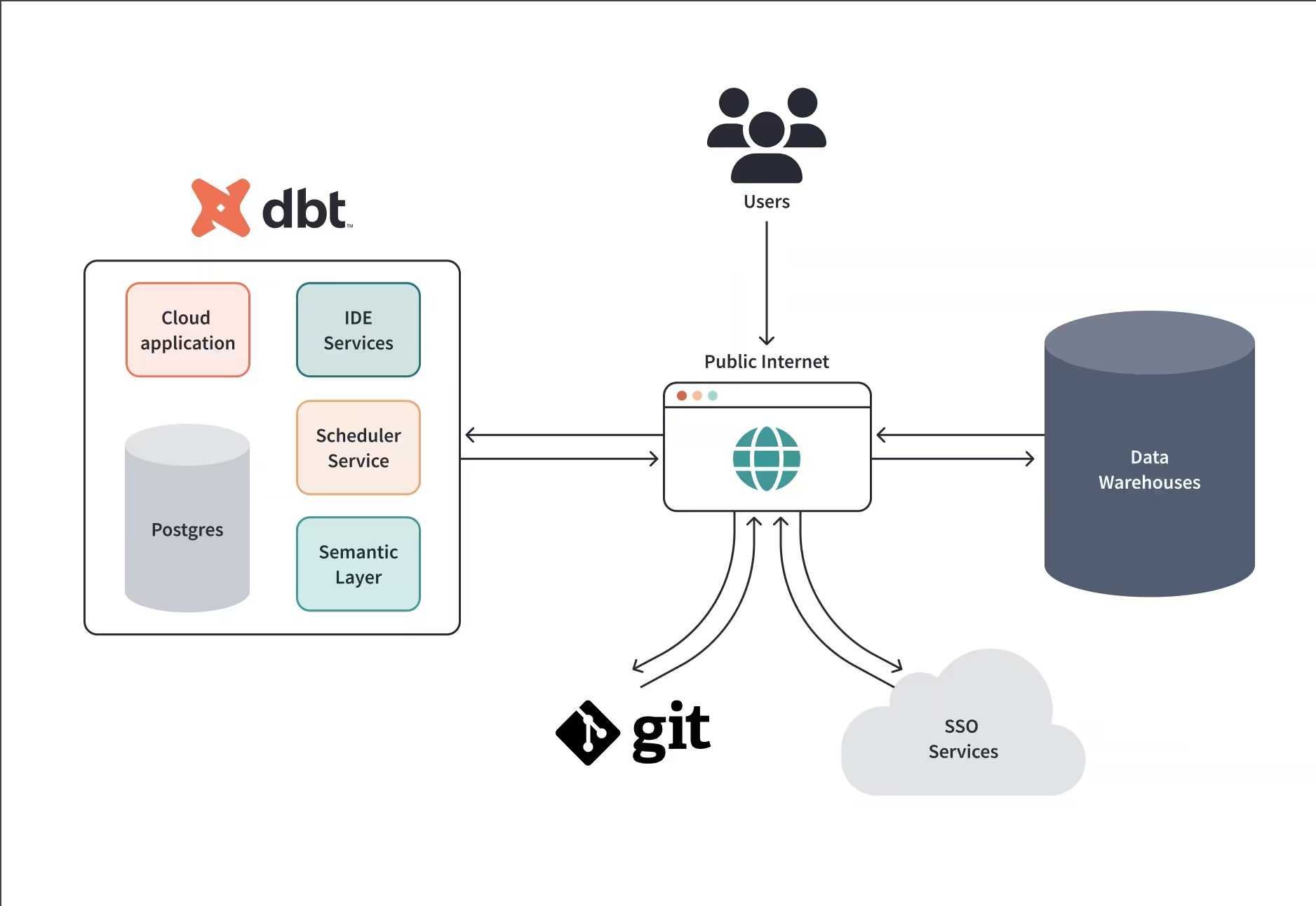
Teams often link dbt Cloud to data warehouses like Snowflake, BigQuery, or Databricks. This helps them build reliable data pipelines where they can schedule tasks, review code using Git, and then enjoy clearer organization, dependable checks, alongside easier releases for everyone involved.
AI improves the dbt Cloud workflows by decoding tricky SQL or proposing improvements, saving you guesswork when performance lags. Teams now have a central spot to build and oversee key measurements, thanks to tools such as dbt-utils alongside evolving semantic layers. Meanwhile, as AI handles repetitive tasks within data engineering, dbt Cloud provides the stability, testing rigor, moreover scalability needed in data engineering.
Also Read: What is dbt in DATA Engineering?
6. Apache Spark
Apache Spark remains the backbone of large-scale data processing, powering both batch and streaming workloads across the modern data stack. You can use it with languages like Python, SQL, Scala, and Java.
It provides high-level APIs in Python, SQL, Scala, and Java, along with specialized libraries for SQL, machine learning (MLlib), graph processing (GraphX), and streaming via Structured Streaming, all running on resilient distributed datasets (RDDs) and DataFrames.
Data engineers use Spark to orchestrate massive ETL/ELT pipelines on lakes and lakehouses, join terabytes of Parquet, Delta, or Iceberg data, and perform windowed aggregations or real-time feature enrichment. Thanks to exactly-once semantics enabled by checkpoints and watermarking, Spark can blend batch and streaming under one unified codebase.
Under the hood, Spark’s Catalyst optimizer, Tungsten execution engine, and Adaptive Query Execution (AQE) deliver strong performance across skewed data and mixed workloads. Table formats like Delta Lake and Apache Iceberg add ACID transactions, schema evolution, and time travel, turning raw data into reliable, auditable pipelines.
AI now extends Spark’s power on two fronts:
- AI coding assistants embedded in IDEs help author PySpark or Scala logic, optimize partitioning and broadcast hints, scaffold Structured Streaming jobs, and even generate unit tests, cutting down on boilerplate and reducing manual tuning.
- Platform-native AI within lakehouse environments (like Databricks or open-source stacks) analyzes execution plans to suggest cluster sizing, flag expensive stages, and propose join strategies or file-compaction routines, improving both reliability and cost efficiency.
Common design patterns include building Bronze/Silver/Gold medallion layers, managing CDC ingestion from Kafka or Confluent into Delta/ICEBERG, and running batch backfills alongside continuous streams within a single architecture.
Spark remains one of the best AI tools for data engineering that can transform raw, high-volume data into curated tables and production-ready features. AI assistance further streamlines development, reduces tuning guesswork, and helps teams meet SLAs, while keeping compute spend in check through smarter code and adaptive autoscaling.
7. Apache Kafka/Confluent Cloud
Unlike warehouses or IDEs that now include built-in AI assistants, Apache Kafka itself doesn’t provide a native “copilot” or generative interface. Instead, it functions as the real-time streaming backbone that feeds and operationalizes AI systems across the modern data stack.
Confluent Cloud, the managed Kafka service, layers on production-grade capabilities—including managed clusters, a robust connector ecosystem, a Schema Registry with compatibility enforcement, and ksqlDB for streaming SQL. These are not AI assistants; rather, they are platform features designed to make streaming data reliable, secure, and governable at enterprise scale.
Data engineers use Kafka to capture change data capture (CDC) from OLTP databases, decouple microservices through event topics, and fan data out to downstream warehouses and lakehouses such as Snowflake, BigQuery, and Databricks, as well as feature stores that host native AI and ML capabilities.
In that sense, Kafka enables AI rather than being a strictly “AI tool”. It delivers the low-latency, durable event streams that power real-time inference, feature pipelines, and RAG or agentic workflows.
Around Kafka, AI-driven tooling like IDE copilots for producer/consumer code, observability systems for anomaly or drift detection, and governance tools tied to schema policies, helps teams move faster while maintaining data quality and compliance.
8. Tableau
Tableau remains one of the most widely used business intelligence and analytics platforms, known for its interactive dashboards, visual analysis, and governed semantic layer. As of 2025, it has evolved through Tableau Next and deeper Salesforce Data Cloud integration, introducing AI-powered features that help users turn natural-language questions into clear, visual insights in seconds.
At its core, Tableau offers drag-and-drop visuals, calculated fields, data modeling, parameterized controls, and connections to both live and extracted data from major warehouses and lakehouses. The Tableau Server and Cloud environments handle secure sharing, alerting, and fine-grained permissions at enterprise scale.
For data engineers, Tableau is the final stop in the data supply chain. They prepare clean, documented schemas in Snowflake, BigQuery, or Databricks, publish certified data sources, and automate extract refreshes and row-level security so analysts and business teams can explore data with confidence and governance intact.
Within the overall data engineering workflow, Tableau represents the consumption and semantics layer. Its AI features shorten the path from model to decision, improve explainability through auto-generated descriptions, and help engineers demonstrate the business ROI of their pipelines by surfacing trusted insights directly to stakeholders.
9. Fivetran
Fivetran is a fully managed ELT platform that automates data ingestion from hundreds of sources, offering over 500 prebuilt connectors, automated schema evolution, and change data capture (CDC) to keep warehouse and lakehouse destinations continuously in sync. It eliminates the need for teams to write or maintain custom extract code, dramatically reducing operational overhead.
Data engineers rely on Fivetran to pull from SaaS systems such as Salesforce, NetSuite, and Zendesk, databases like Postgres and MySQL, and event streams, all feeding into destinations like Snowflake, BigQuery, and Databricks.

Features such as role-based access, granular scheduling, and alerting ensure reliable, auditable pipelines that scale with organizational needs. Fivetran’s platform includes specialized capabilities like automated schema drift handling, “Powered by Fivetran” for embedding tenant-managed pipelines into SaaS products, and programmatic management via robust APIs and CLI tools.
Its Connector SDK also lets developers build custom data sources that inherit Fivetran’s built-in monitoring, retry logic, and observability.
Fivetran serves as the ingestion backbone, de-risking data movement, shortening time-to-first-query and time-to-first-model, and providing consistent lineage and observability handoffs into the transform and consumption layers. It’s the dependable entry point that ensures every AI or analytics workflow starts with clean, timely, and trusted data.
10. Databricks (with Delta and Mosaic AI)
Databricks is a unified lakehouse platform that brings together data engineering, streaming, business intelligence, and machine learning on top of open table formats. At its foundation is Delta Lake, which provides ACID transactions, time travel, and scalable table management across both batch and streaming workloads, ensuring reliability and consistency at scale.
Data engineers use Databricks to implement medallion architectures, build pipelines with Spark, SQL, and Delta Live Tables, and maintain governance through Unity Catalog, which unifies access control, lineage, and metadata across notebooks, jobs, and SQL endpoints.
Databricks’ Mosaic AI layer infuses AI directly into the platform. Engineers can use AI assistants to help author and optimize Spark or SQL code, leverage vector search and retrieval for RAG-style workloads, and deploy model serving with integrated feature and embedding pipelines. Built-in evaluation and drift monitoring tools close the feedback loop for continuous improvement and model reliability.
Databricks stands out for its seamless connection between pipelines and machine learning, covering everything from feature engineering to serving within the same environment. The Photon execution engine delivers warehouse-grade SQL performance, while Delta Live Tables and Workflows offer declarative orchestration with embedded data-quality checks and SLAs.
Databricks transforms the lakehouse into a production-grade AI platform, merging scalable data engineering with intelligent automation and enterprise-level governance.
Conclusion
AI tools for data engineering are moving routine pipeline work into automated, governed, and platform‑native flows, so engineers can focus on architecture, reliability, and cost control rather than boilerplate coding and firefighting.
To get real value from data, combine tools for bringing information together, like Fivetran alongside Kafka, with systems for shaping it, such as dbt Cloud. Then utilize platforms like Snowflake, BigQuery, or Databricks, which now build artificial intelligence right into how they handle data.
Tools like GitHub Copilot or ChatGPT help speed up work with code and reports. Ultimately, the goal is simple: process data where it lives, leverage AI to clarify everything, maintain control throughout, thereby allowing smarter insights to grow without risk.
Learn How to Leverage AI Tools for Data Engineering
Level up the AI side of data engineering with our Data Engineering Masterclass built around GenAI in pipelines, real interview problem solving, and the frameworks top teams use to ship at scale.
Led by Samwel Emmanuel, ex‑Google and Salesforce, now at Databricks, this session dives into how LLMs, GenAI, and agentic patterns change ingestion, transformation, feature serving, and system design, with live walk‑throughs that mirror FAANG+ interview rigor.
You’ll see real problems deconstructed with clear trade‑offs, learn modern architecture patterns for real‑time systems, and pick up actionable strategies to stand out in 2025’s AI‑driven hiring market.
FAQs: AI Tools for Data Engineering
1. What’s the single best AI tool for data engineering in 2025?
There isn’t a one‑size‑fits‑all choice; teams typically combine a platform with native AI (Snowflake Cortex, BigQuery + Gemini, or Databricks + Mosaic AI) plus a transformation layer (dbt Cloud) and a copilot (Copilot or Tabnine) to cover authoring, governance, and performance at scale.
2. How do copilots actually help day‑to‑day?
They generate SQL/Python/dbt scaffolds, tests, and docs, refactor complex queries, and reduce context switching, speeding delivery while preserving code review and standards when used with best practices.
3. Is Kafka an “AI tool”?
Kafka doesn’t ship a native assistant; it is the real‑time transport that feeds AI systems. Managed ecosystems around Kafka provide governance, ksqlDB, and connectors, while AI lives in warehouses/lakehouses and IDE assistants that build streaming apps faster.
4. Where should AI features live? Platform or IDE?
Both. Platform‑native AI (Cortex, Gemini, Mosaic) keeps inference and semantic search near governed data, while IDE copilots accelerate authoring and reviews. This dual approach minimizes data movement and shortens time to production.
5. What’s the fastest way to pilot an AI‑augmented stack?
Start with a governed warehouse/lakehouse that has native AI, plug in managed ingestion, standardize transformations in dbt Cloud, and enable a copilot for the team, then measure deploy frequency, query cost, and defect rate to prove value.


