Java String split() Method: Syntax, Delimiters, and Examples
Java String split() Method: Syntax, Delimiters, and Examples
Last updated by Vartika Rai on Apr 1, 2026 at 12:41 AM
|
Reading Time: 3 minutes
Article written by Kuldeep Pant, under the guidance of Marcelo Lotif Araujo, a Senior Software Developer and an AI Engineer. Reviewed by Mrudang Vora, an Engineering Leader with 15+ years of experience.
Last updated on Apr 1, 2026 at 12:41 AM
|
Reading Time: 3 minutes
In Java, the String.split () method is used to break a string into smaller pieces. It does this by finding a character or pattern called a delimiter and splitting the text every time it sees that pattern.
Understanding how the Java string split method works is really important for working with data. When you know how to use it, you can decide how you want to split a string and how many pieces you want to get.
This makes it a lot easier to work with text in your applications. You can use the Java String.split () method to organize your data and make it easier to process.
Key Takeaways
The split() method treats delimiters as regular expressions, allowing for complex parsing logic beyond simple characters.
The method always returns a String[], making it easy to store and iterate through the resulting substrings.
The limit parameter is essential for managing the number of splits and deciding whether to keep or discard trailing empty strings.
Reserved regex characters (like . or |) must be escaped with \\ or handled via Pattern.quote() to be treated as literal delimiters.
While StringTokenizer is faster for simple tasks, split() is the modern standard due to its flexibility and integration with the String class.
What Is the Java String Split() Method and What Does It Do?
The Java string split method is a built-in function of the java.lang.The String class is used to decompose a string into an array of substrings. It identifies specific characters or regular expressions, known as delimiters, to determine where each split should occur within the original text.
By applying this method, you can effectively partition data based on patterns, allowing for precise manipulation of string components. It is the primary way to transform a single block of text into a structured collection of individual elements for easier processing.
Java String split() Method: Syntax
Java offers two versions of the split() method. One accepts a regular expression to define the delimiter, while the other includes a limit parameter to control the number of resulting substrings.
// Signature 1: Splits based on the regexpublicString[] split(Stringregex)
// Signature 2: Splits based on regex with a result limitpublicString[] split(Stringregex, intlimit)
Return Value: Returns a String[] of substrings split around regex matches.
1. split() Method with Multiple Arguments
In this method, the regex (regular expression) serves as the delimiter. When you call split(‘ ‘) on the string ‘Java is powerful’, the space character acts as the boundary where the string is cut.
Stringstr = "Java is powerful";
String[] result = str.split(" ");
// Output: ["Java", "is", "powerful"]
The space acts as the delimiter; the method identifies every occurrence of the space, removes it, and stores the remaining words as individual elements in the array.
2. split() Method with Limit Parameter
The limit parameter is an integer that controls how many times the pattern is applied and how trailing empty strings are handled:
limit > 0: The pattern is applied at most $n-1$ times. The array’s length will not exceed the limit, and the last entry contains all remaining text.
limit = 0: The pattern is applied as many times as possible, and trailing empty strings are discarded.
limit < 0: The pattern is applied as many times as possible, and trailing empty strings are included.
To use the split() method effectively, you need to understand how the regex defines the split points and how the limit manages the resulting array size.
Detailed Parameter Breakdown
regex: This is a Regular Expression string. It isn’t just a literal character; it’s a pattern. For example, using \\d would split the string at every digit, while \\s would split it at every whitespace character.
limit: This integer controls the ‘threshold’ of the split. A positive limit restricts the array size, a zero limit (the default) strips empty trailing strings, and a negative limit keeps everything the split produces, including empty strings at the end.
Return Value and Technical Details
The split() method is a core part of the Java standard library, designed to provide a structured array as an output. To ensure your code is robust, it is important to handle the specific exceptions it can throw and be aware of the version compatibility.
Detail
Value
Returns
String array (String[])
Throws
PatternSyntaxException (if the regex syntax is invalid)
Java version
Available since 1.4
Technical Note: Since the method relies on the java.util.regex.Pattern class internally, any string passed as a regex that does not follow standard regular expression rules will result in a PatternSyntaxException at runtime.
What Are Delimiters in the Java split() Method?
A delimiter is a specific character or sequence of characters that marks the boundary between separate regions in a text string. In the split() method, the delimiter tells Java exactly where to break the string to create individual array elements.
Common delimiters used in Java development include:
Space (” “)
Comma (,)
Pipe (|)
Dot (.)
Beyond simple characters, regex patterns can also serve as delimiters. This allows you to split strings based on complex criteria, such as any digit, one or more spaces, or multiple different punctuation marks simultaneously.
Stringline = "Java,Python,C++,JavaScript";
// Using a comma as the delimiterString[] languages = line.split(",");
// Output: ["Java", "Python", "C++", "JavaScript"]
Handling Special Characters in Java split() <h2>
Because the split() method interprets the delimiter as a regular expression, certain metacharacters cannot be used as literal delimiters without escaping. These characters include: | * + ^ $? { } [ ] ( ) \\.
If you attempt to split by these characters directly, Java will treat them as regex commands rather than literal text.
To split by a literal dot, for example, you must use a double backslash (\\.) to escape it.
As a cleaner alternative to manual escaping, you can use the Pattern.quote() method. This utility automatically handles all necessary escaping for any string, ensuring the method treats the input as a literal delimiter regardless of special characters.
In scenarios where a string contains different types of separators, you can use a regex character set to split the string at any of those characters simultaneously. A character set is defined by wrapping the desired delimiters in square brackets [ ].
A regex character set like [,;|] tells the Java split() method to treat each character inside the brackets as an individual valid delimiter. Instead of searching for the exact sequence “,;|”, the method identifies every occurrence of a comma, a semicolon, OR a pipe and performs a split at that point.
StringfruitList = "apple,banana;orange|grape";
// Split by comma, semicolon, or pipeString[] fruits = fruitList.split("[,;|]");
// Output: ["apple", "banana", "orange", "grape"]
Leading and Trailing Delimiters in Java split()
The way the split() method handles delimiters at the beginning or end of a string is a frequent source of bugs and a common topic in technical interviews. Understanding these edge cases is essential for predictable data parsing.
Leading Delimiters: If a string starts with a delimiter, the method identifies a split at the first character. This results in an empty string at index 0 of the returned array.
Trailing Delimiters: By default (when the limit is 0), trailing delimiters are ignored, and any resulting empty strings at the end of the array are discarded.
Preserving Trailing Strings: To prevent the method from stripping these empty segments, you must use a negative limit (e.g., limit = -1). This forces Java to include all trailing empty strings in the final array.
To fully understand how the Java string split method behaves in real-world scenarios, let’s look at these specific implementation examples ranging from basic text parsing to complex regular expressions.
1. Splitting a Sentence into Words
This is the most common use of the method. By using a single space as the delimiter, you can break a sentence into an array where each element is an individual word.
Stringsentence = "Java is powerful";
String[] words = sentence.split(" ");
// Output: ["Java", "is", "powerful"]
2. Splitting a CSV String
Comma-Separated Values (CSV) are frequently used for data storage. You can split the string by commas and then access specific data points by their array index.
By using a complex regex with the pipe (|) operator, you can split a URL into its core components (protocol, domain, and path) by targeting colons, slashes, and dots simultaneously.
You can use regex quantifiers like + to treat multiple consecutive punctuation marks as a single delimiter. This prevents empty array elements when a string has irregular punctuation.
Stringtext = "Hello, world... how are you?";
// Split on one or more occurrences of a comma, a question mark, or a periodString[] parts = text.split("[,?.]+");
// Output: ["Hello", " world", " how are you"]
5. Split with a limit Parameter
The limit parameter changes how many times the split is applied and whether the remainder of the string is preserved in the final index.
Stringstr = "one two three four";
// limit = 2: Splits only once, resulting in 2 elementsString[] limitTwo = str.split(" ", 2);
// limit = -1: Splits at every space, preserving all segmentsString[] limitNegative = str.split(" ", -1);
// Output (limit = 2): ["one", "two three four"]// Output (limit = -1): ["one", "two", "three", "four"]
Exceptions in Java String split()
While the split() method is straightforward, it can trigger specific runtime exceptions if the inputs are invalid. Understanding these exceptions helps you write more resilient code and avoid common application crashes.
1. Pattern Syntax Exception
A PatternSyntaxException is thrown when the regular expression provided as a delimiter is syntactically invalid. This most commonly occurs when using reserved regex characters, such as a single backslash, without proper escaping.
Stringtext = "root\\home\\user";
// Incorrect: A single backslash is an invalid regex escapeString[] parts = text.split("\");
// Output:// Exception in thread main java.util.regex.PatternSyntaxException:// Unexpected internal error near index 1
One-line fix: Use a double backslash (\\\\) to represent a literal backslash in regex or use Pattern.quote(“\\”).
2. NullPointerException
A NullPointerException occurs if you attempt to call the split() method on a String object that is null. Since the method is an instance method of the String class, the object must exist in memory before the method can be executed.
Stringdata = null;
// Throws exception because 'data' is nullString[] result = data.split(",");
// Output:// Exception in thread main java.lang.NullPointerException:// Cannot invoke "String.split(String)" because data is null
One-line fix: Always validate that the string is not null using if (data != null) before calling the split method.
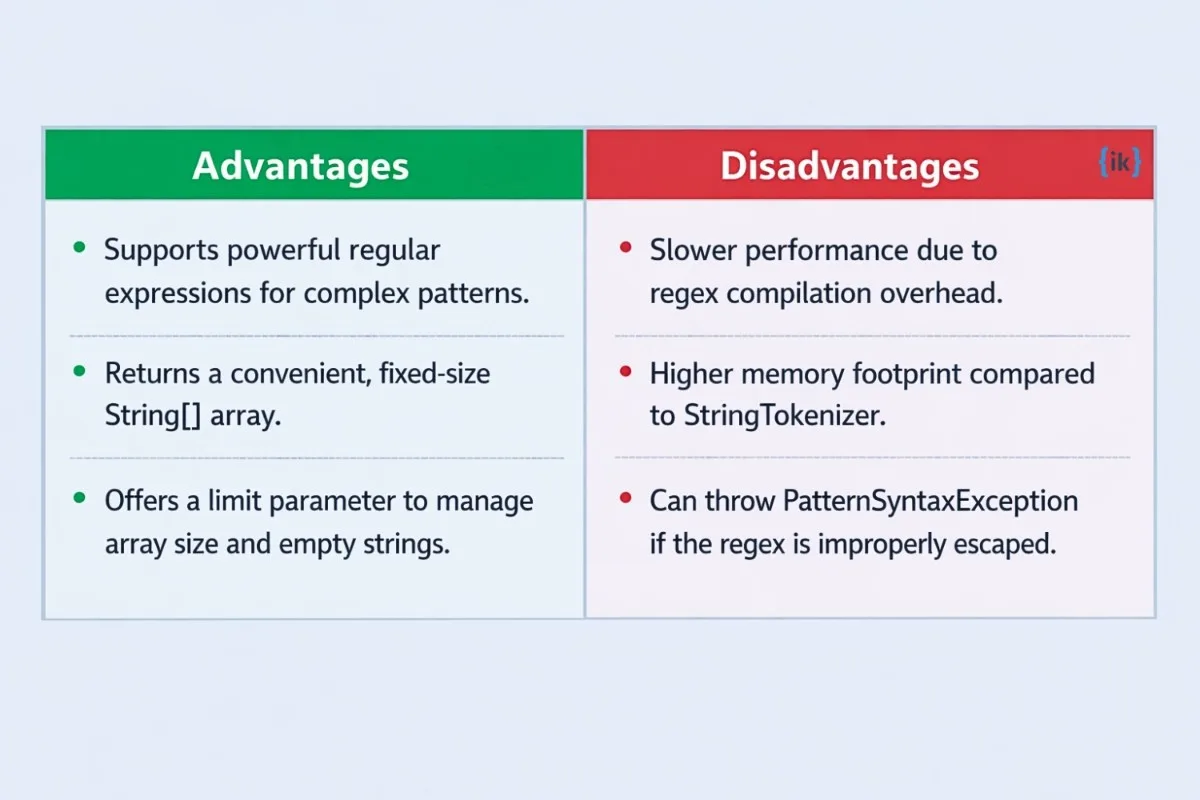
Advantages and Disadvantages of Java String split() Method
Choosing the split() method depends on your specific performance requirements and the complexity of your data. While it is the most flexible tool for string manipulation, it carries certain trade-offs compared to legacy alternatives like StringTokenizer.
Advantages
Regex Support: It allows for complex splitting logic using regular expressions, enabling you to split by multiple delimiters or patterns simultaneously.
Array Output: The method returns a standard String[], which is easy to iterate over, sort, or access by index.
Limit Control: The built-in limit parameter provides precise control over the number of substrings and the handling of trailing empty strings.
Disadvantages
Performance Overhead: Because it compiles a regular expression internally every time it is called, it is slower than StringTokenizer for simple, high-frequency splitting tasks.
Memory Usage: It creates a new array and multiple new String objects, which can lead to higher heap consumption in large-scale data processing.
Interview Questions on Java String split() Method
In technical interviews, the split() method is often used as a building block for string manipulation and data validation tasks. These questions test your ability to handle regex patterns and manage array outputs effectively.
1. Check if a string is a valid email ID using regex
Q. How would you use split() to perform a basic structural validation of an email address?
A: Split the string using the @ delimiter and ensure the resulting array has a length of exactly 2. This confirms there is exactly one @ symbol separating the local part and the domain.
2. Check if a hyphen-separated phone number is valid
Q: How do you validate that a phone number in the format XXX-XXX-XXXX contains the correct number of segments and digits?
A: Split the string by the hyphen character and verify that the array contains 3 elements with lengths of 3, 3, and 4, respectively. You can then use matches(“\\d+”) to ensure each segment contains only digits.
Q: Given a sentence with repeating words, how can you return a version containing unique words?
A: Split the sentence into an array using a space ” ” delimiter, then add all elements into a LinkedHashSet. The Set automatically ignores duplicates, while the Linked implementation preserves the original word order.
import java.util.*;
Stringtext = "Java is fun and Java is powerful";
String[] words = text.split(" ");
Set<String> uniqueWords = newLinkedHashSet<>(Arrays.asList(words));
Stringresult = String.join(" ", uniqueWords);
// Output: "Java is fun and powerful"
Difference Between split() and StringTokenizer in Java
While both split() and StringTokenizer are used for breaking strings into smaller tokens, they belong to different eras of Java development.
StringTokenizer is a legacy class from Java 1.0, whereas split() was introduced in Java 1.4 as part of the String class to provide a more powerful, regex-based alternative.
In modern Java development, split() is the preferred choice for almost all use cases due to its flexibility and integration with the String class.
However, StringTokenizer remains significantly faster for simple literal delimiters because it does not involve the overhead of regular expression compilation.
Feature Comparison: split() vs. StringTokenizer
Feature
split()
StringTokenizer
Regex support
Yes (Full support)
No (Literal delimiters only)
Return type
String[] (Array)
Enumeration/Tokens
Performance
Slower (Regex overhead)
Faster (Simple character scanning)
Trailing empty strings
Can preserve (via limit)
Always ignored
Recommended for
Modern applications, complex patterns
Legacy code, performance-critical simple splits
💡 Pro Tip: Use split() when you need to handle complex patterns or want the convenience of an array. Only reach for StringTokenizer if you are working with a legacy codebase or if profiling proves that string splitting is a primary performance bottleneck in your application.
Crack Backend Engineering Interviews with Interview Kickstart
If you are mastering Java strings to land a role at a Tier-1 tech company, our Backend Engineering Interview Prep is designed for you. Understanding the nuances of the Java string split method is just the beginning; top-tier recruiters expect deep expertise in data structures, algorithms, and scalable system design.
Our program is engineered by FAANG+ leads to help you navigate the most rigorous technical rounds. You will gain:
Get 1:1 technical coaching and homework assistance to bridge your knowledge gaps.
Practice in real-life simulated environments with Silicon Valley engineers who provide actionable, structured feedback.
Master everything from core Java concepts to advanced backend architecture.
Benefit from resume building and live behavioral workshops to optimize your personal brand.
Enroll in our free webinar to learn how to transition from a skilled developer to a top-tier engineer.
Conclusion
The Java string split method is an essential tool for any developer, allowing you to easily break a string. Split Java logic uses either a simple literal delimiter or a powerful regular expression to return a structured String[]. This makes it incredibly useful for common tasks like parsing CSV data, extracting URL components, and processing raw text into individual words.
FAQs: Java String Split
Q1. Between String.split() and StringTokenizer, which is better?
While StringTokenizer is faster for simple literal delimiters, the split() method is preferred in modern Java. It is more reliable, supports powerful regular expressions, and returns a standard String[] array that is easier to manipulate in modern collections.
Q2. What is the best application of the String split() method?
The split() method is best used for validating structural data, such as checking email IDs by splitting on the @ symbol. It is also ideal for parsing file data line-by-line or extracting specific protocol and domain components from complex URLs.
Q3. How do you split a string in Java?
To split a string, call the .split(delimiter) method on any String object. You provide the character or regex pattern you want to split by, and the method returns a String[] containing the resulting substrings.
Q4. What does the limit parameter do in Java split()?
The limit parameter controls the number of times the pattern is applied. A limit > 0 caps the array size, limit = 0 (the default) discards trailing empty strings, and limit < 0 ensures all trailing empty strings are preserved in the result.
Q5. Can the Java split() method use multiple delimiters?
Yes, you can split by multiple delimiters in a single call by using a regex character set. For example, using split(“[,;|]”) will instruct Java to break the string whenever it encounters a comma, a semicolon, or a pipe character.
Q6. What happens if the delimiter is not found in the string?
If the specified delimiter is not found, the split() method does not throw an error. Instead, it returns a String[] with a length of one, containing the original string entirely unchanged as the only element.
Q7. How do you split a string using regex in Java?
You can pass any valid regular expression as the delimiter argument. For instance, using split(“\\s+”) allows you to split a string based on one or more whitespace characters simultaneously. For more complex patterns, mastering Java Regular Expressions is highly recommended.